

ShaneO
New Member
February 7, 2025
Solved

Experiencing weird prototype options bug - My trigger frame always gets cut off

  • February 7, 2025
  • 4 replies
  • 221 views

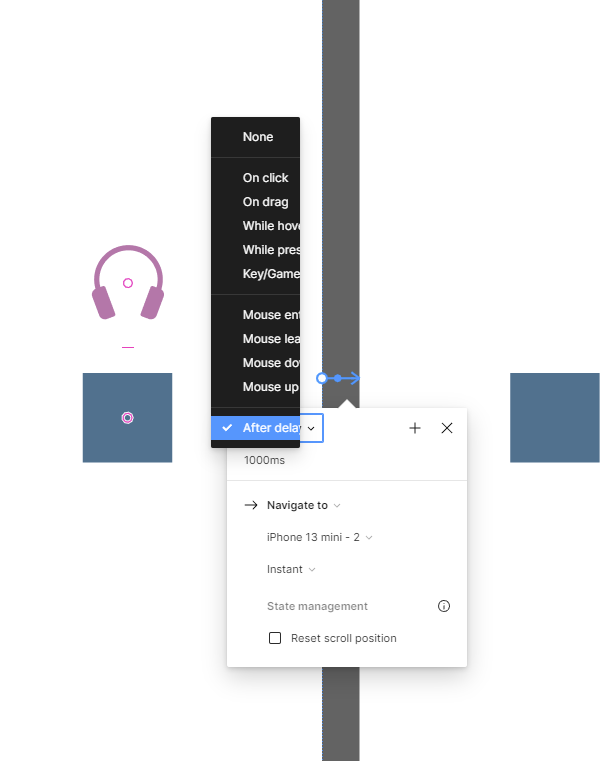
Haven’t been able to find anyone else experiencing this so apologies if it’s already documented, but I’m getting a really annoying bug when selecting the trigger for a prototype where no matter where I am on the page it cuts off the options dialogue. Is there a fix? 


    This topic has been closed for replies.
    Best answer by Gayani_S

    Hey everyone! Our engineers worked on resolving the issue and we are pleased to inform you that the fix has been successfully released!
     
    Please refresh Figma to ensure that you are using the fixed version. If you continue to experience the issue, please let us know and we will flag it down for further investigation.
     
    We apologize for any inconvenience this issue may have caused you. If you have any further questions or concerns, please do not hesitate to reach out, thank you! 


    4 replies

    Dreamy Robin
    New Member
    February 10, 2025

    The On-click dropdown in prototype panel looks half cut for my device. tried restarting, still the same. recently got this issue from yesterday. Thought it will be fixed by today. maybe a minor bug. 

    Gayani_S
    Figmate
    Community Support
    February 10, 2025

    Hey ​@ShaneO, thank you for reaching out! I’ve seen another community member have flagged a similar issue. They’re experiencing this on the desktop app. 

    Can you confirm if you’re seeing this in the browser and the desktop app? Also is this happening for you in the new UI? 

    Please try clearing your cache:

    For the desktop app: Clear Desktop Cache

    For browsers, here are guides for each:

    I’d recommend to make sure both your OS and Figma app are up to date, this can sometimes fix performance issues. 


    Let me know if these steps resolve your issue, happy to help our further! 


    Gayani_S
    Figmate
    Gayani_SAnswer
    Community Support
    February 12, 2025

    Hey everyone! Our engineers worked on resolving the issue and we are pleased to inform you that the fix has been successfully released!
     
    Please refresh Figma to ensure that you are using the fixed version. If you continue to experience the issue, please let us know and we will flag it down for further investigation.
     
    We apologize for any inconvenience this issue may have caused you. If you have any further questions or concerns, please do not hesitate to reach out, thank you! 


    Dreamy Robin
    New Member
    February 13, 2025

    Hey ​@ShaneO, thank you for reaching out! I’ve seen another community member have flagged a similar issue. They’re experiencing this on the desktop app. 

    Can you confirm if you’re seeing this in the browser and the desktop app? Also is this happening for you in the new UI? 

    Please try clearing your cache:

    For the desktop app: Clear Desktop Cache

    For browsers, here are guides for each:

    I’d recommend to make sure both your OS and Figma app are up to date, this can sometimes fix performance issues. 


    Let me know if these steps resolve your issue, happy to help our further! 


    Yes, now its fixed. thanks for letting me know.
