Solved
Enter user name to remove user
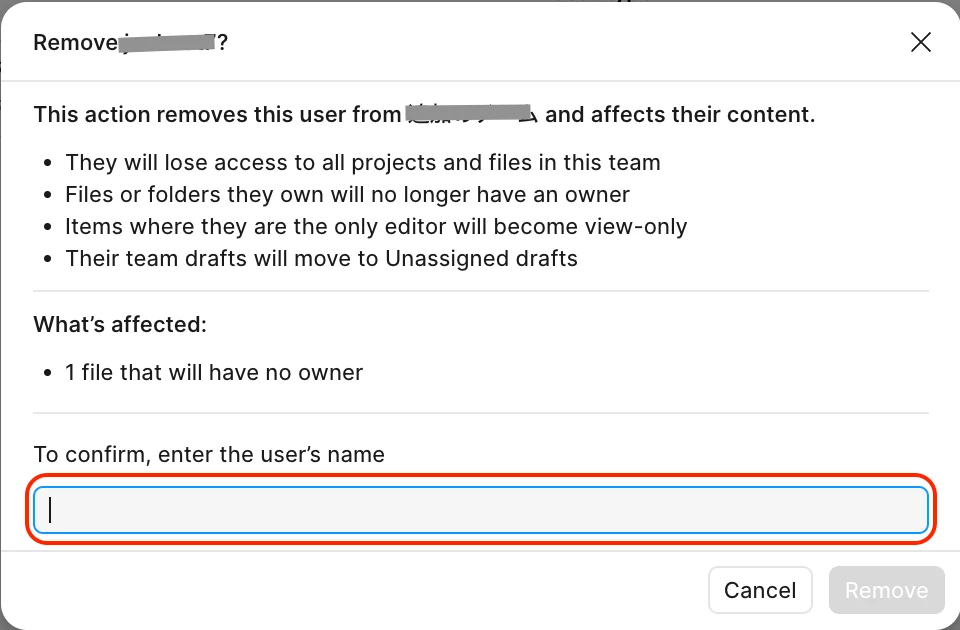
The new mechanism for removing users from a team requires admins to enter the user’s EXACT username before removal. This creates a lot of unnecessary friction for organizations with hundreds of users in Figma
- The “username” that admins must type is actually the display name that users can freely change in their settings.
- This name cannot be copied, so admins have to type it manually into the confirmation field.
- Users can create complicated names such as “Phương nhi 🧚hhl” which makes the removal process unnecessarily difficult for admins.
- Since users can change their display names at any time, someone could initially use a simple name like “Nhi” and later switch to a more complicated one, making urgent removal harder for admins — especially in organizations managing 200+ files and hundreds of users.
I understand that this mechanism is intended to prevent accidental actions by admins, but the current implementation feels excessive and creates usability issues at scale.
A simpler and more practical approach could be:
- Type “delete” to confirm, OR
- Enter the user’s email address to confirm, OR
- Allow admins to copy the username/display name directly from the dialog
This would still protect against accidental removals while making team management much more efficient for large organizations.