
Question

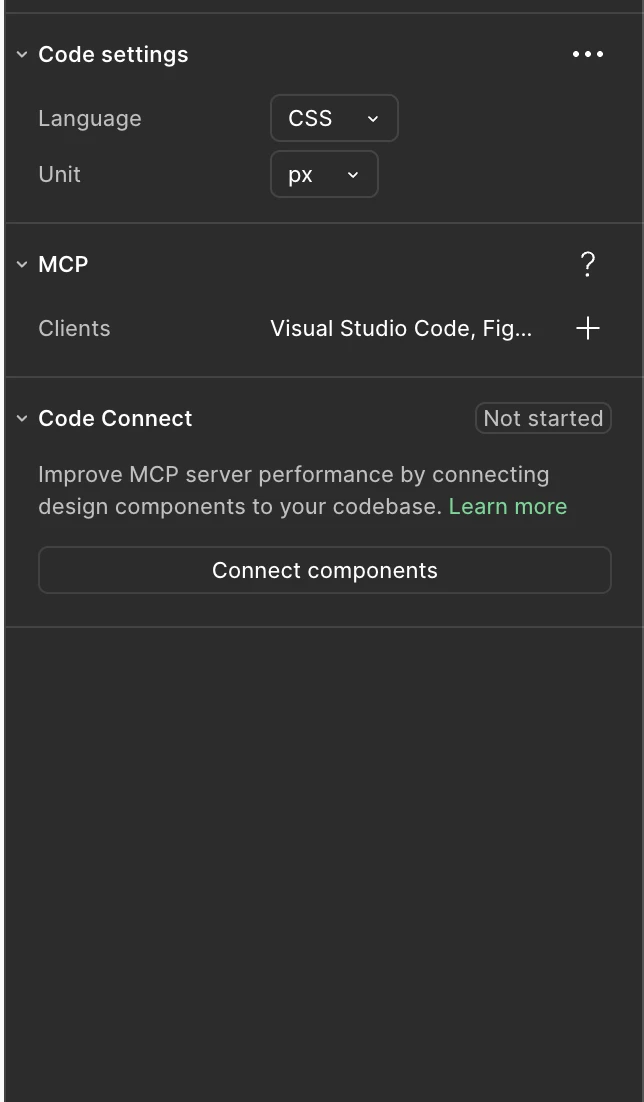
Enable MCP/MCP Server section not showing up on Figma Dev
  • August 13, 2026
  • 1 reply
  • 3 views

Dey Bersamin
Figma Dev Mode — Right Panel Settings

The option to enable MCP can’t be seen in the above image.


I have already checked for updates and restarted Figma. Also restarted my Mac.

1 reply

djv
Figmate
  • Community Support
  • August 13, 2026

Hi ​@Dey Bersamin, thanks for reaching out! 

I understand the confusion here. Please note that we recently updated the MCP panel in Dev Mode, and the old Enable desktop MCP server button was replaced by Connect to AI agent. That’s why checking for updates and restarting won’t help with this. 
 

You can use the remote MCP server instead. There's nothing to enable in Dev Mode, and it supports our latest tools (including writing back to the canvas): Set up the remote server here. If you still need/prefer the desktop server, press ⌘K (Ctrl+K on Windows) and search "Enable desktop MCP server." Hope this helps!
