

Solved

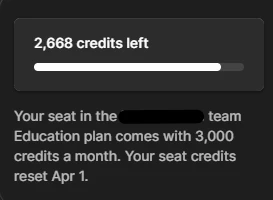
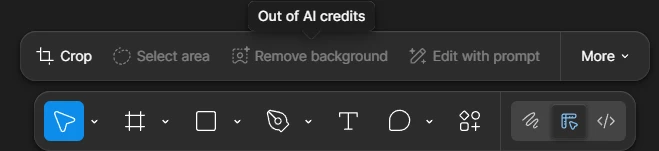
Education plan: AI features blocked (out of credits) despite 2,668/3,000 credits left in verified team

  • March 12, 2026
  • 2 replies
  • 50 views

KODESIGNS

I'm on Figma's Education plan ( my own team seat, resets Apr 1) with 2,668 AI credits left (full monthly bar shows). File is in this Education team, and AI tools like 'Remove background' worked fine until yesterday.
 

Now every AI action errors with 'Out of AI credits' popup, despite balance visible. I've:

  • Confirmed file/team

  • Checked AI balance in Main menu

  • Tried new files in same team

This forces app-switching, killing workflow. Daily limit bug? Plan verification glitch? Screenshots attached. Thanks for help!


Best answer by Gayani_S

Hey ​@KODESIGNS, thanks for outlining everything you’ve already checked! I reached out to our team internally to investigate, and they’ve now applied a fix on the backend.

When you have a moment, could you please refresh Figma and try the AI actions again to see if everything is working as expected? If you’re still seeing the error, let me know right away and we’ll continue digging in.


Thank you for your help!

2 replies

Gayani_S
Figmate
  • Community Support
  • Answer
  • March 12, 2026

Hey ​@KODESIGNS, thanks for outlining everything you’ve already checked! I reached out to our team internally to investigate, and they’ve now applied a fix on the backend.

When you have a moment, could you please refresh Figma and try the AI actions again to see if everything is working as expected? If you’re still seeing the error, let me know right away and we’ll continue digging in.


Thank you for your help!


KODESIGNS
  • Author
  • New Member
  • March 13, 2026

Hey ​@KODESIGNS, thanks for outlining everything you’ve already checked! I reached out to our team internally to investigate, and they’ve now applied a fix on the backend.

When you have a moment, could you please refresh Figma and try the AI actions again to see if everything is working as expected? If you’re still seeing the error, let me know right away and we’ll continue digging in.


Thank you for your help!

Perfect! Everything’s working again now. I jus wonder what caused the issue, probably something technical. Just a question, is there a better way to communicate this to you so it can be resolved faster, rather than waiting a day or two?

Anyway, thanks a lot! What a relief!
