Santiago7
New Member
April 17, 2026
Solved

Edit Pointer button missing in Figma Make

  • April 17, 2026
  • 10 replies
  • 183 views

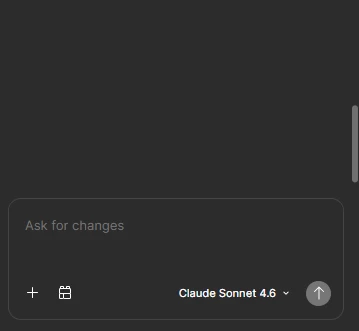
I can’t see the button to make design edition manually. I made a Figma reset due to it wasn’t working correctly and now the button is missing.


Best answer by Tom Reem

Hi everyone, thanks for flagging this and sorry for the trouble.

I checked with our engineering team and they recently resolved an issue that was affecting how the point and edit tool appeared in some Make files. ✅

I tested this just now and the tool is showing up as expected on my end — is anyone else still encountering this?

@Louisa_Armbrust — thanks for confirming you're on a full seat. Could you try reloading the tab you're working in and letting me know if the point and edit tool appears?

If it's still missing after that, the following would help me narrow things down:

  1. Platform and version: Are you and your client using a browser, the Figma Desktop App (126.2.10 or later), or both?
  2. Scope: Is this happening across all files and accounts you have access to, or just specific ones?
  3. Error details: Is the missing tool accompanied by any error messages or other unexpected behavior? A screenshot would be really helpful for us to keep investigating.

Please let me know how it goes either way. I'll keep an eye out for your reply.

10 replies

Astrid B
New Member
April 17, 2026

Same here, it’s not available and it’s very frustrating

John Petersen
New Member
April 17, 2026

Yes, me too. This is a serious issue and I hope this is a bug. This is my primary means of making tweaks to a design. Without the feature, the software is FAR LESS usable and kind of useless for my purposes. If their product team is reading this, as an enormous Enterprise Customer and decision maker, we pay way too much for these kinds of issues.

Louisa_Armbrust
New Member
April 20, 2026

Same here. My client was ready to make text edits and now neither they nor I (we both have full seats) have the point to edit feature showing. 

Tom Reem
Figmate
Tom ReemAnswer
Figmate
April 21, 2026

Hi everyone, thanks for flagging this and sorry for the trouble.

I checked with our engineering team and they recently resolved an issue that was affecting how the point and edit tool appeared in some Make files. ✅

I tested this just now and the tool is showing up as expected on my end — is anyone else still encountering this?

@Louisa_Armbrust — thanks for confirming you're on a full seat. Could you try reloading the tab you're working in and letting me know if the point and edit tool appears?

If it's still missing after that, the following would help me narrow things down:

  1. Platform and version: Are you and your client using a browser, the Figma Desktop App (126.2.10 or later), or both?
  2. Scope: Is this happening across all files and accounts you have access to, or just specific ones?
  3. Error details: Is the missing tool accompanied by any error messages or other unexpected behavior? A screenshot would be really helpful for us to keep investigating.

Please let me know how it goes either way. I'll keep an eye out for your reply.
John_Petersen
New Member
May 3, 2026

Tom,

The pointer has been back and functioning for me since a day or two after my post was made.Thank you for addressing the issue.


Tom Reem
Figmate
Figmate
May 4, 2026

Great to hear, ​@John_Petersen — thanks for confirming! If anyone notices anything else, don't hesitate to reach out. 🙏🏻

Santiago7
Santiago7Author
New Member
May 4, 2026

The Point and Edit option is effectively restored. Thanks!

Andrea Mosquera
New Member
August 18, 2026

Hello the Point and Edit option has gone missing again. When can we expect resolution?

Summer Derrick
New Member
August 18, 2026

Its gone for me as well

Jaycee Lewis
Figmate
Figmate
August 18, 2026

Hey ​@Summer Derrick  ​@Andrea Mosquera 👋 Sorry to hear this is happening to you. 

One thing to check: in newer Make files the control is now in the upper-right toolbar, just right of the comment icon — hover it and you'll see "Edit." Older files keep the previous point and edit tool. More here: https://help.figma.com/hc/en-us/articles/42009840449175-Edit-a-Figma-Make-file 

I see that icon in a new Make file on the desktop app right now, so it would help to know whether your file is a recent one or an older one, and whether hovering those upper-right icons surfaces an "Edit" tooltip.


If it’s still missing, can you share:

  • A full-screen screen recording that isn't zoomed in plus any screenshots
  • A link to the file, shared with view access.Just iInvite support-share@figma.com as a viewer. Adding support as a viewer won't affect your billing or take up a seat on your plan
  • Whether you're on browser or the desktop app, and whether it's every Make file or just this one

Thank you! — Jaycee

