Double nested instance resets when changing main component variant
I have a button component that I had built a long long time ago before Figma changed how variants worked / a lot of the new functionality was built that made them more flexible.
This component is set up where I have a skeleton for a button with two sizes and a bunch of possible toggles (for icons, labels, etc), a second component which includes that skeleton as an instance which has all of the state / color variants, and a third icon-only component with specific dimensions for each size to keep them square that has the main button component with the skeleton instance nested within it.
My issue is when using the icon-only button and changing the variant of the underlying button component (e.g. to change the style), and then changing the size of the icon button, the skeleton instance resets, undoing all overrides to the skeleton. This only happens when changing to a different variant of the button component - if I use the default button variant and make changes everything works fine.
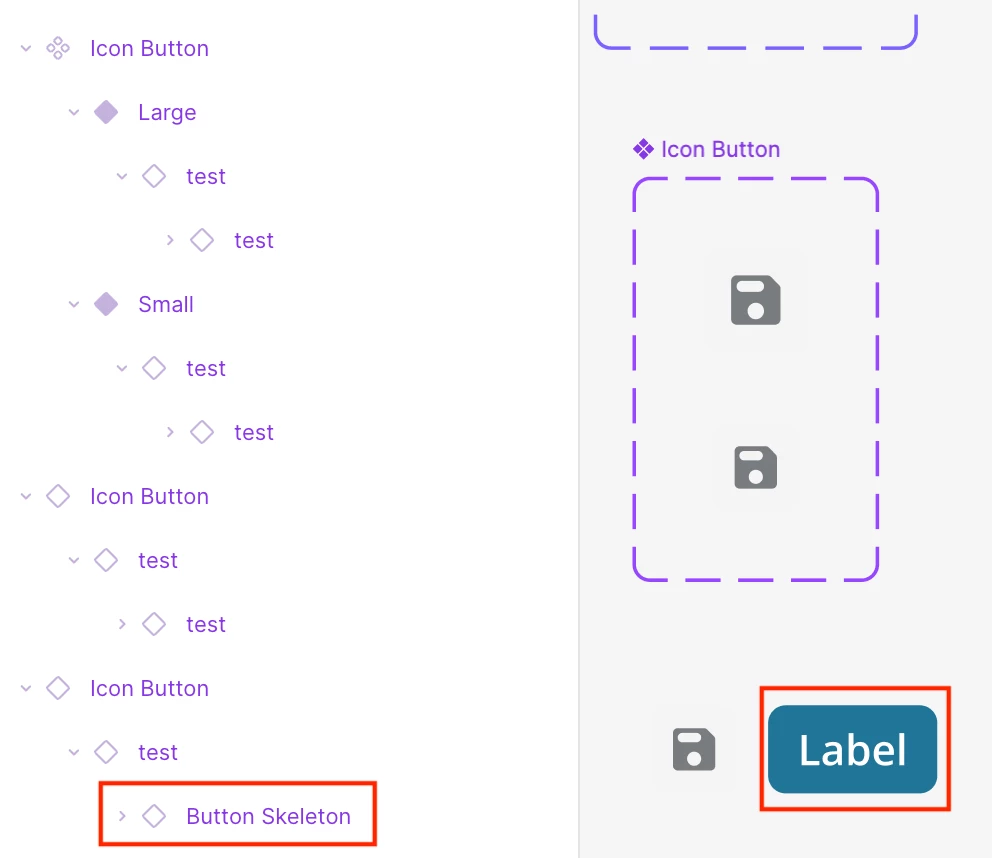
I’ve included a screenshot showing the layer structure that shows that the skeleton component is resetting - you can see how the “test” name of the skeleton instance resets to “Button Skeleton” in this scenario. This used to work fine but somewhere along the line something happened thats causing this to no longer work correctly. Ideally I’d rebuild this component to not have these nested instances but with them being used all across our app that would be a large undertaking to update.