

Disable AI sparkle icon/"Show Agents on canvas" setting has been removed

  • July 1, 2026
  • 13 replies
  • 89 views

tmnt

Hello, 

"Show Agents on canvas" setting has been removed. Could you please bring this setting back? Having the Agents panel permanently displayed on the canvas disrupts the workflow, and I need the option to hide it. Is there any particular reason you removed it? Are you forcing this on your users? 


July 3, 2026

Hi everyone, just a quick update that our team is actively rolling out a fix for this.

As the rollout continues, please try refreshing or reloading Figma, as that may help once the update reaches your account.

Thanks for your patience while we work to get this resolved as quickly as possible 🙏

13 replies

Thomas Portman

Hi ​@Clare L, thanks for following up! 

That’s definitely odd. Here’s a screenshot that may help you locate this setting on your own: 


If you’re still having trouble, please let me know what you’re seeing on your end. If you could provide a screenshot, that would be helpful, and we can continue troubleshooting together from there.

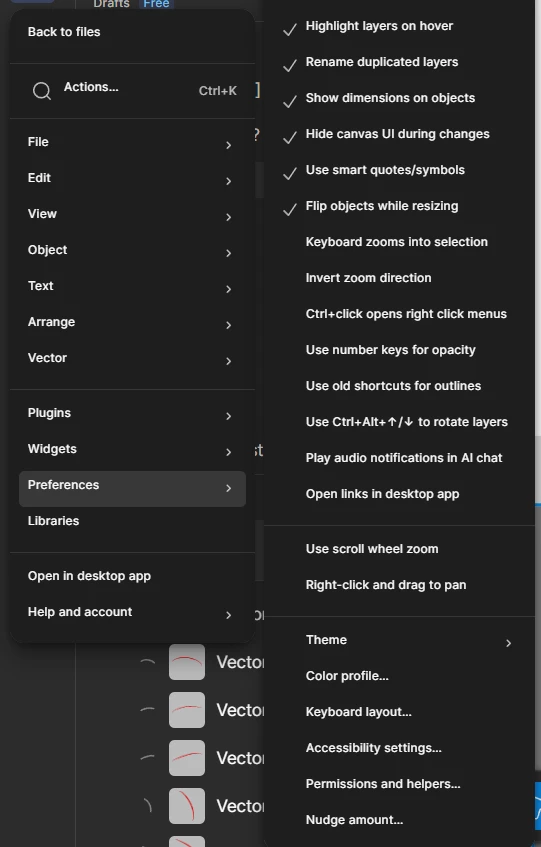
I have this problem too. When I open the Preferences window, I don't have the "Show Agents on canvas" setting.

[Moderator note: This post was merged from "Disable AI sparkle icon per user account" into "Disable AI sparkle icon/"Show Agents on canvas" setting has been removed" on 2-Jul-2026.]


Tibs
  • New Member
  • July 1, 2026

I also don't have the "Show Agents on canvas" setting.

[Moderator note: This post was merged from "Disable AI sparkle icon per user account" into "Disable AI sparkle icon/"Show Agents on canvas" setting has been removed" on 2-Jul-2026.]


Eli_Lozovyagin

Hi, everyone
I think “free plan people” cant hide it.
So the solution to “(Figma icon in upper left corner of the app) → Preferences → Show Agents on canvas and turn that setting off.”  - works only for those who pay.

[Moderator note: This post was merged from "The icon for the new Figma Agent is in the worst spot" into "Disable AI sparkle icon/"Show Agents on canvas" setting has been removed" on 2-Jul-2026.]


Eli_Lozovyagin

Hi everyone!

Actually I couldnt find any option to disable AI agents. Maybe Im looking in a wrong place.

[Moderator note: This post was merged from "The icon for the new Figma Agent is in the worst spot" into "Disable AI sparkle icon/"Show Agents on canvas" setting has been removed" on 2-Jul-2026.]


Emmie_Paivarinta

I have the same issue, this is what my settings look like:

I’m running Figma 126.6.12 for Apple Silicon under MacOS 15.7.4.


Please fix this issue, this benefits nobody.

[Moderator note: This post was merged from "Disable AI sparkle icon per user account" into "Disable AI sparkle icon/"Show Agents on canvas" setting has been removed" on 2-Jul-2026.]


tmnt
  • Author
  • New Member
  • July 1, 2026

I don't have the "Show Agents on canvas" setting. The option has been removed. Please add it back asap. I can’t work with that thing showing up all the time. 

[Moderator note: This post was merged from "Disable AI sparkle icon per user account" into "Disable AI sparkle icon/"Show Agents on canvas" setting has been removed" on 2-Jul-2026.]


Tom Reem
Figmate
  • Figmate
  • July 1, 2026

Hey ​@Eli_Lozovyagin, thanks for the screenshot. I see what you mean, and I've flagged this with the product team. We'll follow up here as soon as there's more to share.

In addition, ​@Samuel Tomé, I've merged your post into this thread so we can track this feedback in one place.

[Moderator note: This post was merged from "The icon for the new Figma Agent is in the worst spot" into "Disable AI sparkle icon/"Show Agents on canvas" setting has been removed" on 2-Jul-2026.]


Celyn_L
Figmate
  • Figmate
  • July 2, 2026

Hi everyone, thanks for taking the time to flag this.

We've shared these reports with the team, and they're actively looking into it.

We'll post an update here as soon as we have more information. Thanks for your patience in the meantime 🙏


tds321
  • New Member
  • July 2, 2026
they removed it because they’re turning into a scum AI company. Just fucking stop, you have a good product, why are you spending resources on ruining it?

[Moderator note: This post was merged from "Disable AI sparkle icon per user account" into "Disable AI sparkle icon/"Show Agents on canvas" setting has been removed" on 3-Jul-2026.]


tds321
  • New Member
  • July 2, 2026

Give me back the ability to turn the AI off. It was there, and now it’s not.
You are turning into a scum AI company, please stop. Thanks.

[Moderator note: This post was merged from "I can't turn off the AI" into "Disable AI sparkle icon/"Show Agents on canvas" setting has been removed" on 3-Jul-2026.]


Celyn_L
Figmate
  • Figmate
  • July 3, 2026

Hi everyone, just a quick update that our team is actively rolling out a fix for this.

As the rollout continues, please try refreshing or reloading Figma, as that may help once the update reaches your account.

Thanks for your patience while we work to get this resolved as quickly as possible 🙏


Kateryna Gregor

I don’t need AI features, but it keeps suggesting itself, right now there’s a new ⭐ icon next to anything I select, I keep accidentally hitting it, and it just opens a promotional pop-up for AI-agent that I CAN’T EVEN USE as it requires an upgrade. Other things include replacing text in my auto layouts and components.

I don’t need AI features and I don’t like them being pushed to us so aggressively. Is there a way to disable them? I have a starter plan and I’m  not a member of any team

[Moderator note: This post was merged from I want to disable AI features, is that possible? into Disable AI sparkle icon/"Show Agents on canvas" setting has been removed on 07-Jul-2026.]


Tom Reem
Figmate
  • Figmate
  • July 7, 2026

Hey ​@Kateryna Gregor, thanks for flagging this. A few other designers raised the same concern and we have a fix. I'm merging your post into a thread where we're tracking this.

To hide the agent from your canvas: Figma menu (logo in upper left corner of your file) → Preferences → uncheck "Show Agents on canvas".