

Solved

Critical issue – Unable to publish or update website on Figma Make after last prompt

  • December 16, 2025
  • 25 replies
  • 673 views

H4RK4N

Hello Figma Support Team,

I am reaching out because I am currently experiencing a blocking issue with Figma Make, which prevents me from publishing or updating my website.

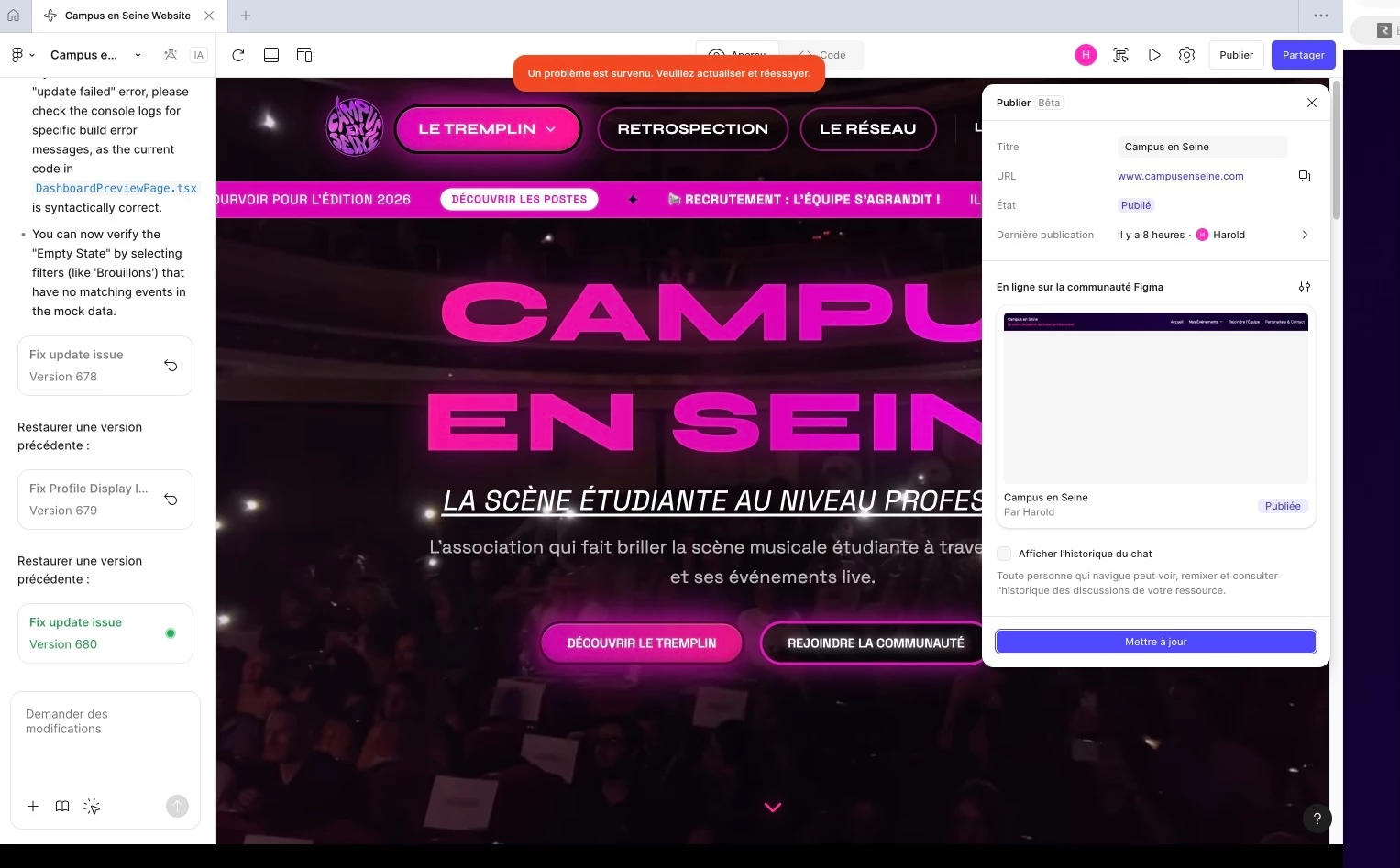
Since sending my last prompt in Figma Make, I am no longer able to update or publish the website. Every time I try to do so, I consistently receive the following error message displayed in red at the top of the interface:

“An error occurred. Please refresh or try again.”

I have tried refreshing the page and retrying multiple times, but the issue persists and I am completely blocked.

Additional troubleshooting attempted

To isolate the issue, I also tried reverting the project to the previous version, before I sent the prompt that seems to have triggered the problem.
However, even after reverting to this earlier version and attempting to publish/update the website, I still received the exact same error message.

Because of this, I reverted back to the latest version (after the prompt), but the issue remains unchanged: I still cannot publish or update the site.

Context

The initial reason I was using Figma Make was to fix a critical issue affecting users of the website (related to association account creation and email confirmation). Unfortunately, since attempting to implement this fix, I can no longer:

  • Publish the website

  • Update the live version

  • Push new features or corrections

  • Resolve the existing user-facing issue

This means that not only is the original problem still affecting users, but I am now also unable to use Figma Make at all to address it.

I have attached a screenshot showing the error message for reference.

Impact

This issue is particularly problematic because:

  • The website cannot be updated or maintained

  • Users are currently blocked by an existing bug

  • Figma Make is effectively unusable on my end at the moment

Could you please help investigate what might have caused this issue and how it can be resolved?
If this is related to the last prompt, a failed build, a corrupted project state, or a publishing pipeline issue, I would really appreciate guidance on how to restore a functional and publishable version of the site.

Thank you very much in advance for your help. I remain available to provide any additional information you may need.

Best regards.


Best answer by Celine_

Hey everyone, thank you for your patience here! Our engineering team has released a fix for this error and users should now be able to publish Make files successfully.
 
Please refresh Figma to ensure that you are using the fixed version, thank you!

This topic has been closed for replies.

25 replies

Rayan Simões dos Santos

eu estava terminando meu site e cliquei em publicar no figma make assim que eu cliquei apareceu “algo deu errado aytualize e tente novamente por favor me ajude!!!!


Rayan Simões dos Santos

oh my... me too


H4RK4N
  • Author
  • New Participant
  • December 16, 2025

let me know If you have any updates, I have the same issue ! 


Rayan Simões dos Santos

let me know If you have any updates, I have the same issue ! 


ok!


Flávio Campos

Também com o mesmo problema por aqui.


Felipe Medeiros

I have the same problem


Felipe Medeiros

O botão de publicar do Figma Make não funciona. Ele diz “algo deu errado atualize e tente novamente” e me deixa sem explicações.


Tanmay Saxena
  • New Member
  • December 17, 2025

me too


Luminous
  • New Member
  • December 17, 2025

Hello, I am currently facing an issue with publishing the updates in Figma make.

I have updated my page and changed some codes. All of a sudden, I started to see an error message, “"Something went wrong.” when I tried to publish the changes.

I’vetried to refresh the page, remove all cache, use the incognito mode, use different browsers, update browsers and Windows. However, all didn’t work. 

Can you help me to fix this issue?


Phan Nhat Bao
  • New Member
  • December 17, 2025

I cannot publish site via Figma Make, every single times when i click on Publish, it was always showed a red notification “something went wrong...” Even i reseted a file and wait for 24 hours to click Publish again


Celine_
Figmate
  • Community Support
  • December 17, 2025

Hey ​@Phan Nhat Bao ,  thanks for flagging this, and sorry you’re running into issues publishing your site.

As a first step, please check that your internet connection is stable. If the issue continues, try duplicating your Figma Make file and publishing from the duplicated version.

If this still doesn’t resolve the issue, I have also sent you a DM so we can collect a few more details via a secure form and investigate further with our internal team. Thank you!


acortezrose
  • New Member
  • December 17, 2025

I’m having the same issue. I ran out of AI credits and made my last round of updates all manually. I thought that might be why but it doesn’t sound like others are out of credits.


Even after a hard refresh, closing the window, and waiting a day, I still get the “Something went wrong, refresh and try again error”. 


I’m also getting a 403 error in the console when it fails:


H4RK4N
  • Author
  • New Participant
  • December 17, 2025

Day 2 and I’m still getting the same error. I’m not very experienced with coding, so I don’t fully understand what’s causing the issue, but I’m happy to provide any information that could help fix it — both for my website and potentially for other websites, as I can see I’m not the only one experiencing this error.


acortezrose
  • New Member
  • December 17, 2025

I think I might have found a workaround if you’re using a community file: 

  1. Select “Publish” from the top right hand corner of the screen
  2. Select the filter looking button next to the “Live on Figma Community” heading
  3. Select Update “Community Page” from the dropdown
  4. Continue as normal

For some reason it worked for me to publish that way, but I’m guessing this might only apply to files that were already shared to the community. 


H4RK4N
  • Author
  • New Participant
  • December 17, 2025

@acortezrose Thanks a lot for sharing this and for taking the time to help, I’m really glad to hear that this workaround worked for you 👍

Unfortunately, in my case it doesn’t seem to be applicable. My website isn’t published to the Figma Community; it’s only published live on the web with a custom domain already connected. Additionally, the site relies on Supabase to handle database operations and user data, which means I can’t publish it to the Figma Community the way you did in your example.

Still, I really appreciate you sharing your solution, and I’m happy it helped in your situation. Thanks again for your help !

I’m still hoping that the Figma Support team will manage to help me 😅


Eberty Edin
  • New Member
  • December 17, 2025

I am having issues publishing project updates on Figma, with the attached message being displayed.

I tested other projects as well, and the issue persists.


Wise_K
  • New Member
  • December 17, 2025

Still no luck even after doing exactly that.


H4RK4N
  • Author
  • New Participant
  • December 17, 2025

Update / Workaround that worked for me

I managed to find a workaround that allowed me to publish and update my website again, so I wanted to share it in case it helps others.

What I did was:

  • I created a duplicate (copy) of my existing Figma Make website project.
  • From the original project, I disconnected everything (custom domain, Supabase connection, etc.).
  • Then, on the new duplicated project, I reconnected:
    • my custom domain,
    • my Supabase database,
    • and all required configurations.

This process can take some time, but in my case, it worked and allowed me to update and publish the site again. It might simply be the easiest way to reset whatever was blocking the publish process.

⚠️ Very important note about the domain configuration

When reconnecting your custom domain, be extremely careful to use the exact same domain configuration as before.

For example, in my case, I initially made a mistake by enabling a redirection suggested by Figma and pointed it to the non-www version of the domain (e.g. campionscene.com) instead of the original www.campionscene.com.

As a result:

  • The website was accessible when typing the domain in the browser,
  • But previously indexed pages (for example on Google) were no longer found, because the domain was technically different (www vs non-www).

Make sure to double-check:

  • Whether your site uses www or non-www,
  • Whether a redirection is enabled,
  • The direction of the redirection,
  • And that your DNS configuration matches exactly what you had before.

⚠️ General caution

I strongly recommend doing this very carefully:

  • Make sure everything is properly saved before starting.
  • Ideally, ensure your original Figma project is connected to GitHub and that all the code is backed up, so nothing is lost.
  • Take the time to verify all settings before and after reconnecting services.

For me, this workaround successfully resolved the issue.

That said, I would still really appreciate a response from the Figma support team to better understand the root cause of the original issue, so similar situations can be avoided in the future


H4RK4N
  • Author
  • New Participant
  • December 17, 2025

i published on my report page about the same problem a way to fix it, it might help you guys ! 


Celine_
Figmate
  • Community Support
  • December 17, 2025

Hey, Celine from Figma here! Thanks everyone for flagging this and sharing your reports, we really appreciate it!

Our engineering team is aware of the issue and is actively investigating. If you’d like your specific case to be included in the ongoing investigation, you can also submit a bug report so the team has your file and environment details to review.
To do this, please follow these steps:

  1. Open our Support Hub
  2. In the search bar, enter “report a bug”
  3. Click “Start a chat”
  4. Press “Enter”
  5. Respond to the next question with “Yes”
  6. Submit the bug report

We’ll share updates here as we have more to report, thank you for your patience while our team is investigating it 🙏🏼


dsafcxv
  • New Member
  • December 18, 2025

I’ve tried turning it off and on, clearing the cache, switching browsers, and even creating a new account, but every time I enter an AI prompt I keep getting a “something went wrong” error.


Celine_
Figmate
  • Community Support
  • Answer
  • December 19, 2025

Hey everyone, thank you for your patience here! Our engineering team has released a fix for this error and users should now be able to publish Make files successfully.
 
Please refresh Figma to ensure that you are using the fixed version, thank you!


Luminous
  • New Member
  • December 19, 2025

Thank you! It’s working now 👍


Hey everyone, thank you for your patience here! Our engineering team has released a fix for this error and users should now be able to publish Make files successfully.
 
Please refresh Figma to ensure that you are using the fixed version, thank you!


Nicolas Guy
  • New Member
  • January 29, 2026

Hi ! I have the problem too, but it seems to be specific to some files. Some file can be update, and some others not… It’s critical because I make some user test right now for a big client…! I allready made a ticket, try to duplicate the file, but nothing works…. Pleassee help !


Nicolas Guy
  • New Member
  • January 29, 2026

Update : with prompting, Make found the error and resolve the problem :

Parfait ! J'ai corrigé l'erreur. Le problème était que le fichier /components/MobileContentPanel.tsx importait un fichier SVG inexistant (svg-t7o51jyg8c.ts). Le fichier a été corrigé pour importer svg-rapy09fsoe.ts qui contient bien le path SVG p3651a200 utilisé par l'icône Alarm dans le composant. Résumé de la correction : ❌ Avant : import svgPaths from '../imports/svg-t7o51jyg8c'; (fichier inexistant) ✅ Après : import svgPaths from '../imports/svg-rapy09fsoe'; (fichier existant avec le bon path SVG)

The problem is resolve !
