

Dennis Rech
New Member
August 28, 2026
Solved

Creating a direct link to a comment does not work

  • August 28, 2026
  • 3 replies
  • 56 views

When I open a comment in a design, then click the three dots and “Copy link” I would expect that when someone clicks that link, he’s not only taken to the corresponding place in the design but also the comment where I created the link from will show.
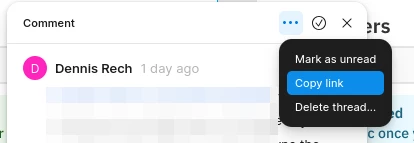


So I see 2 options here: 


  1. disable “copy link” function in the comment section if it is not opening the comment but only points to the underlying design - just allow “Copy link” on the design itself.
  2. (Better option) The link should contain information about the comment itself and open the comment from which the link was generated. Otherwise, especially when multiple comments are on the screen, no one will know what was referenced here.

Best answer by Gayani_S

Hey ​@Dennis Rech, thanks for following up! 

What you're describing matches how Copy link on a comment currently works: it takes whoever opens it to the right page and pinned location on the canvas, but it won't reopen that specific comment thread. Regardless of whether the comment's been resolved. So on a canvas with a lot of comments nearby, I can see exactly why that gets confusing.

I don't have a timeline to share on either of the two options you outlined, but I've passed your feedback along to our product team, including the point about ambiguity on crowded canvases. 

One thing that might help in the meantime, if you @mention a teammate directly inside the comment thread, they'll get a notification that includes the comment's content. So there's no guesswork about which thread it refers to even though the link itself just lands them on the page.

More on how comment links and sharing work here: View and manage comments.


Thank you, 

Gayani 

3 replies

Gayani_S
Figmate
Community Support
August 28, 2026

Hey ​@Dennis Rech, thanks for reaching out! 

Copying a link from a comment thread using the ••• menu takes whoever opens it to the right page and general location in the Figma Design file, but it won't automatically reopen that specific comment thread. 

Before I pass it along to the team, I'd love to narrow down exactly what you're seeing: does this happen every single time you copy a comment link, or have you noticed it sometimes does open the right comment (for example, depending on whether that comment's been resolved, or how many other comments are nearby)?

In the meantime, here's more on how comments and comment links work in general: View and manage comments.


Dennis Rech
New Member
August 31, 2026

Hey ​@Gayani_S  - thanks for your feedback. By now I always had that when I was trying to share a link to a comment. I always assumed this would point to the right place from the link until my team mates were asking what I’m referring to. So I tried to click on the links that I generated myself and saw that just the screen was opening but not the comment. The problem is that we have some screens with a lot of comments, so it’s hard to tell what the link is supposed to mean / to reference in this case if it does not open the comment from which it was generated. 

If it’s intended not to open the comment I would rather suggest to disable the function to share on comment level and only allow this on screen level. Otherwise it may be kind of confusing. 

Gayani_S
Figmate
Gayani_SAnswer
Community Support
August 31, 2026

Hey ​@Dennis Rech, thanks for following up! 

What you're describing matches how Copy link on a comment currently works: it takes whoever opens it to the right page and pinned location on the canvas, but it won't reopen that specific comment thread. Regardless of whether the comment's been resolved. So on a canvas with a lot of comments nearby, I can see exactly why that gets confusing.

I don't have a timeline to share on either of the two options you outlined, but I've passed your feedback along to our product team, including the point about ambiguity on crowded canvases. 

One thing that might help in the meantime, if you @mention a teammate directly inside the comment thread, they'll get a notification that includes the comment's content. So there's no guesswork about which thread it refers to even though the link itself just lands them on the page.

More on how comment links and sharing work here: View and manage comments.


Thank you, 

Gayani