

Question

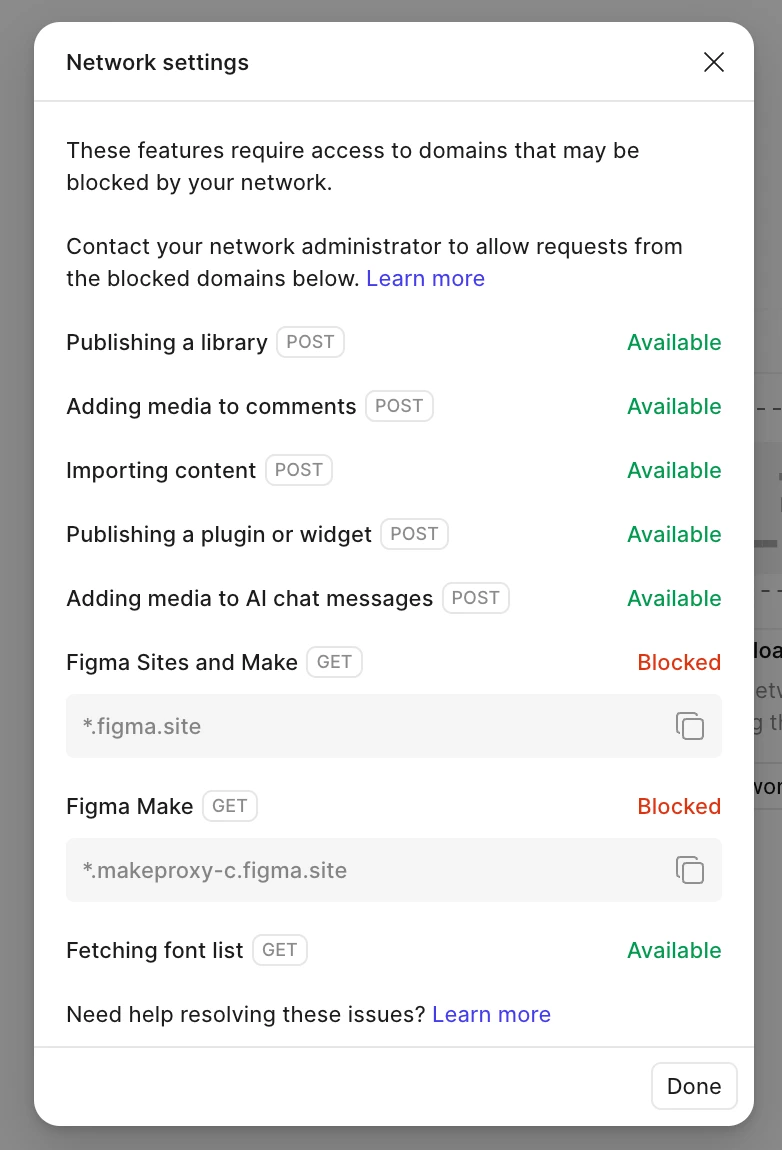
Couldn't load make. Try checking your network connection or refreshing the page.
  • April 29, 2026
  • 2 replies
  • 177 views

cheryll

 Hello there, I’m facing issues with loading the preview of my Figma Make files eventhough I’ve done the Adjust your network settings steps by doing the proxy bypass step, but it still doesn’t work. Any other advice please?  

2 replies

Gayani_S
Figmate
  • Community Support
  • April 29, 2026

Hey ​@cheryll, thanks for sharing those details and for trying to adjust your network settings already!

From what you’ve described, it looks like the domains *.figma.site and *.makeproxy-c.figma.site might still be getting blocked. It’d be worth double-checking your firewall settings or reaching out to your IT team / ISP to make sure those domains are fully allowlisted.

If you’ve already done that and it’s still not working, let me know. I can help get you connected with our support team so they can take a closer look.

Also sharing this forum post in case it helps with additional context: 


Let me know how you’d like to proceed! 


thnwht
  • New Member
  • July 31, 2026

Step 1: Change the DNS on Your Wi-Fi

Your internet router might be fine, but your Mac's default DNS cache is failing to look up Figma's proxy server.

  1. In the Network window open on your screen, click directly on Wi-Fi at the top right.
  2. Click the Details... button next to your connected home network.
  3. Click the DNS tab on the left sidebar of the popup.
  4. Click the + (plus) icon under the DNS Servers section.
  5. Type 1.1.1.1 (Cloudflare's fast DNS) and press Enter.
  6. Click + again, type 8.8.8.8 (Google's DNS), and click OK to save and apply.

THEN

  • Open your Figma Desktop App.
  • Click Help in the Mac top menu bar.
  • Navigate to Troubleshooting > click Reset FIGMA and Restart

    and see the magic