

Muskan Shakya
New Member
June 17, 2026
Question

Copy-pasting design across two Figma instances on multiple monitors results in missing elements

  • June 17, 2026
  • 14 replies
  • 305 views

I am experiencing a bug where copying a design from Figma Instance A (Monitor 1) and pasting it into Figma Instance B (Monitor 2), the elements do not paste correctly. The layers are missing in the destination instance and components are detached as well resulting in empty groups or incomplete components.
This issue only happens when using two separate Figma Desktop instances. If I copy from the same window, the copy-paste operation works perfectly.

Environment:

OS: Edition    Windows 11 Home 26200.8655
Figma Version: 126.5.6
Setup: Dual-monitor, two separate Figma Desktop app windows.
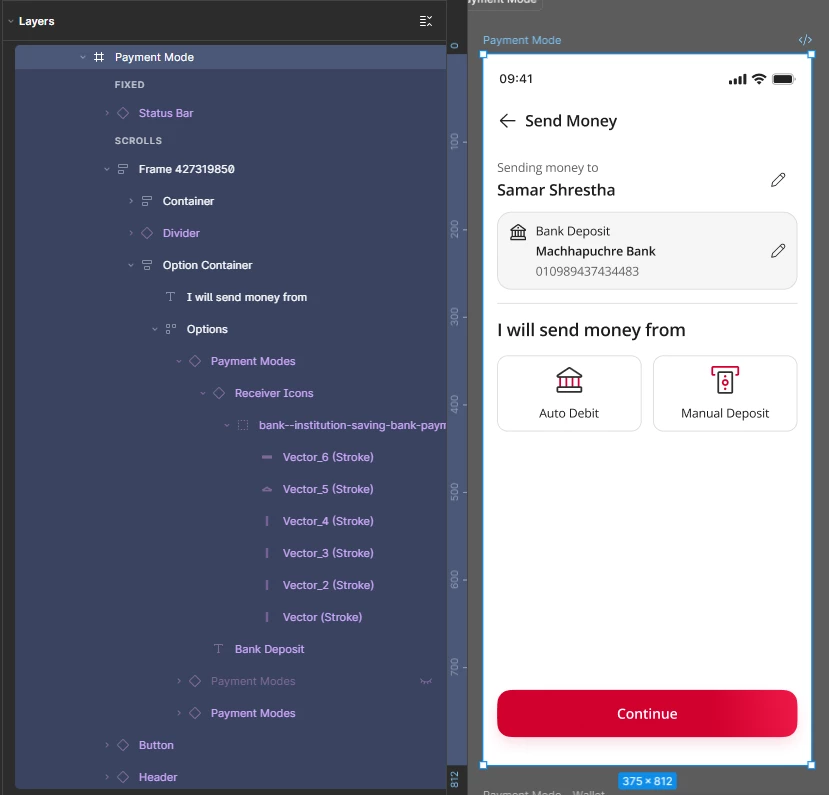
 

Copied Design from Monitor 1
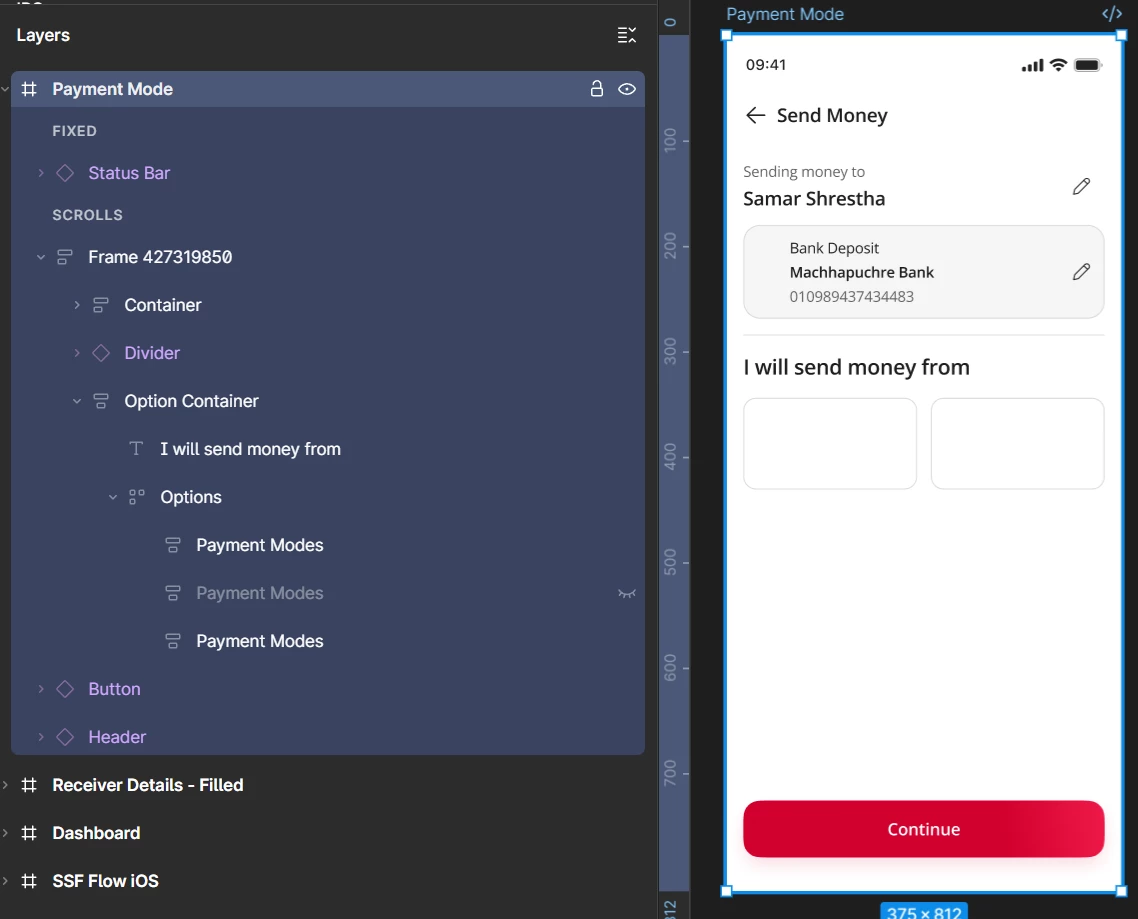
Pasted Design in Monitor 2

    14 replies

    Zainal Muttaqin
    New Participant
    July 5, 2026

    I really appreciate you looking into this.

    One quick question. Could you also share the support ticket link? It's a bit difficult for me to keep track of tickets using only the ID from email, so having the direct link would be really helpful.

    Thanks, ​@Jaycee Lewis !

    Celyn_L
    Figmate
    Figmate
    July 6, 2026

    Hi ​@Zainal Muttaqin, Celyn here stepping in for ​@Jaycee Lewis.

    You can access your support ticket here: https://help.figma.com/hc/requests/1995350

    I hope this helps! Let me know if you're able to access the ticket using this link, or if you run into any issues.

    mouylengh.dev
    New Member
    July 20, 2026

    Hi ​@Celyn_L, Any update so far regarding this issue? I’ve been facing the same issue as ​@Zainal Muttaqin. Appreciate your time looking to this :)

    Hey Zainal 👋

    Thanks for the example — that's really helpful, and it confirms this isn't the same issue as the original report on this thread (that one was about elements dropping during cross-monitor copy; what you're seeing is nested component instances losing their reference entirely and showing as "Removed").

    Since digging into this will need file access, I've moved this to a support ticket, TICKET ID 1995350, and the subject line is Nested component instances show as "Removed" after copying between files. Keep an eye on your email for the follow-up.

    Thanks for your patience on this one! — Jaycee


    Celine_
    Figmate
    Community Support
    July 20, 2026

    Hey ​@mouylengh.dev , stepping in for ​@Celyn_L and ​@Jaycee Lewis here! 👋 Thanks for following up!

    I checked internally and can confirm our engineering team is continuing to investigate this. The Technical Quality team is working closely with them and will keep Zainal updated as soon as there's any new information to share.

    Regarding your issue, it would be really helpful if you could also submit a bug report so the team can take a closer look and confirm whether it's the same issue. This will also help us add it to our report. When you get a chance, please submit one here:  Go to the Support Hub / Click Start a chat / Type “Report a bug” and follow the prompts.
    In the form, please include a direct URL to the file, and also share view access to the affected file with support-share@figma.com (our official Support account) so the team can take a closer look. You won’t be billed for this access. Thank you!