

Solved

Copy Design is not working

  • February 2, 2026
  • 5 replies
  • 82 views

Huseyn Ashurlu

I started using Figma Make 1 week ago and subscribed to the Professional plan(full seat).

The design copy feature was working fine at first, but when I checked again today, it seems to be disabled and I can no longer use it.

Best answer by Harmy

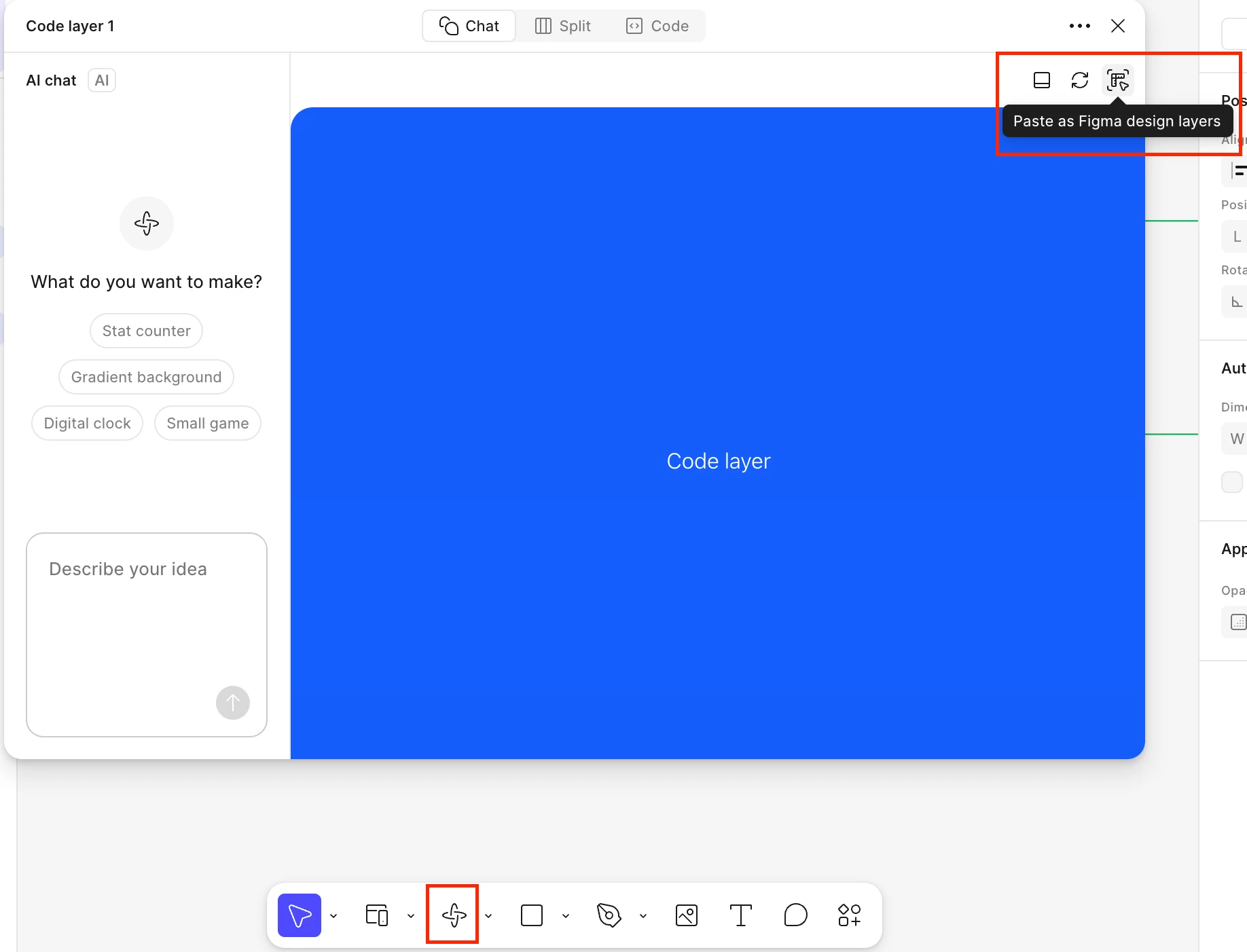
Ok we have a solution! Thank you Figma support team 💖 There seems to be a bug where if you click “Make” from the left toolbar in Figma Sites the “Copy Design” button is broken BUT if you go into the Figma Sites design file and click the Make icon from the bottom toolbar the “Copy Design” functionality will then be available in the pop-up “Make” window that appears. Screenshot from support attached.


5 replies

Harmy
  • New Member
  • February 3, 2026

I’m also on a full seat plan (today) and the copy design button has never worked for me. Anyone else experiencing this problem?


Harmy
  • New Member
  • February 3, 2026

Hi, I’m on a full seat paid plan but the Figma Make “Copy design” button for me is greyed out no matter what I do. I’ve tried:

  • Logging out and in again
  • Reinstalling Figma
  • Trying this in both the web browser and desktop app
  • Trying it with a complex component and a very simple one

If it’s relevant I also don’t have the “Point and edit” option in my Figma Make chat interface.


  • Figmate
  • February 3, 2026

Hi there,
 

I understand that you’re both experiencing an issue where the Copy design button isn’t working in the preview of your Figma Make files.


I checked on my side, and the feature is working as expected. Generally, if a file belongs to a paid team and you have a Full seat on that team, the Copy design option should be available. From what you’ve shared, it sounds like both of you meet these requirements.

Given that, this may be a case where the feature isn’t functioning as expected and needs to be escalated to our team via a support ticket for further investigation.

I can see that both of you have already submitted support tickets. Thank you so much for taking that step!

@Huseyn Ashurlu,

I’ll add an internal note to your ticket to let our team know that you also reached out here in the forum for additional visibility (ticket #1720835). They’ll follow up with you directly via the ticket email.

@Harmy,

It looks like one of our specialists has already replied to your ticket(#1722937). Please check your inbox and follow up with them directly there.


Thanks,


Harmy
  • New Member
  • February 4, 2026

Thanks ​@Junko3 for the quick reply. Help Desk have replied to my ticket but haven’t been able to resolve the issue yet.


Harmy
  • New Member
  • Answer
  • February 6, 2026

Ok we have a solution! Thank you Figma support team 💖 There seems to be a bug where if you click “Make” from the left toolbar in Figma Sites the “Copy Design” button is broken BUT if you go into the Figma Sites design file and click the Make icon from the bottom toolbar the “Copy Design” functionality will then be available in the pop-up “Make” window that appears. Screenshot from support attached.