Jimdavis Labs
New Member
October 5, 2026
Question

“Copy design” is missing in one Figma Make file

  • October 5, 2026
  • 6 replies
  • 62 views

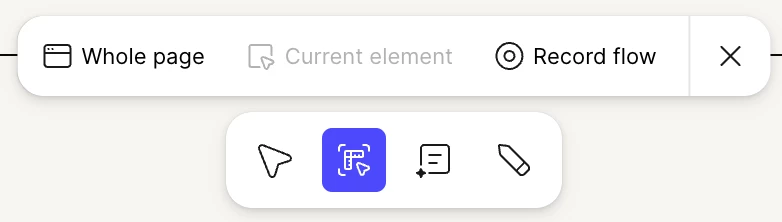
Im using figma make and the Copy design option is missing in one of my Figma Make files, so I cannot copy the preview as editable layers into Figma Design.

I have a Full seat in a Professional team, and Copy design is available in other Make files in the same team. The affected file’s preview loads correctly. I also duplicated the file, but the option is missing in the duplicate.


6 replies

Jaycee Lewis
Figmate
Figmate
October 5, 2026

Hey ​@Jimdavis Labs 👋 Thanks for flagging this issue. This is one that needs a deeper look from our team. I opened a support ticket for this. The ID is 2172749 and the email subject line is Copy design missing in one specific Figma Make file. Please keep an eye on your email (and spam folder if necessary) for the email and any replies from our team. Thank you! — Jaycee

CandiceDingle
New Member
October 8, 2026

Hi ​@Jaycee Lewis Please could you also assist me with the same problem above? 

Celyn_L
Figmate
Figmate
October 8, 2026

Hey ​@CandiceDingle, Celyn here, stepping in for ​@Jaycee Lewis.

I understand that you’re unable to locate the “Copy design” button in your Figma Make file as well.

I’ve went ahead to open a support ticket for you so the team can assist you directly with this. Your ticket number is #2178516.

Please reply directly to your ticket with:

  • A link to the impacted file, and invite support-share@figma.com with “Can View” access (this won’t impact your billing and will allow us to reproduce the issue and investigate further with Engineering).
  • A screenshot or screen recording showcasing the issue.

Someone from the team will be reaching out with next steps shortly, appreciate your patience in the meanwhile! 

Saurabha Prasad Mahapatra
New Member
October 8, 2026

Hi ​@Jaycee Lewis Please could you also assist me with the same problem above?