

Question

Convert Monthly user to a Annual seat thats available?

  • January 30, 2026
  • 2 replies
  • 12 views

Kyle Faloon

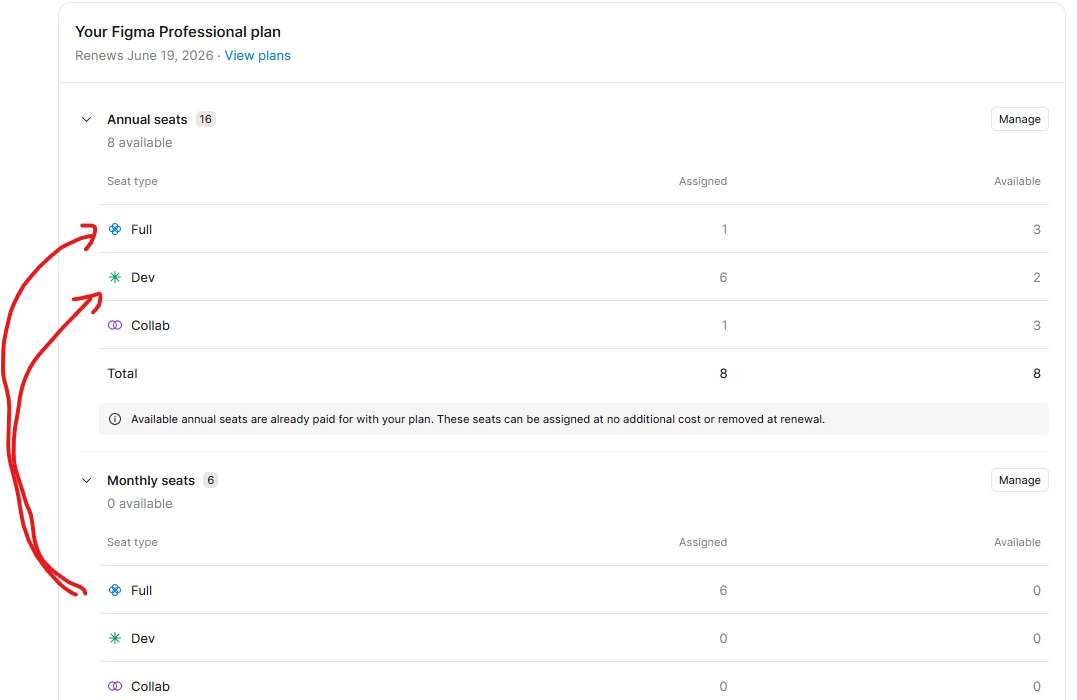
When trying to right size our seat allocations, we cannot switch a monthly billing cycle of a user over to an available annual seat, with out adding a new seat to our annual subsprction.
Couldn’t find any procedure to change this over.


2 replies

Kyle Faloon
  • Author
  • New Member
  • January 31, 2026

All you had to do was assign people around to different seats and when you assigned them back to the expected set, they would be on the annual plan not the monthly….


  • Figmate
  • February 2, 2026

Hi ​@Kyle Faloon


It sounds like you’re looking for a way to automatically add a paid seat to your annual subscription when there isn’t an available annual seat at the time you assign a paid seat to a user.


As you’ve noticed, when additional paid seats are added during an annual subscription term, those seats are billed on a separate monthly subscription by default unless they’re explicitly added to the annual subscription. This is designed to give teams flexibility when some users only need access for a shorter period of time.

That said, I understand that this workflow may present challenges when managing seat allocations, and I’ll share your feedback with our team.

In the meantime, you can find step-by-step guidance in the following articles:

Thanks,