

Question

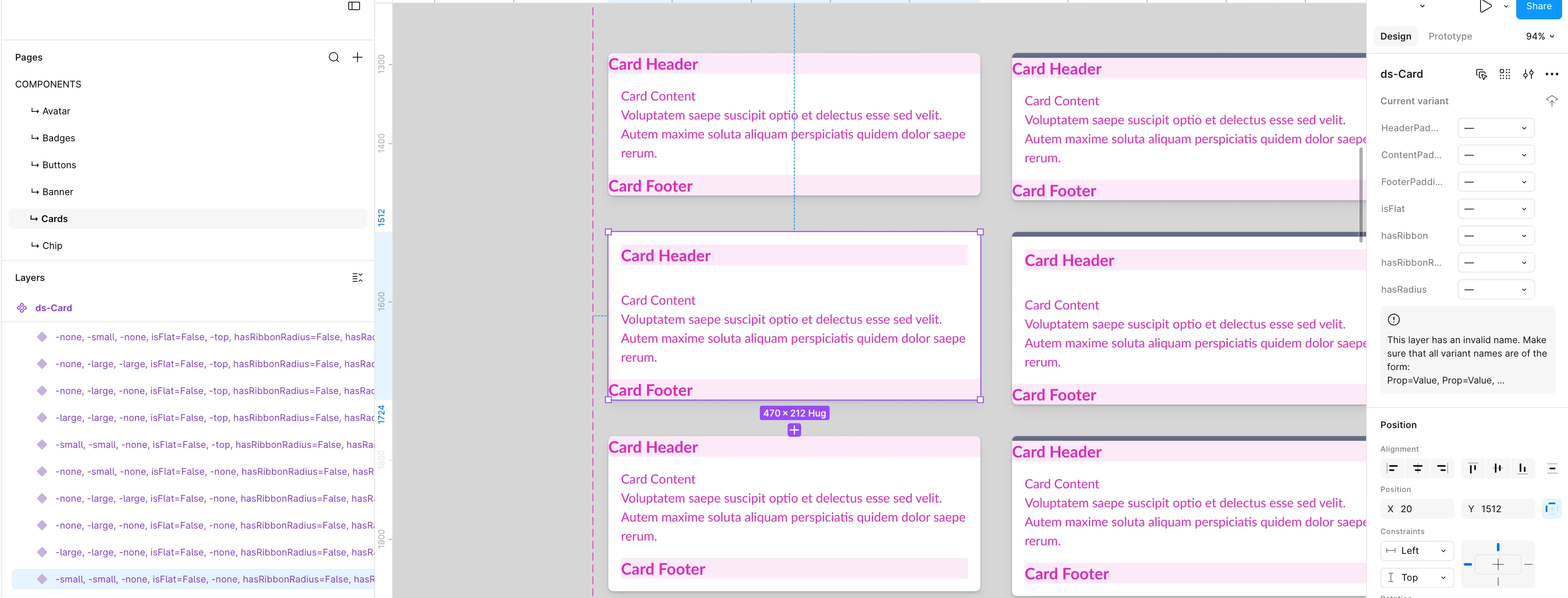
Component variant – layer has invalid name

  • July 8, 2026
  • 3 replies
  • 30 views

Paulina Moszczynska

I encountered a weird problem with some components. Sometimes when I click on the specific component variant all property values are cleaned (without changing anything in them) and I get a warning about layer invalid name (or corrupted property values when I try to publish a library). When I look on the left panel with Layers, variant name looks perfectly fine but still I need to handle property values manually in the right panel.

I don’t know what are the steps to reproduce this issue. It happened several times with various components.
 

3 replies

Adam_Ogrodnik_2

Hi Paulina,

You can double click the variant name in the Layers palette on the left and then the name will change into something like this:
Property1=Value1, Property2=Value2, Property3=False, Property4=True

If the syntax is wrong, then you get the error message.
To fix it, you can:

  • do it manually by typing in the layer panel
  • apply proper values in the properties panel
  • delete problematic properties and create them again

Paulina Moszczynska

Hi Adam! Thank you for the response. I’m aware how to fix this problem when it occurs, but I don’t understand why it happens in the first place (without changing anything in the prop naming). When it happens with only one variant it’s quite easy to fix and let’s say problem is “cosmetic”. But it’s worse if many variants are broken at the same time. Nevertheless, I already reported a bug via Contact Support form.


Adam_Ogrodnik_2

About the possible reason for all this - it happened to me a few times and I suspect I accidentally renamed the variant in the Layers panel. When you hit Cmd+R (Ctrl+R on Windows) for one object, you don’t have the Rename modal, only the inline highlight in the Layers panel, which can be easily overlooked, especially if it wasn’t intentional and you were looking elsewhere.

And I thought I could swear I haven’t done this, it really felt like a bug.
Â