

Boyan_Bueters
New Member
September 10, 2026
Question

Component change state interaction defaults to original state.

I have several components in my library that change to a Hovered state while hovering. This interaction works correctly in the library itself and looks like this: 
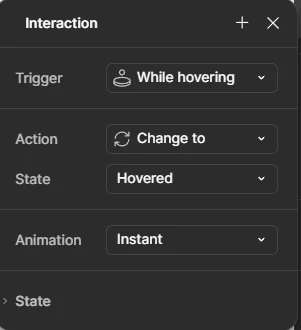
 

When adding the component to a different file, the interaction defaults to the Enabled state, which it’s already in. It then looks like this: 
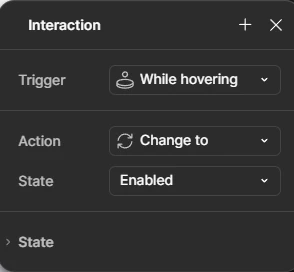
 

This is happening to a lot of components, including components that previously worked fine. 

3 replies

djv
Figmate
Community Support
September 10, 2026

Hi ​@Boyan_Bueters, thanks for reaching out! 

I understand how this must be disrupting your workflow. Please know that this is a confirmed bug by our team, and they’re already working on the fix. Currently, when a component with a "While hovering → Change to" interaction is brought into another file, the Hovered state isn't always carried across with it, so the interaction falls back to the state the component is already in. Two quick things that would help us match your case to what we're tracking:

  1. How are you bringing the components into the other file? Copy and paste, or dragging them in from the Assets panel?
  2. Is the receiving file subscribed to the library, or in a different team or project?


In the meantime, one temporary solution that has worked for others: duplicate the library file, then copy the component from the duplicate into your working file. The Hovered state comes through intact that way. You can also reselect the Hovered state under "Change to" on an affected instance to restore it individually.


I'll follow up here as soon as I have an update from the team in regards to a fix! 

Boyan_Bueters
New Member
September 15, 2026

Hey ​@djv,

  1. I have tried both copy/paste and dragging from the Assets panel. Both of them show the same issue. 
  2. The receiving file is in the same team as the library, but in different projects.
djv
Figmate
Community Support
September 15, 2026

Hi ​@Boyan_Bueters, thanks for the additional context! 
 

Here's where things stand: our team has confirmed an issue where the "Change to" destination gets dropped when a component with a hover interaction is copied into another file, and a fix for that is in review. What you're describing with the Assets panel is a bit different, so I'll check with the team whether it's the same underlying cause or something separate.


In the meantime, the most reliable thing you can do is reselect the Hovered state under "Change to" on an affected instance. That restores it for that instance, and it holds.


Lastly, when did you first notice this? You mentioned components that used to work, so knowing whether it started in the last few weeks would help narrow it down. Either way, I’ll be sure to update you as soon as the team has narrowed down their fix.