Yuanrui_Li
New Participant
April 23, 2025
Solved

Color in part of instance is not controllable

  • April 23, 2025
  • 6 replies
  • 256 views

As the Screen recording shows, I cannot change color in part of the instance, not matter if it’s linked to a variable, or detached. It can only be changed via its master component. 

This topic has been closed for replies.
Best answer by Raphael_M

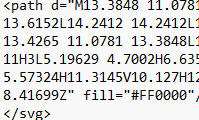
You need to re-union(merge) the path because there are 2 paths on your current vector file.


Current vector has 2 paths: 


After union it will be merged into 1 path:


6 replies

Yuanrui_Li
New Participant
May 5, 2025

No one met this problem before? Or the screen recording doesn’t work? 🤔

Raphael_M
Power Member
May 6, 2025

I have some guess, can you show the path? the entire vector layer? or send me a copy of the file just put it on drafts the share on view.

Yuanrui_Li
New Participant
May 6, 2025

I have some guess, can you show the path? the entire vector layer? or send me a copy of the file just put it on drafts the share on view.

Thanks for replying! It’s a single flatten path. Please check the link attached


Raphael_M
Raphael_MAnswer
Power Member
May 6, 2025

You need to re-union(merge) the path because there are 2 paths on your current vector file.


Current vector has 2 paths: 


After union it will be merged into 1 path:


Yuanrui_Li
New Participant
May 6, 2025

thank you so much!

So it was not a single path. I wonder if it only can be distinguished through its code? It’s hard to find difference visually. 

Raphael_M
Power Member
May 6, 2025

To be honest, that’s not what is expected for Figma to behave. Because both colors uses the same variable so both should be modified simultaneously and not just that one path when you changed the variable, I’m just not sure what happened. You can try flagging this with the Figma team and see if it’s intended.