

Question

Cannot create a team project without error message

  • June 11, 2026
  • 2 replies
  • 20 views

tatum powell

Hi. I have tried to create a new project folder and every time I do it forces me to add someone to the project but then no matter how I format it they won’t let me add anyone and move on to the next step. I called someone at Figma earlier this year and eventually gave up bc he didn’t know either. 

I work alone so I don’t want to add anyone to my project and don’t understand why you wouldn’t be able to have your own project folder without adding people? But I tried to add people regardless just to see if that would let me make the folder. 

Ok so, 

The input field tells you to to add emails, names or user groups.


I have tried:


  1. Entering my own email (error message = you can’t add yourself to a project)
  2. Adding someone who I am connected with on Figma to see if the person has to have figma in order to. be invited (error message = you can’t use special characters (??)...even though it’s just a name I have selected from a list and there are no special characters)
  3. Adding my sisters email (error message = you can’t use special characters) 

Please someone help me! I am desperate to organize my files lol. Attaching images 
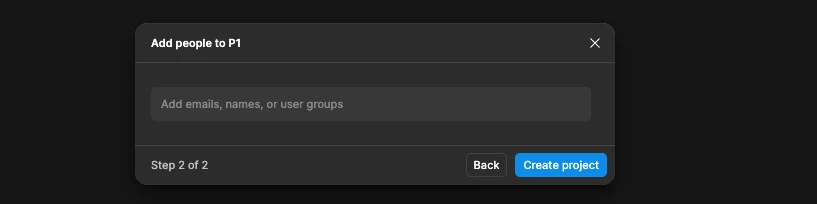
input field prior to entry
 
If i enter my email
​​​​​​
If I enter someone elses email OR if i select someone from my list of people I’ve shared files with in the past.


thank you!!

2 replies

Jaycee Lewis
Figmate

Hey hey ​@tatum powell 👋 Thanks for your post and for including all the details. 

Quick reassurance first: adding people is optional. Looking the Figma Help Center, you can leave that invite field empty and click Create project to finish. So the "you must add someone" wall shouldn't be there—which makes me think something else is quietly blocking the step.

To pin it down, a few things would help:

  • When you leave the people field completely empty and click Create project, what happens exactly? (Does the button do nothing, gray out, or throw an error?)

  • That "characters are not allowed: / : ? * " error — does it pop up under the people field, or under the project name field a step earlier? Those characters are the ones we block in names, so I want to make sure we're looking at the right spot

  • Are you on a Starter or Professional plan? Seat type?

  • Are you in the browser or the desktop app?

One thing worth checking: if there's any stray character or emoji in the project name, that can block the whole flow and look like the people step is the problem.

Here's the reference for the full flow

Once I know which field is throwing that error and what the empty-field click does, we can get you sorted. 🙂

Jaycee


tatum powell
  • Author
  • New Member
  • June 11, 2026

thank you!

