J.S
New Participant
May 9, 2025
Solved

Cannot copy one line of CSS in Firefox Dev - returns unicode token

  • May 9, 2025
  • 20 replies
  • 424 views

I can no longer copy one line of CSS out of dev view.

I now have to use the clipboard icon to copy all the CSS and paste it into my file, then delete what I don’t need.

I have added stills showing basics.

I am on a Mac Sequoia 15.3.1, using Figma in Firefox Dev 139.0b5. It seems to be ok in Chrome, but that is irrelevant, unfortunately, as process is dependent on Firefox Dev.


    Best answer by Vsevolod Kochnev

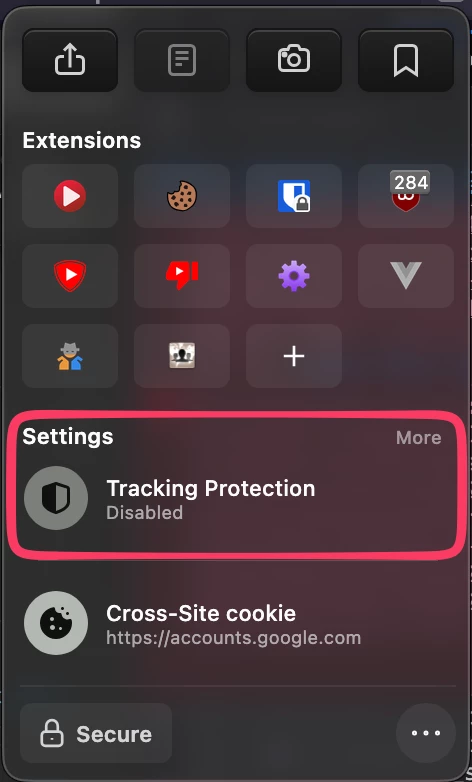
    The same issue occurs in the Zen browser. However, I found a workaround — turning off tracking protection seems to fix the issue.


    20 replies

    Samuel Patro
    New Member
    June 25, 2025

    Same issue on firefox. Did they changed something with clipboard?

    ksn
    Figmate
    Community Support
    July 1, 2025

    Hey both - I’m checking in with our engineering team about this now. 


    Since it does seem limited to Firefox only, do either of you use any extensions there? Curious to see if that may be a factor in this. 

    Samuel Patro
    New Member
    July 1, 2025

    Hey both - I’m checking in with our engineering team about this now. 


    Since it does seem limited to Firefox only, do either of you use any extensions there? Curious to see if that may be a factor in this. 

    I disabled all extensions same issue.

    ksn
    Figmate
    Community Support
    July 3, 2025

    Thanks ​@Samuel Patro - I filed a bug ticket on my end to see if there’s something going wrong on our end, and waiting to get an update. I’ll try to get an answer expedited, but I do want note that Figma will be observing the 4th of July holiday, so the response may be late.. 

    Appreciate your patience!

    J.S
    J.SAuthor
    New Participant
    July 9, 2025

    Disabled what I had (default Mozilla:

    • OpenH264 Video Codec provided by Cisco Systems, Inc.
    • Widevine Content Decryption Module provided by Google Inc.

    and a React Dev Tools extension

    Restarted and issue persists.


    And to be more specific - this is Firefox Developer, not plain Firefox.


    Also - do you know how I can get alerts to this thread? I’ve only received the first notice when Samuel Patro replied...

    ksn
    Figmate
    Community Support
    July 9, 2025

    ​@J.S Understood - still poking engineering about this, but I’ll add the additional info you sent over.


    re: alerts -- on your first message that started the topic, do you have the ‘subscribe’ option available and selected? Just want to make sure - did you get an email alert when Samuel responded, but not me when I did? 

    J.S
    J.SAuthor
    New Participant
    July 10, 2025

    Hi ​@ksn - thank you!


    I see “Unsubscribe” on my original message, so that should mean I am subscribed. I did get an alert when Samuel replied, but not on any other except this one.

    ksn
    Figmate
    Community Support
    July 10, 2025

    ​@J.S Goooot it! Can you go click your profile image at the top right of the page > settings > notifications and then check to see what preferences you have set?

    I think you may have the “Notify me only about the first new reply since my last visit” checked. You can switch it to “Notify me about every reply” and that should get all replies sent to you via email.


    Let me know if you do have that option already selected. 


    ksn
    Figmate
    Community Support
    July 10, 2025

    ALSO for everyone that comes across this: I got an update from an engineer who works on dev mode, and he was able to replicate in Firefox Developer. The bug ticket I filed has been queued up to be worked on, but I don’t have a current timeline I can promise for it.


    [I added this a separate comment to make sure it didn’t get lost in the bottom of my last comment with the screenshot]

    J.S
    J.SAuthor
    New Participant
    July 29, 2025

    Thank you ​@ksn ! That’s great news.

    And you are correct - I changes that option in my settings - thank you!