
Question

Cannot Copy Design

  • March 20, 2026
  • 3 replies
  • 21 views

inovaitsys

Hello Support,

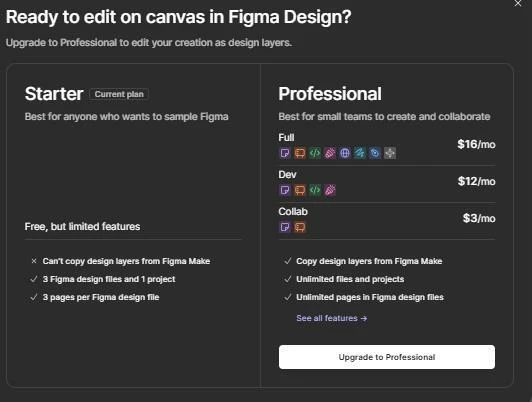
Why are we getting this message when clicked on the "Copy Design" button?

It used to work normal till yesterday.

Please assist.

Thank you


3 replies

  • Figmate
  • March 20, 2026

Hi ​@inovaitsys


I understand you’re seeing an upgrade modal when you click “Copy design” in Figma Make.


I checked our backend and see that you have access to a Professional team with a Full seat, so this function should be available if the file is in that Professional team.

Copy a Figma Make preview as design layers


I also tested it on my Professional team and it’s working as expected with a Full seat.

To help us narrow this down, could you please confirm:

  • Do you happen to have another Figma account?

  • Is the Make file in your Professional team (the team where you have the Full seat)?

  • Does this happen in the desktop app, in the browser, or in both?


If you confirm the Make file is in your Professional team and you still see the upgrade modal, please let us know and I’ll connect you with our support team to investigate further.


Thanks,


inovaitsys
  • Author
  • New Member
  • March 20, 2026

Yes I have a another account . This was happened in the browser 


  • Figmate
  • March 24, 2026

Thanks for following up.


Is this happening on a different account, or on the account you posted from?


If it’s occurring on another account, please confirm the Make file is in a paid team and that you have a Full seat on that team.

You can check the requirements here: Copy a Figma Make preview as design layers


If the file is in a paid team with a Full seat and you still see the upgrade modal on the other account, please submit a bug report using Contact support (the ? icon) inside the Figma Make file where this occurs.

The chatbot will walk you through opening a report so our team can investigate and you can communicate directly with a specialist.

For guidance, see: What to share in a bug report to Figma Support


Thanks,
