
Solved

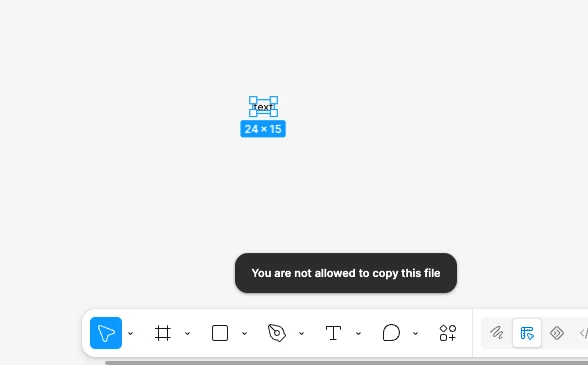
Can't copy anything

  • July 27, 2026
  • 19 replies
  • 316 views

Joshio

This just started minutes ago, and I can’t copy anything — even in files I own. I’ve restarted, logged out and back in. This is critical!

 

Best answer by Tom Reem

Hey everyone — sorry for the disruption today. Thank you for reporting this.

Following up here as our Engineering team deployed a fix: Copying should be working as expected again.

If you haven't already, please refresh your tab and you should be good to go.

This issue is posted on Figma's status page, where you can subscribe for updates as well: status.figma.com.

19 replies

Todd_Coleman
  • New Participant
  • July 27, 2026

Yes, I am getting that too. Just did a version update right before that.


Ian Manners
  • New Member
  • July 27, 2026

I have the exact same problem immediately after the version update. Restarting the desktop app and logging in/out don’t change anything.


nweir013
  • New Member
  • July 27, 2026

Same here.


James C
  • New Member
  • July 27, 2026

Same issue. I can’t copy from any files I own and can’t view share / permissions window. It just pinwheels and then closes. Tried restarting/clearing cache and logging out and back in. Same issue in web and app


Roxana Gomez
  • New Member
  • July 27, 2026

I'm seeing the same issue in the browser version of Figma as well. I refreshed the page and cleared my cache, but the problem is still happening.


Hannah S.
  • New Member
  • July 27, 2026

Same. Logged in/out on both desktop app and browser and cleared cache. Now, the share feature isn’t working...Seems to be due to the new version update


Molly Mellinger

Same here. At least I know now its not just me… 


abbiekmiec
  • New Member
  • July 27, 2026

Having the same issue, duplicate (CMD + D) works, just not copy


Allie_Lozinak

Same 😭


becdier
  • New Member
  • July 27, 2026

Same 😭 And the ‘share’ menu isn’t loading, either. Just spins then crashes. Looks like Libraries have also been unlinked. This only started after I updated to the new version.


Bruno Katekawa

Same here 😥… What's happening? OMG! 

I'm blocked in my design work 🤣


kosolapik
  • New Member
  • July 27, 2026

This just started minutes ago, and I can’t copy anything — even in files I own. I’ve restarted, logged out and back in. This is critical!


Same thing 


Sara Mercille

Same here!


TsveteLina Petkova

Same here. I can not edit my own files. 


Patrick Sanders

Same, started right after updating as well


sooz888
  • New Member
  • July 27, 2026

Ditto. Same as everyone else. 


sooz888
  • New Member
  • July 27, 2026

Also, all the previously added libraries are gone and cannot add them back.


Dan Jackson
  • New Member
  • July 27, 2026

Same, right after update too.

Also, Library has been unlinked from file and when I click “Browse team libraries > Add to file” it doesn’t work.


Tom Reem
Figmate
  • Figmate
  • Answer
  • July 27, 2026

Hey everyone — sorry for the disruption today. Thank you for reporting this.

Following up here as our Engineering team deployed a fix: Copying should be working as expected again.

If you haven't already, please refresh your tab and you should be good to go.

This issue is posted on Figma's status page, where you can subscribe for updates as well: status.figma.com.
