

Solved

Can no longer export in Figma Slides

  • April 1, 2026
  • 7 replies
  • 124 views

McRaven

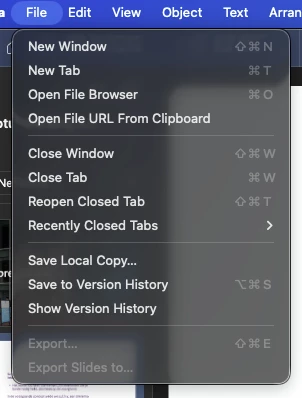
Yesterday, I used the Figma Slides export option with no problem. Today the option is greyed out for all Figma Slide decks. I can no longer export the deck, I’ve checked with my teammates and they have the same problem. Please help, as it is an important part of our work and should be included in our business plan.

 

Best answer by ksn

Hey all -- our engineering team believes this to now be fixed.

Please quit + restart Figma, and see if things are working normally. If not, please reply here and let us know.

7 replies

Squembri
  • New Member
  • April 1, 2026

It’s exactly the same for me – just today, when I went to export a presentation I’d been working on yesterday and had exported without any problems, I ran into the very same issue you’re describing. I’ve looked through the help guides and can’t find a solution either; perhaps it’s a problem with the version update?


In design mode, the export option does appear, but only for individual slides. And when saving as a PDF, there is no option to keep the PowerPoint format, nor to combine all the slides into a single PDF file.


Let’s hope they can sort this out for us!


McRaven
  • Author
  • New Member
  • April 1, 2026

It’s exactly the same for me – just today, when I went to export a presentation I’d been working on yesterday and had exported without any problems, I ran into the very same issue you’re describing. I’ve looked through the help guides and can’t find a solution either; perhaps it’s a problem with the version update?


In design mode, the export option does appear, but only for individual slides. And when saving as a PDF, there is no option to keep the PowerPoint format, nor to combine all the slides into a single PDF file.


Let’s hope they can sort this out for us!


Work around I’ve found is the browser app. In there the export option is available!


Allison Henry Aver

I am having this exact same issue. It worked yesterday and today I can no longer export a deck for a client!!! 


Rafael de Paula

Same!


Laura Cline
  • New Member
  • April 1, 2026

Having the same problem in the app. Exporting from the browser does work as a temporary solution for this, but just commenting so we hopefully can get some eyes on this issue.


djv
Figmate
  • Community Support
  • April 1, 2026

Hey All, thank you for flagging this issue! 

Our engineers are now aware and working to resolve it.
 

As a temporary solution, you can export your slides using the file menu inside the Slides file by clicking on the Figma logo in the upper-left corner.
 
?name=image.png


We apologize for any inconvenience. We'll keep you updated as soon as we receive any new information.


ksn
Figmate
  • Community Support
  • Answer
  • April 1, 2026

Hey all -- our engineering team believes this to now be fixed.

Please quit + restart Figma, and see if things are working normally. If not, please reply here and let us know.