

EVANEVAN
New Member
September 30, 2026
Question

Can I switch back to the previous “Edit with prompt” experience?

Hi Figma team,

Is there any way to switch back to the previous version of “Edit with prompt”?

After the recent update, I noticed that two important features from the previous experience are no longer available:

  1. I can no longer add an existing image directly from the canvas as a reference.
  2. My previous prompt is no longer retained or displayed when I reopen the editor.

Both features were essential to my workflow. I now have to add reference images again and rewrite my prompt every time, making the image-editing process significantly slower and more frustrating.

At minimum, the new version should support:

  • Adding existing canvas images directly as references;
  • Retaining and displaying the most recent prompt;
  • Allowing users to switch between the previous and current editing experiences.

If there is already a way to access these features, could you please let me know where to find them? Otherwise, please consider restoring them or providing an option to switch back to the previous experience.

Honestly, this is the first time I’ve ever felt strongly enough to complain about Figma’s product experience. The new workflow is genuinely difficult to use and has made a previously efficient workflow much more cumbersome.

Thank you.
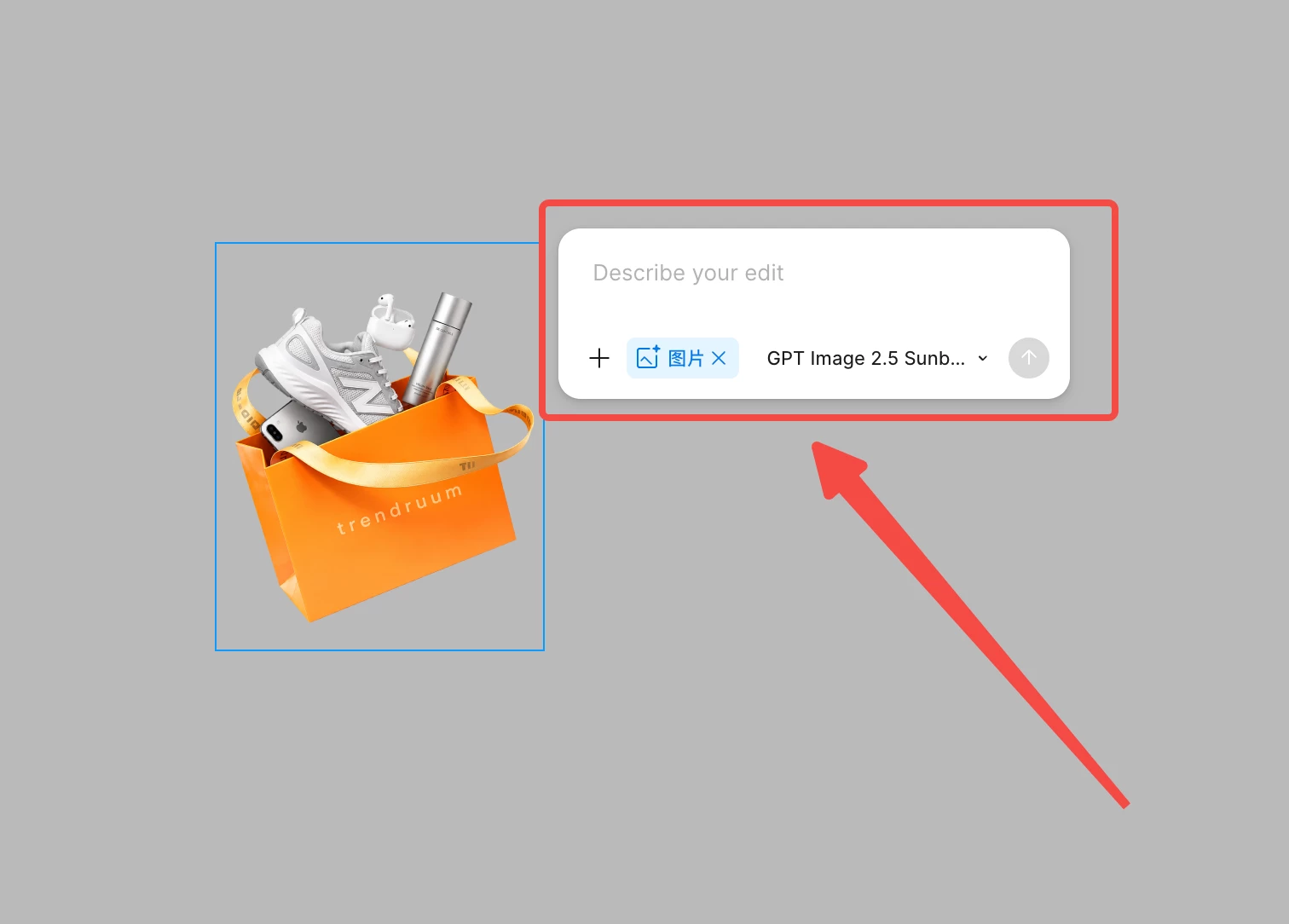
 

    2 replies

    adamsmasher
    Figmate
    Figmate
    September 30, 2026

    Hey, ​@EVANEVAN. Thanks for your post, and I can understand why repeatedly rebuilding the same context is frustrating for you.


    Regarding making additional edits to an image on the canvas, you can still do that by doing the following:

    1. Select the frame or layer containing the image you want to edit.
    2. Click the agent icon beside the selected layer.
    3. Click **+**, then choose **Edit image**.


    You can also access past chats in the panel on the left in a couple of ways. The first is to click on Agents, then in the list of chats click on the relevant history. The second way - which might be more what you are looking for - is to do the following:

    1. Click on layer and click the agent button to the right
    2. On the popup, click on the down arrow on the top-right corner.
    3. This shows past chat history for the layer. You can then view it in the left-side panel by clicking the Show in agents panel button (it’s directly next to the up arrow).


    Let me know if I’ve missed anything or if I haven’t understood exactly what you’re looking for.

    Mike V
    New Member
    October 17, 2026


    Hi! Which popup are you talking about? There is no button in the top right corner in the popup you described. Please look again at the screenshot from the original question message. If you are talking about a different popup, please attach your own screenshot.

    Nothing is clear. This severely hinders my work. I am used to the history being saved; I write a prompt, and then I realize I will have to recall it from memory all over again. We are talking about "Edit with prompt". The prompt history is simply not saved in the left panel. Either this is some kind of frustrating A/B testing.

    "Show in agents panel button (it’s directly next to the up arrow)" — what is this? Where is this button? Please send a screenshot.