Linnea.T
New Member
September 18, 2026
Question

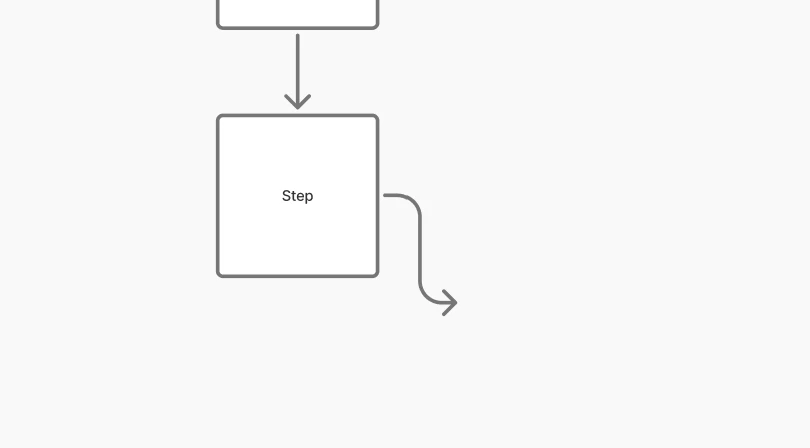
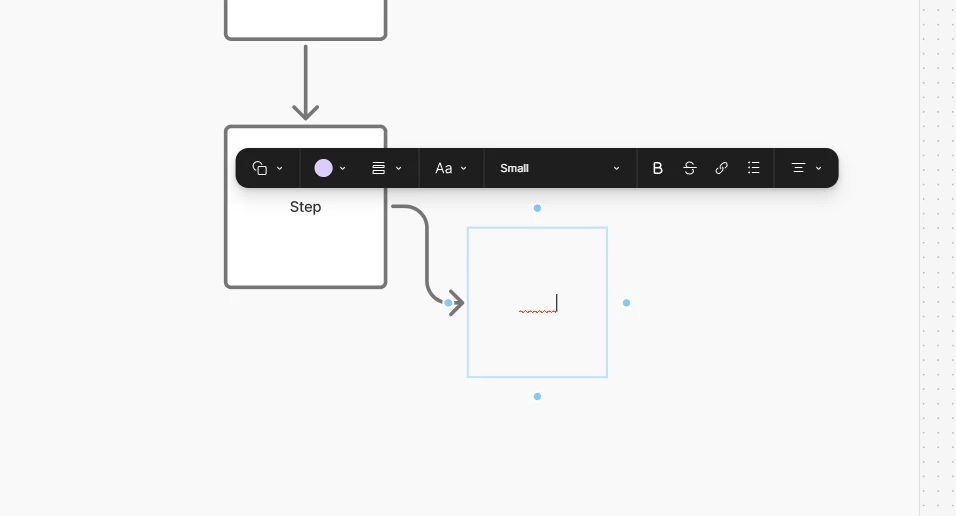
Buggy behaviour when adding next step in flow diagram with arrow keys

FigJam issue.

When adding a next step in a flow chart, using the arrow buttons, the next step is not created properly. The text is invisible and the box is not showing on the screen after clicking on the canvas. The new box is not behind the section either.

It does not happen every time, but when it starts it persists for that arrown on that box.
 

    5 replies

    adamsmasher
    Figmate
    Figmate
    September 18, 2026

    Thanks for your post, ​@Linnea.T.  That definitely introduces a scenario in which you could have invisible elements in your flow chart.


    I tried recreating this and couldn’t seem to get it to happen. I could get a subsequent box with no stroke, but I was actively choosing that as an option - it wasn’t happening randomly on its own. I couldn’t get the text to be white, even after using the text tool and choosing white as the font color. 


    Hmm… Are you copying and pasting any text? And are you using the desktop app or a web browser. I was testing in the Desktop app on mac OS.

    Linnea.T
    Linnea.TAuthor
    New Member
    September 20, 2026

    Hi, 

    I’m using the web browser (Microsoft Edge) on a windows pc. 

    I get the issue when typing text, not copying and pasting. I don’t know if the text is white but rather ‘invisible’. And after I create the new shape it disappears. 

    Attaching a recording that shows the behavior.

    adamsmasher
    Figmate
    Figmate
    September 20, 2026

    Thank you for the screen recording - it’s very helpful! It does look like it’s not actually creating the new layer, although you could move the frame and elements around to see if it’s behind the frame for some reason.


    Are you using Microsoft Edge v121 or later? It seems like this happens consistently enough that you could also test using another browser. You could also try a different browser, like Chrome 131 or later, or Firefox 141. There’s also the desktop app if you have it, as well. 


    Using any other option will help us narrow down if this is a browser specific issue or not. Thanks!