

Solved

Bug when resizing the Easing panel

  • July 30, 2026
  • 3 replies
  • 34 views

Marco_Spreca_Fueled

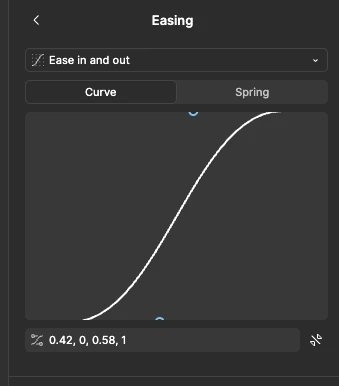
Found a bug on the Easing panel in Motion. When you resize the right side panel the content inside the easing panel “grows” with and the bezier is no longer editable as it disappear - check out the video for more context
 

Best answer by adamsmasher

Hi again, ​@Marco_Spreca_Fueled! Just wanted to let you know that our team has released an update so the bezier curve scales properly with the panel - should be much easier to edit now when you expand or shrink the panel. Cheers!

3 replies

adamsmasher
Figmate
  • Figmate
  • July 30, 2026

Hi, ​@Marco_Spreca_Fueled! Thanks for your post and for the video/screenshot. I can see how this would make adjusting the curve difficult when you can’t zoom out within the adjustment frame. I also tried selecting something else on the canvas and coming back to edit the curve and it still was at the same zoom level.


I’m sharing your feedback with the team for review - I’m not sure if this is a bug or a usability change that would be helpful for fine-tuning custom bezier curves for Motion. At any rate, thank you again for sharing this!


adamsmasher
Figmate
  • Figmate
  • Answer
  • August 12, 2026

Hi again, ​@Marco_Spreca_Fueled! Just wanted to let you know that our team has released an update so the bezier curve scales properly with the panel - should be much easier to edit now when you expand or shrink the panel. Cheers!


Marco_Spreca_Fueled

that’s great - thank you so much :)
