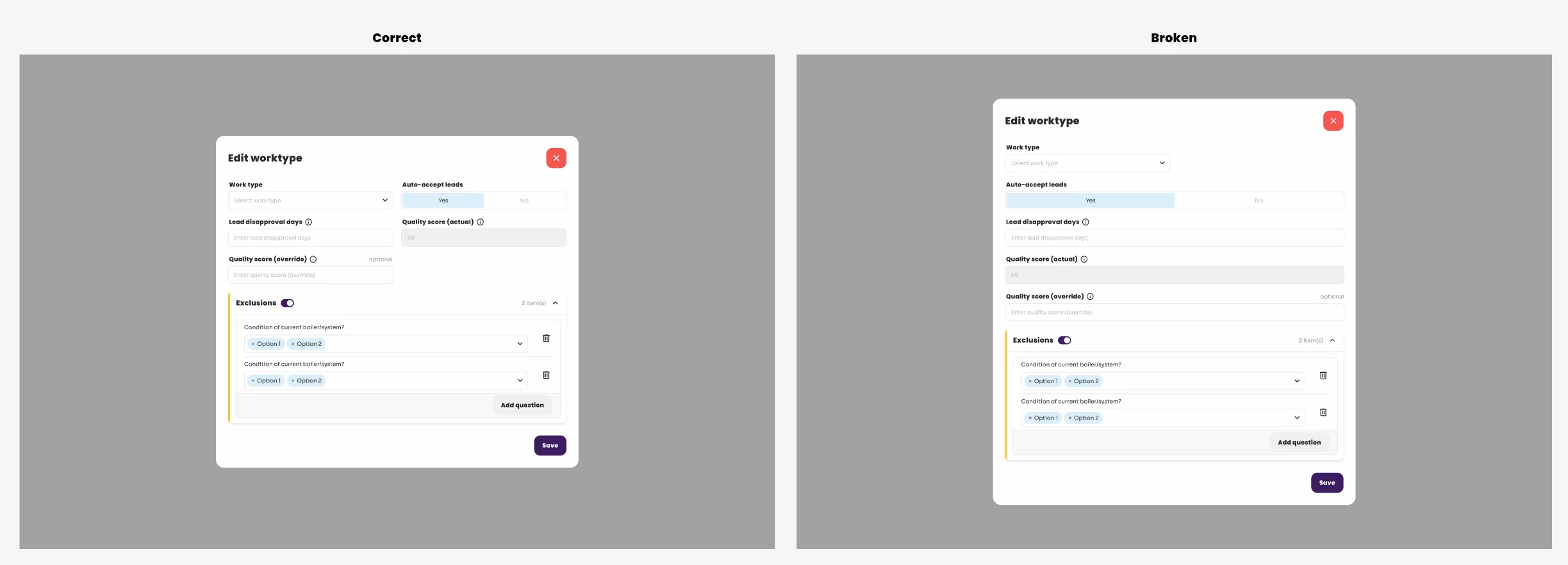
[BUG] Slots occasionally break sizing of content inside
We’ve run into a decently major issue when it comes to the new Slots in Figma.
We’ve seen this happening quite a few times before but had trouble reproducing it.
On occasion, designs we’ve made that include slots break. Sometimes this happens when we click the designs, but often times it happens out of nowhere, without our knowledge.
This is a big issue, as these designs need to stay consistent for our development team.
I have two examples attached where we’ve been able to reproduce it, seemingly by reloading the page.
What happens:
- We create a design including a component using slots
- The slot itself has auto-layout set up. In one example that’s simply horizontal, the other has a wrap.
- This works fine, until suddenly it breaks (We don’t know what causes it)
- the widths of some elements inside the slot changes causing the original design to break.
- When it happens we cannot revert it using cmd+z
- We have to manually fix the sizing. But it can happen multiple times even after fixing.
This is something that impacts our workflow greatly, as many of our designs use components with slots!
If any additional information is needed, I’m happy to share. But please note that the files cannot be shared as they handle sensitive data.