Question

Bug Report: Auto Layout Fill + min-width fails to distribute remaining space

  • August 25, 2026
  • 2 replies
  • 13 views

tozaki

Summary

In a horizontal Auto Layout frame with two Fill children (layoutGrow: 1), when one child's min-width exceeds the equal share of available space, the layout engine fails to redistribute remaining space. The other child falls back to its content width instead of filling the remaining space, leaving an unallocated gap.

Reproduction Steps

  1. Create a horizontal Auto Layout frame (no gap, no padding)
  2. Add two child frames, both set to Fill container (layoutGrow: 1)
  3. Set child A's min-width to 80px, child B's min-width to 160px
  4. Add text content inside each child (with 8px padding)
  5. Resize the parent frame to various widths and observe

Setup (common across all cases)

  • Both children: Fill container, layoutGrow: 1
  • Child A: min-width: 80
  • Child B: min-width: 160
  • Parent: Horizontal Auto Layout, gap: 0, stroke: 1px OUTSIDE (included in layout)
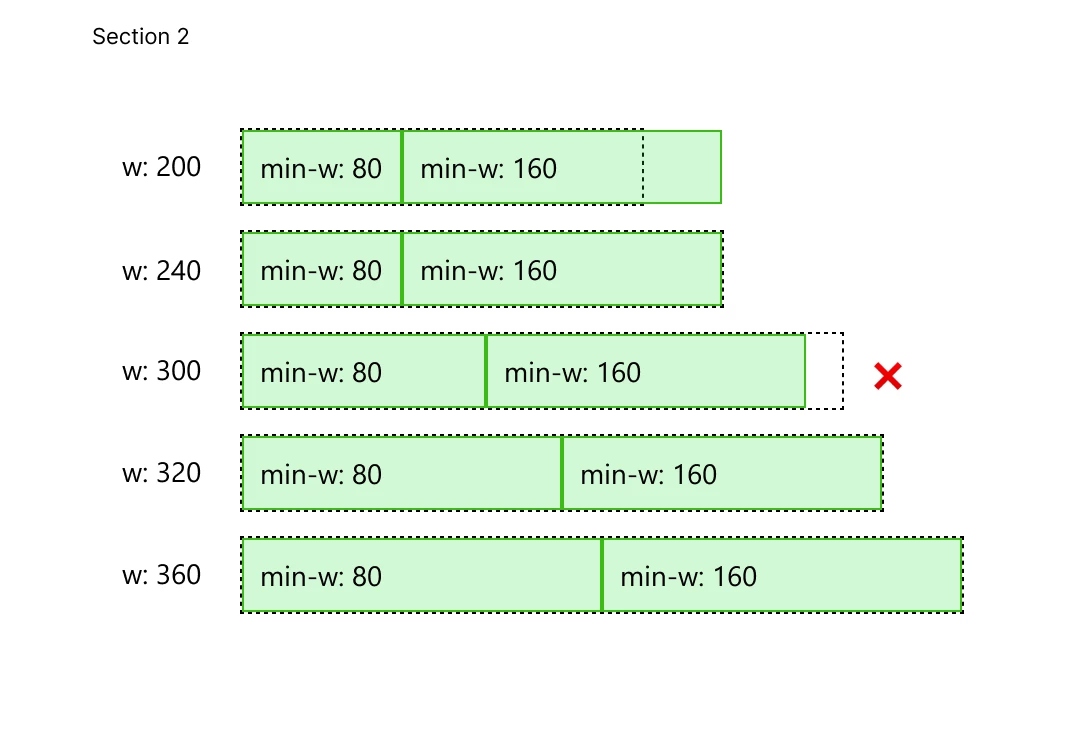
  • Child A content width: ~122px (text + padding)

Results


Analysis

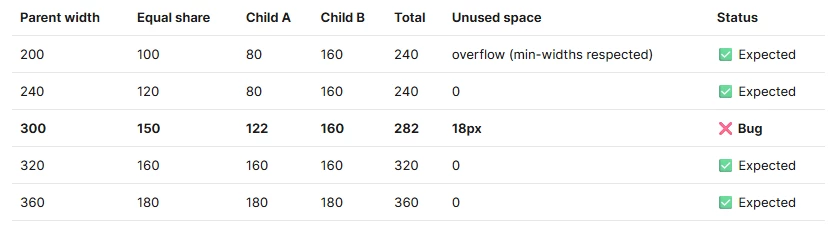
The bug occurs only when the equal share falls between the two min-width values (80 < equal share < 160):

  • w: 300 → equal share = 150. Child B’s min-width of 160 exceeds the equal share (150).
  • Expected: Child B → 160px, Child A → remaining 140px (> min-width 80, so valid)
  • Actual: Child B → 160px, Child A → 122px (content width fallback), 18px unallocated

When equal share ≥ 160 (w: 320, 360), both children Fill correctly. When equal share < 80 (w: 200), both children respect min-widths and overflow as expected. The issue is isolated to the case where one child's min-width forces it above the equal share.

Expected Behavior

When Child B's min-width pushes it above the equal share, the layout engine should allocate the remaining space (parent width − Child B's min-width) to Child A, as long as that value is ≥ Child A's min-width. This matches CSS Flexbox behavior with flex-grow + min-width.

Impact

This prevents common layout patterns such as:

  • Fixed-min-width sidebar + flexible main content area
  • Navigation panel + content area where both have min-width constraints
  • Any two-column layout where columns have different minimum size requirements

Environment

Figma (August 2025)

2 replies

tozaki
  • Author
  • New Member
  • August 25, 2026

Update: I found the root cause and a workaround, but this still appears to be a layout engine bug. The issue is specifically triggered when Fill children have Auto Layout with horizontal (side) padding.

Test Setup (common across all cases)

  • Parent: Horizontal Auto Layout, width 720px, no gap, no padding
  • Child A: Fill container, layoutGrow: 1, min-width: 160
  • Child B: Fill container, layoutGrow: 1, min-width: 480
  • Equal share = 720 / 2 = 360. Child B's min-width (480) exceeds this, so expected result: Child B → 480, Child A → remaining 240.

Results

1. No Auto Layout on children (Baseline) 🟢 Child A = 240, Child B = 480. Total = 720. Fills correctly.

2. Auto Layout with padding on children ❌ Both children set to Auto Layout: Vertical, Padding: 8 (all sides). Child A = 224, Child B = 480. Total = 704. 16px unallocated. The missing 16px = Child A's left + right padding (8 + 8).

3. Auto Layout without padding on children 🟢 Both children set to Auto Layout: Vertical, Padding: 0. Child A = 240, Child B = 480. Total = 720. Fills correctly.

4. Padding moved to nested frame 🟢 Children set to Auto Layout: Vertical, Padding: 0. A nested child frame inside each has Padding: 8. Child A = 240, Child B = 480. Total = 720. Fills correctly.

Conclusion

The only variable that breaks Fill distribution is horizontal padding on the Auto Layout child itself. The layout engine appears to subtract the child's side padding from its allocated width during the Fill calculation, but fails to redistribute that space.

Workaround: Avoid setting side padding directly on Fill children that have Auto Layout. Instead, nest a child frame inside and apply padding there (Case 4).


Celyn_L
Figmate
  • Figmate
  • August 25, 2026

Hi ​@tozaki, Celyn from the Figma Community Support team here. Thanks for putting together such a thorough report and following up with your additional testing!

I understand that applying horizontal padding directly to Auto Layout children set to Fill container with different minimum-width constraints can leave part of the parent frame’s width unallocated. Your comparison of the different setups and the workaround you found are especially helpful.

I’ve created a support ticket so our technical team can take a closer look. Your ticket number is #2090567. I’ve also added all the details and screenshots you shared here to the ticket so the team has the full context.

To help the team reproduce the behavior, please share the test file with support-share@figma.com, set the access to Can view, and click Invite. This won’t affect your billing. Once shared, please reply directly to the ticket with the file link so the team can investigate further.

Someone from the team will follow up with you directly, so please keep an eye on your inbox. Thanks again for taking the time to document everything so clearly!