

Solved

[Bug] Missing "Desktop" Option when choosing a device for prototype settings

  • September 16, 2025
  • 2 replies
  • 191 views

Bevs

I am currently in a student plan, and I have the app version of Figma on windows.

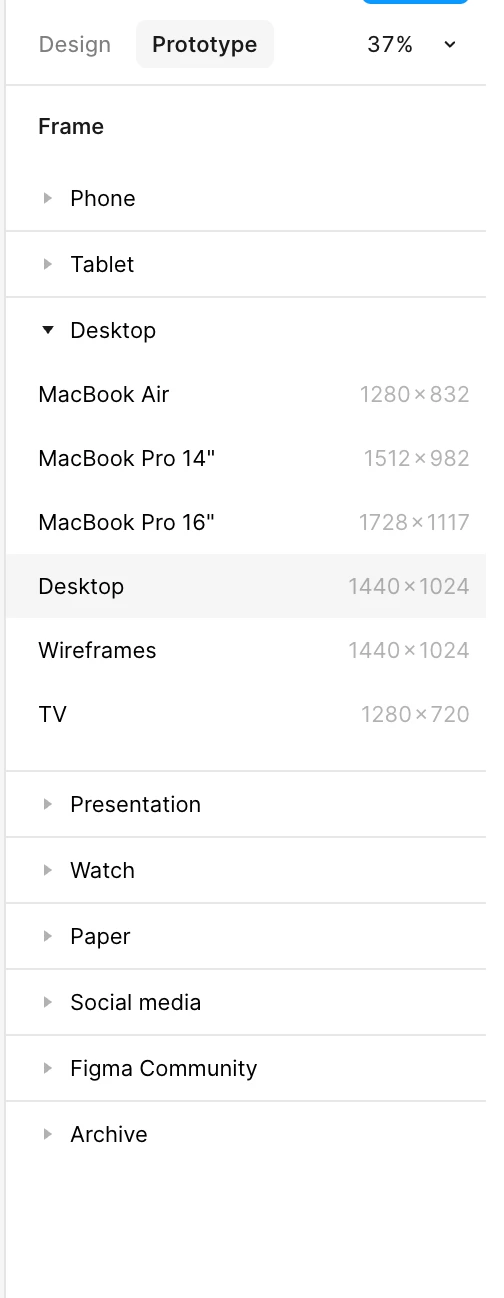
I am designing a website with the Desktop frame and when I go to its prototype panel, under Prototype setting, the “Desktop” option is gone. I hope this will be fixed soon.

Best answer by Gayani_S

Hey ​@Bevs, I’m really sorry for the very delayed reply here, this got missed on my end earlier. I know this was from a while back, but I still wanted to follow up.

I checked in with the team and they confirmed that we have a “Desktop” option when creating a frame but don’t have one in the device dropdown here. 


I’ve passed your feedback onto the teams for consideration. 


This topic has been closed for replies.

2 replies

Gayani_S
Figmate
  • Community Support
  • September 16, 2025

Hey ​@Bevs, thanks for pointing this out! I’ve reached out to the team to confirm whether this change was intentional or not, and I’ll update you as soon as I hear back. Really appreciate you flagging this and your patience while we look into it.


Gayani_S
Figmate
  • Community Support
  • Answer
  • April 8, 2026

Hey ​@Bevs, I’m really sorry for the very delayed reply here, this got missed on my end earlier. I know this was from a while back, but I still wanted to follow up.

I checked in with the team and they confirmed that we have a “Desktop” option when creating a frame but don’t have one in the device dropdown here. 


I’ve passed your feedback onto the teams for consideration.