

Solved

BUG: Figma Slides - Component property controls are duplicated

  • November 26, 2025
  • 3 replies
  • 300 views

Rohan Shivkumar

The controls for component properties appear twice when in slides mode. Not the end of the world but kinda annoying to work with some dropdowns. Surfacing this as it does not look like intended behavior.
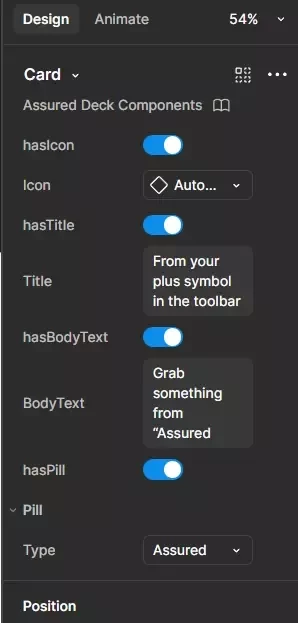
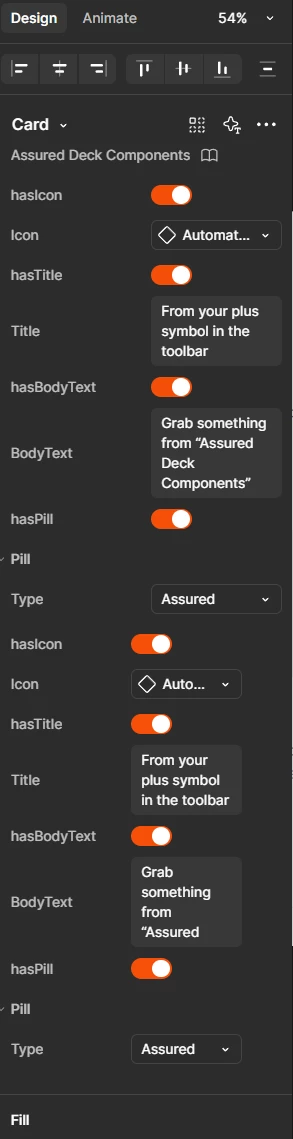
Card in design mode
Exact same card in slides mode


Best answer by djv

Hey All, thank you for flagging this! 

Our team was able to investigate and push out a fix.
Please refresh your tabs and let us know, if you’re still seeing this issue. 

3 replies

Adolfo
  • New Member
  • November 28, 2025

I'm creating a pre-made master template that any user can swap instances and fill control properties, and I have the same issue! No big deal if you have a few properties, but when it comes to complex slides, it can be overwhelming and confusing

for a regular user. Is it a way to hide one of them?


Markus Willbee

I am also having the same issue, just started recently.  It also displays properties for both at once which makes it difficult to make selections.


djv
Figmate
  • Community Support
  • Answer
  • December 5, 2025

Hey All, thank you for flagging this! 

Our team was able to investigate and push out a fix.
Please refresh your tabs and let us know, if you’re still seeing this issue.
