

macaspac
New Member
June 18, 2025

[Bug?] Dead space on the Effects and Stroke panel

  • June 18, 2025
  • 3 replies
  • 98 views

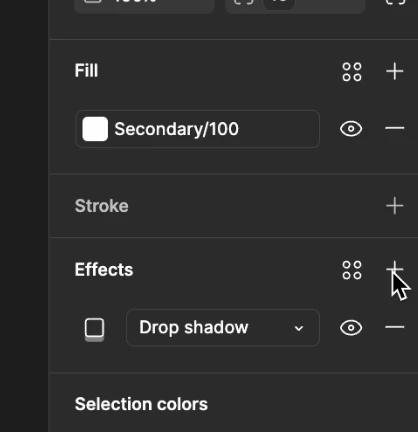
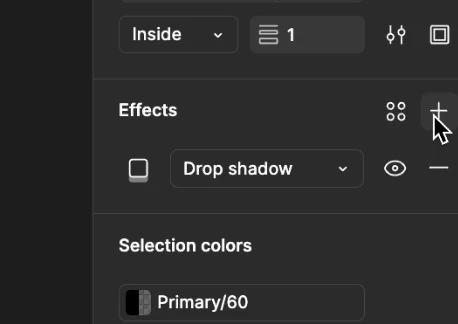
Not really sure how to log this because I don’t think it’s a question, and it’s not really worth having a conversation around, but I’m noticing this ‘dead space’ on the effects and stroke panel. I’ve restarted my Figma file + app multiple times but it doesn’t change anything. The only thing that fixes is it if I scroll up in the right panel… as if there’s an imaginary square blocking me from clicking the `+` button. 


Video for reference


You can see if I hover here, there’s no hover state (it’s not letting me click it): 
 

But if I were to scroll or add a stroke, I can add an effect: 
 

The video will show you a better idea of what I’m talking about lol, but I’d like to flag this. This isn’t working on my other computer, so it’s confusing but also annoying. 

    This topic has been closed for replies.

    3 replies

    Figmate
    June 19, 2025

    Hi ​@macaspac,


    Thanks for those screenshots and the video. I see what you mean – it looks like you're having trouble adding effects to an Auto Layout frame that already has a drop shadow applied, and it only seems to work after you add a stroke.


    I've tried to replicate this issue on my end, but I haven't been able to see the same behavior yet.

    To help troubleshoot this further, I'd like to submit a request on your behalf to connect you with our team. But before I do that, could you please confirm a few things for us?

    • Is this happening in the desktop app, a supported browser, or both?
    • Is this issue occurring in a specific file or in all files?

    Once you let me know, I'll get you connected with the right team to dig into this.

    Thanks for your help!

    macaspac
    macaspacAuthor
    New Member
    June 19, 2025

    It’s happening in the desktop app, in all my files. Thank you!

    Figmate
    June 23, 2025

    Thanks for the info!

    I'll go ahead and set up a support request for you with all the details you shared. Our team will reach out directly to help get this sorted out. You'll get an email about the new ticket soon – it'll land in the inbox linked to your account.

    Thanks,