

David_Bonnet
New Participant
May 16, 2025
Question

Bug: creating and using style with fill pattern

  • May 16, 2025
  • 22 replies
  • 916 views

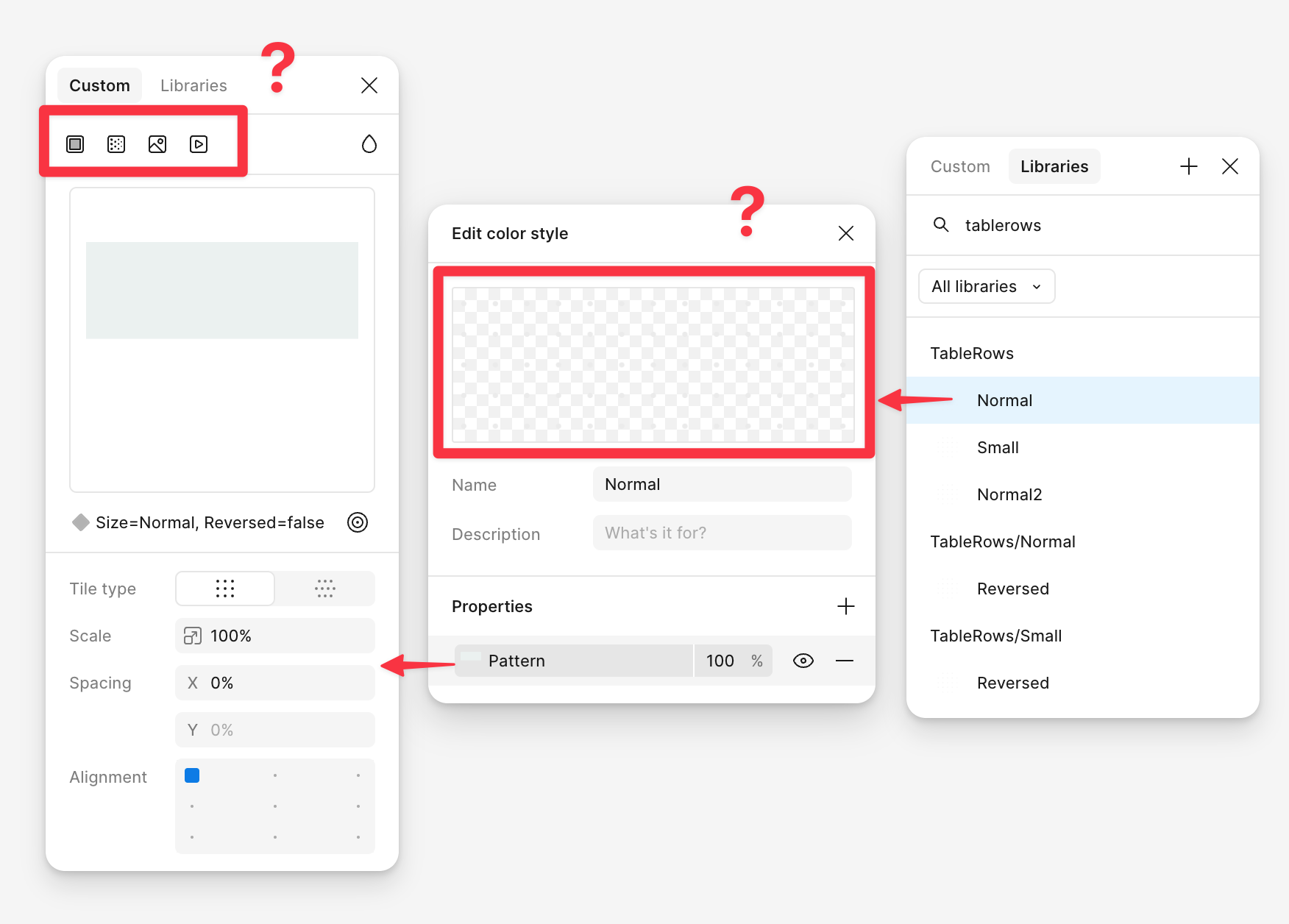
The recently introduced fill patterns do not seem to be correctly saved in styles:

  1. They are not editable (cannot select a new pattern object, and the toolbar does not show the pattern tab)
  2. When exported from a library, using them in another file results in displaying dots (presumably the default pattern)
 

22 replies

Jackie_T
New Participant
November 24, 2025

same here :-/

Aginger
New Member
April 9, 2026

I would also like to save a pattern as a style to be reused throughout my projects without having to bring in the “source” into every file. In adobe, I can save any pattern as a style, and use that style anywhere with a synced library. Figma should be able to do the same

jessie1
Active Member
June 2, 2026

Thanks for checking this out. Yes I also get this bug: the fill pattern of styles doesn’t seem to be changeable, and the pattern icon is not present in the fill option.

I filed a bug report in addition to this post and Ryan K is having a look.


Did you get any updates after they have taken a look?
 

My pattern fill doesn’t show up when I apply the style in other files even though the source itself is a component published within the same library where the style is created… 

djv
Figmate
Community Support
June 3, 2026

Hey ​@jessie1,  thanks for following up here!
 

To be transparent, I checked back in with our team on this last Fall, but they currently don't have a new update to share just yet. I know that's not the answer anyone here wants to hear, so I genuinely appreciate everyone's patience. This thread has done a great job documenting the behavior in detail, and I want to keep the Community in the loop rather than continue to stay quiet. 
 

A couple of quick questions while we continue to wait, just so I have the full picture of your most recent issue with this bug:

  • Is the pattern source frame a plain frame, or does it use a component/component instance? (There's been a pattern that component-based sources are more prone to breaking on publish.)
  • Are you seeing the gray dots appear, or is the fill missing entirely?


I appreciate whatever additional context you can provide. I'll pass it onto the team while they continue to investigate then reply here as soon as the team has something concrete to share.

jessie1
Active Member
June 4, 2026
  • Is the pattern source frame a plain frame, or does it use a component/component instance? (There's been a pattern that component-based sources are more prone to breaking on publish.)
  • Are you seeing the gray dots appear, or is the fill missing entirely?


Pattern source: Both the regular image as the published component / instance have the same issues. Multiple issues:

  • Sometimes the pattern is missing (white dots) in the styles menu, but seems visible in the design.
  • Sometimes the pattern is missing in the design and the styles menu.
  • Sometimes the pattern is visible in the design but not in the prototype or on Figma mirror (??)
djv
Figmate
Community Support
June 4, 2026

Thanks for the additional context, ​@jessie1! 

I’ll pass this onto the team. I’ll be sure to follow up if/when there is any update to share.

Wikke
New Member
September 3, 2026

Just wanted to raise that this issue is still occurring ​@djv 😪

djv
Figmate
Community Support
September 3, 2026

Hey ​@Wikke, thanks for the nudge! 
 

I understand how this must be slowing down your workflow. The original issue in this thread (patterns breaking on publish when the source was a component) was fixed last year. So this may be a separate, newer bug our team has since pinned down. This likely happens when the pattern fill points to a source node that's been deleted, and that node contained a component instance. But don’t worry - a fix is coming.


In the meantime, there's a temporary solution that's worked for other affected teams: rebuild the pattern without deleting the source node. Keep the original frame you're pointing at alive in the library file rather than removing it after setting the fill. To make sure that's actually your case, could you let me know:

  • Was the pattern's source frame deleted at any point after you applied the fill?
  • Is the source a plain frame, or a component/instance?
  • Are you seeing gray dots, or is the fill blank/missing entirely?
  • Where does it break? Canvas, the styles panel, prototype/Mirror, or all three?

If the temporary solution doesn’t work for you, let me know. I can help connect you with our technically quality team to investigate further.

Wikke
New Member
September 4, 2026

Hi ​@djv 
Thanks for getting back.
Even when not deleting the source node, the style is not shared between file. 
This means that if you are using the pattern across files, you can not have it as a library, but need a local pattern source in each file. 

  • Was the pattern's source frame deleted at any point after you applied the fill?
    Tried it both ways, both braks 
  • Is the source a plain frame, or a component/instance?
    Plain frame
  • Are you seeing gray dots, or is the fill blank/missing entirely?
    Grey dots
  • Where does it break? Canvas, the styles panel, prototype/Mirror, or all three?
    It is not shown either in the canvas or the style panel, I have not tried prototyping with it. 


djv
Figmate
Community Support
September 4, 2026

Thanks for the additional context, ​@Wikke! 

I’ve created ticket #2113953 on your behalf to connect you with our support team to investigate this with you. If you have any additional context or details to provide, such as file URLs, please provide them directly to the team via email. The team will review and get back to you as soon as they can. 

jessie1
Active Member
September 14, 2026

I still have the same issue as well. I have a saved style in my main component library, which has both a gradient fill + the pattern on top. The original pattern source is also a component within the same file (though I have tried with a regular image as well).

When I try to access that style in any other file (with the library linked) I get the grey dots. Moreover, I have a “background component” in said library that has (among other assets) the style applied. Whenever I use this component (wether as an instance or a nested instance) I also get the dots. The only “workaround” is to detach the style, and relink the source by adding the texture-as-a-component to that file and manually selecting it. I really could use a fix to this as this adds overhead and untidy files.


djv
Figmate
Community Support
September 14, 2026

Hi ​@jessie1, thanks for letting me know!

Glad to hear you found a temporary solution, but I understand how this workaround is definitely not a fix. I’ve followed up with the team to inform them of the possible regression.

At this point, it may be best to connect you with our support team directly to investigate further. I’ve created ticket #2131030 on your behalf to connect you with our technical quality team. If you have any further questions or concerns, you can continue working through this with the team directly via email.