Solved

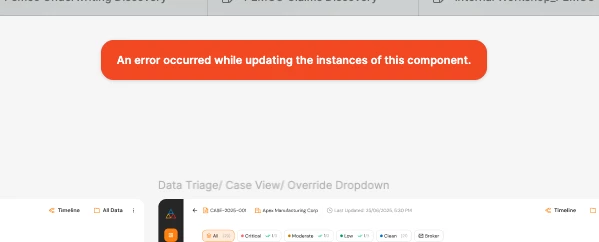
An error occurred while retrieving the variable

  • May 19, 2026
  • 3 replies
  • 14 views

KaustavR19

Whenever I am trying to swap tokens or variable instances from my design system library files or trying to pull updates, I am facing the same error be it a component or a variable. And this is happening for all the files in my project folder that have the libraries added.

I have raised a support ticket as well.

Best answer by Celine_

Thanks for trying those steps already, and sorry to hear the issue is still happening!

I can also see on my end that our Technical Quality team is currently investigating this further. I’d recommend continuing the conversation directly through your support case, as the team will follow up there if they need any additional information or testing from you during the investigation.

I understand this is blocking official work, so I’ve noted the urgency internally as well. Thanks again for your patience while the team continues looking into it!


Update: Glad to see this has been resolved! It looks like some security measures applied by your IT team were causing the issue. If you run into anything else, feel free to reply directly to your support ticket and it will reopen automatically. I'll go ahead and close this thread here, thank you! 🙏


This topic has been closed for replies.

3 replies

Celine_
Figmate
  • Community Support
  • May 19, 2026

Hey, thanks for the detailed report and sorry you're running into this across multiple files. I can see your support ticket and have added a follow-up note internally for additional visibility. The team will be able to take a closer look at your specific case and get back to you directly.

In the meantime, here are a couple of things worth trying:

  • Unpublish and republish the library that's triggering the error (don't worry, unpublishing won't break existing connections with subscribed file)
  • Make a small tweak to the affected component or variable in the library file (for example, make a small change to the component (like editing the description), then republish the update and accept it in the files using that library.

Hopefully one of these helps unblock you while the support team investigates further. Thanks for your patience! 🙏


KaustavR19
  • Author
  • New Member
  • May 19, 2026

Hey, thanks for the detailed report and sorry you're running into this across multiple files. I can see your support ticket and have added a follow-up note internally for additional visibility. The team will be able to take a closer look at your specific case and get back to you directly.

In the meantime, here are a couple of things worth trying:

  • Unpublish and republish the library that's triggering the error (don't worry, unpublishing won't break existing connections with subscribed file)
  • Make a small tweak to the affected component or variable in the library file (for example, make a small change to the component (like editing the description), then republish the update and accept it in the files using that library.

Hopefully one of these helps unblock you while the support team investigates further. Thanks for your patience! 🙏

Hey, Thanks for responding. I have already tried out both of the ways but nothing seems to be working. So, I will wait for the team to come back. It would be great if you could expedite it a bit as some official work is facing a blocker.

Thank you for your cooperation.


Celine_
Figmate
  • Community Support
  • Answer
  • May 20, 2026

Thanks for trying those steps already, and sorry to hear the issue is still happening!

I can also see on my end that our Technical Quality team is currently investigating this further. I’d recommend continuing the conversation directly through your support case, as the team will follow up there if they need any additional information or testing from you during the investigation.

I understand this is blocking official work, so I’ve noted the urgency internally as well. Thanks again for your patience while the team continues looking into it!


Update: Glad to see this has been resolved! It looks like some security measures applied by your IT team were causing the issue. If you run into anything else, feel free to reply directly to your support ticket and it will reopen automatically. I'll go ahead and close this thread here, thank you! 🙏