

Lyn Tan
New Member
September 14, 2026
Question

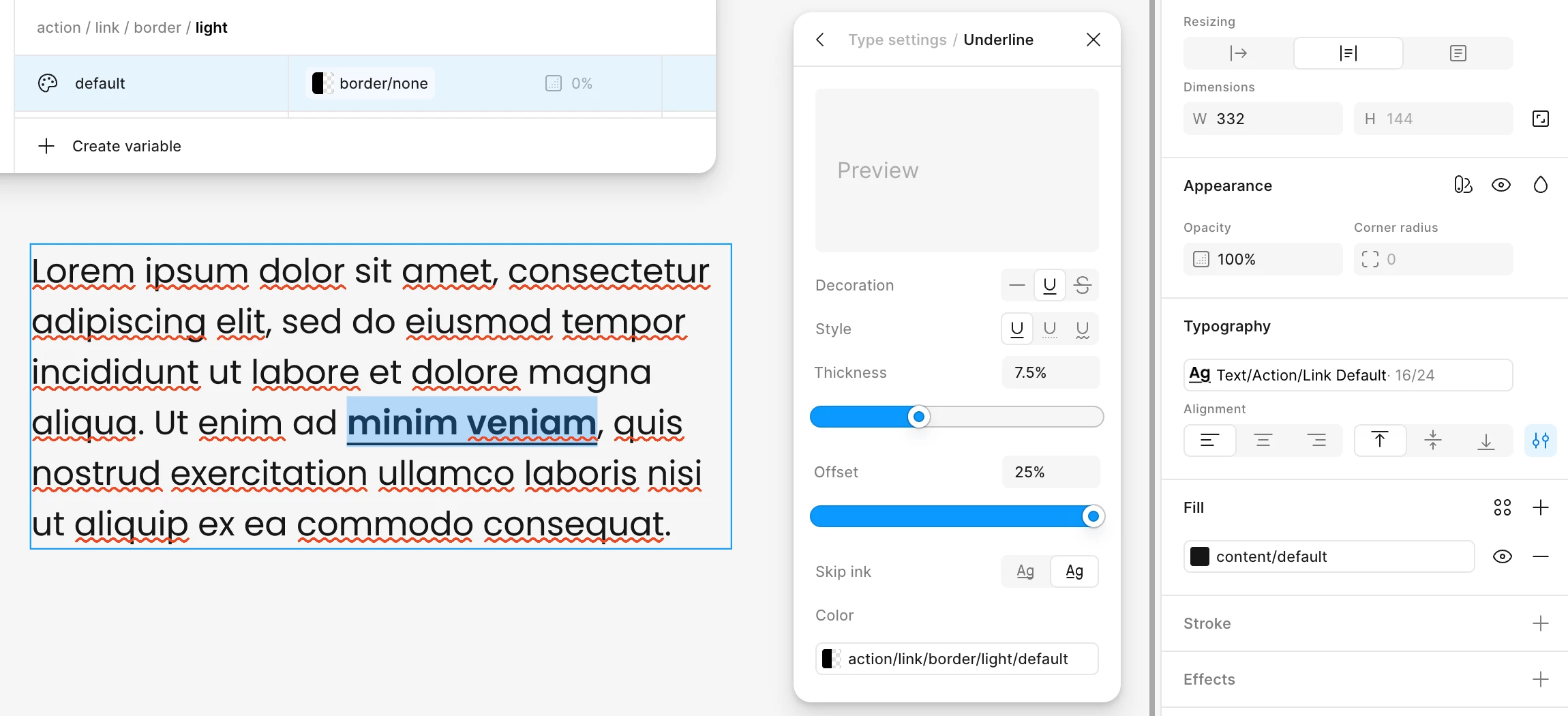
Aliasing a colour variable with 0% opacity within text style > underline details > color doesn't render correctly
  • September 14, 2026
  • 3 replies
  • 34 views

See screenshot above. I have assigned a variable with 0% opacity to the underline colour of a text style, but when applied to text, it ignores the opacity. This only happens if opacity is 0%. If I input another value and set it to 1%, 50% etc. it renders correctly so this seems like a bug?

Would appreciate if this could be fixed, so I don’t have to make work arounds that aren’t in line with dev. Thanks!

3 replies

djv
Figmate
Community Support
September 14, 2026

Hi ​@Lyn Tan, thanks for flagging this! 

I understand how this must be slowing down your workflow. This definitely doesn’t seem like expected behavior. May I ask:

  • Is the opacity set on the variable itself, or on an alias pointing to a parent color variable?
  • Does the same variable behave correctly at 0% when used as a regular text fill, or is the underline color the only place it breaks?


In the meantime, setting opacity to 1% should work as a temporary solution. With these details, I can flag this over to our team to investigate. Let us know!

Lyn Tan
Lyn TanAuthor
New Member
September 15, 2026

Hey ​@djv,

  • I’ve tested both ways and currently neither reflect the correct behaviour.
  • On a regular fill (text, frame etc.), 0% opacity variables behave correctly. So underline colour is the only place it breaks.

Will be great if you can raise this with your team, I’ve done the 1% workaround for now :)

djv
Figmate
Community Support
September 15, 2026

Hi ​@Lyn Tan, thanks for the additional context! 

I’ve passed this forum topic over to the team to review. They’ll do their best to reproduce and pin point a fix. I’ll follow up here if I get any updates from the team.

We appreciate your patience!