

Question

Afterimage bug

  • January 9, 2026
  • 2 replies
  • 35 views

Lucas B

 I’m having this afterimage and resolution bug on the desktop app
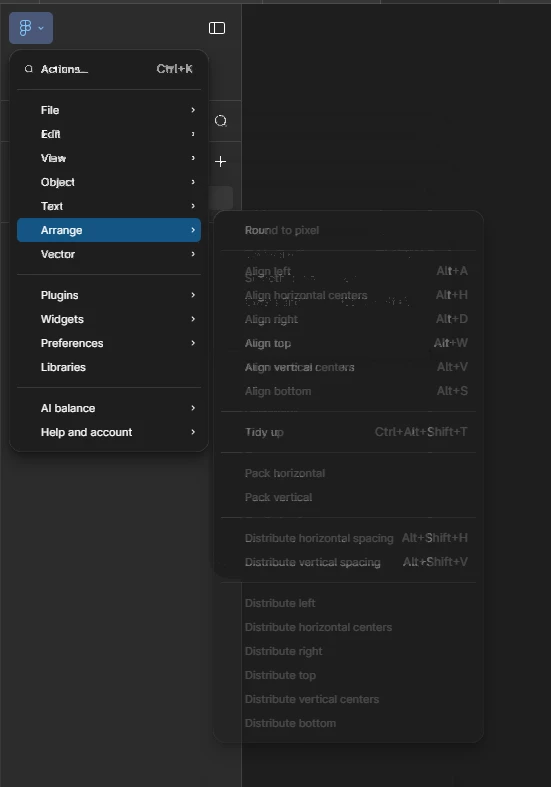


  • Every component leave this afterimage that fades away after 1 or 2 seconds (sometimes they don’t) 
  • This problem started today (01/08) 
  • It’s occurring only on my desktop, on my laptop it’s normal
  • My Pc specs:
    Processor AMD Ryzen 7 7800X3D 8-Core Processor
    Video Card NVIDIA GeForce RTX 3070
    Operating System Windows 10
    RAM 32 GB

2 replies

Lucas B
  • Author
  • New Member
  • January 9, 2026
Afterimage on menus
Afterimage on toolbar
grainy resolution


djv
Figmate
  • Community Support
  • January 9, 2026

Hi ​@Lucas B, thanks for flagging this! 

I completely understand how this must be affecting your workflow. Afterimages on the canvas are usually caused by GPU issues, caching problems, or network interference.

Can you please try the following to see if any of them help with the issue? 

  1. Restart Figma: Close the desktop app and reopen it
  2. Reload Tab: Right-click the Figma tab and select "Reload Tab"
  3. Clear your Cache: Learn how to clear your Figma desktop app cache here
  4. Check Network/VPN: Disable VPNs or check corporate network settings
  5. Toggle GPU Acceleration: In Figma Settings > Preferences, turn "Use GPU Acceleration" off or on.
  6. Check File Specificity: Create a new Figma file to see if the issue is happening in one specific file or in all files
  7. Update/Reinstall: Ensure Figma is up to date or try reinstalling the desktop app


Learning what does help or if none of these work can help us figure out where to troubleshoot next.