Question

After subtracting the shape, extra dots appear in pixel-free mode.

  • March 11, 2026
  • 2 replies
  • 43 views

TimurInSpark

Problem

After subtracting pixel imperfect shape, extra dots (artefacts) appear on outside contour.
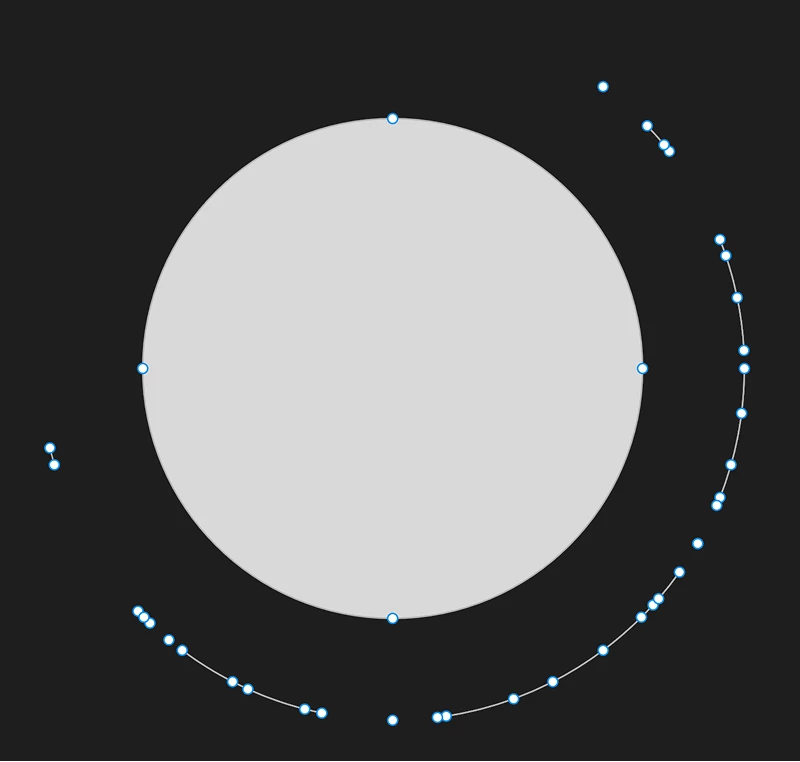
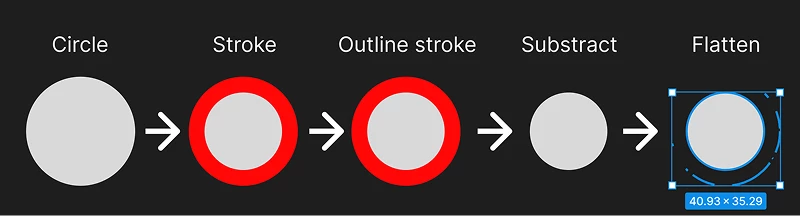
Extra dots after substraction non-pixel-perfect shape after stroke outline.

How to reproduce

With Snap to pixel grid disabled:

  1. Add a shape (circle)
  2. Add stroke to the shape
  3. Make Outline stroke
  4. Substract stroke from circle
  5. Flatten shape 
The process of reproducing the error.


Importance

Due to this artifacts it is hard to use figma for illustration. In my workflow I need to repeat this steps several times on different shapes and this generates a lot of artefacts.

2 replies

TimurInSpark
  • Author
  • New Member
  • March 12, 2026

As an alternative to subtraction, I tried Split vector (in Figma Draw mode from context menu) and it works. No artefact dots. But this way generates a lot of other vectors (in case of complex form), that I should remove, so I hope that the error with substruct will be fixed.

The goal is to crop the shape along the contour by the same amount. Simple shapes can be simply resized, but in the case of complex ones, this does not work.

Should I register this original question as a bug somewhere?


TimurInSpark
  • Author
  • New Member
  • March 14, 2026

The other way is to make a centered stroke with double the thickness.