

SLT-UX
Active Member
April 9, 2025
Solved

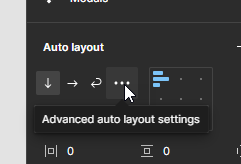
Advanced Autolayout Settings broken?
  • April 9, 2025
  • 5 replies
  • 390 views


I click on it, and nothing happens. I’ve rebooted, updated my browser, installed windows updates, etc.. Still not working. 

This is a fairly big problem as it means I can no longer access the “First/Last on top” option. 

Has anyone else experienced this issue?

    This topic has been closed for replies.
    Best answer by Celine_

    Hey both, thanks for flagging this, and apologies for the delay in getting back to you.

    I’ve checked on our end, and our engineering team has released a fix for UI2 that ensures the Advanced auto layout settings now open as expected.

    If you're still running into issues, please let us know! Thanks again.

    5 replies

    Rohan Jhunja
    New Member
    April 10, 2025

    Facing the same issue

    Celine_
    Figmate
    Celine_Solution
    Community Support
    April 29, 2025

    Hey both, thanks for flagging this, and apologies for the delay in getting back to you.

    I’ve checked on our end, and our engineering team has released a fix for UI2 that ensures the Advanced auto layout settings now open as expected.

    If you're still running into issues, please let us know! Thanks again.

    Xhaddman Hossain
    New Member
    July 15, 2025

    the three dots that is supposed to open my advanced layout option is not present in ,my auto layout properties

    layout properties

    djv
    Figmate
    Community Support
    July 15, 2025

    Hi ​@Xhaddman Hossain, thanks for following up with the screenshot! 

    Advanced auto layout settings moved when we launched Grids. You can now access Auto layout settings for Strokes and Canvas stacking from the toggle icon. 


    Hope this helps clarify!

    Nisar Shah
    New Member
    December 26, 2025

    i can’t find the advance auto layout settings