

网页版文本工具中,中文输入法输入冒号后出现中英文冒号重复字符
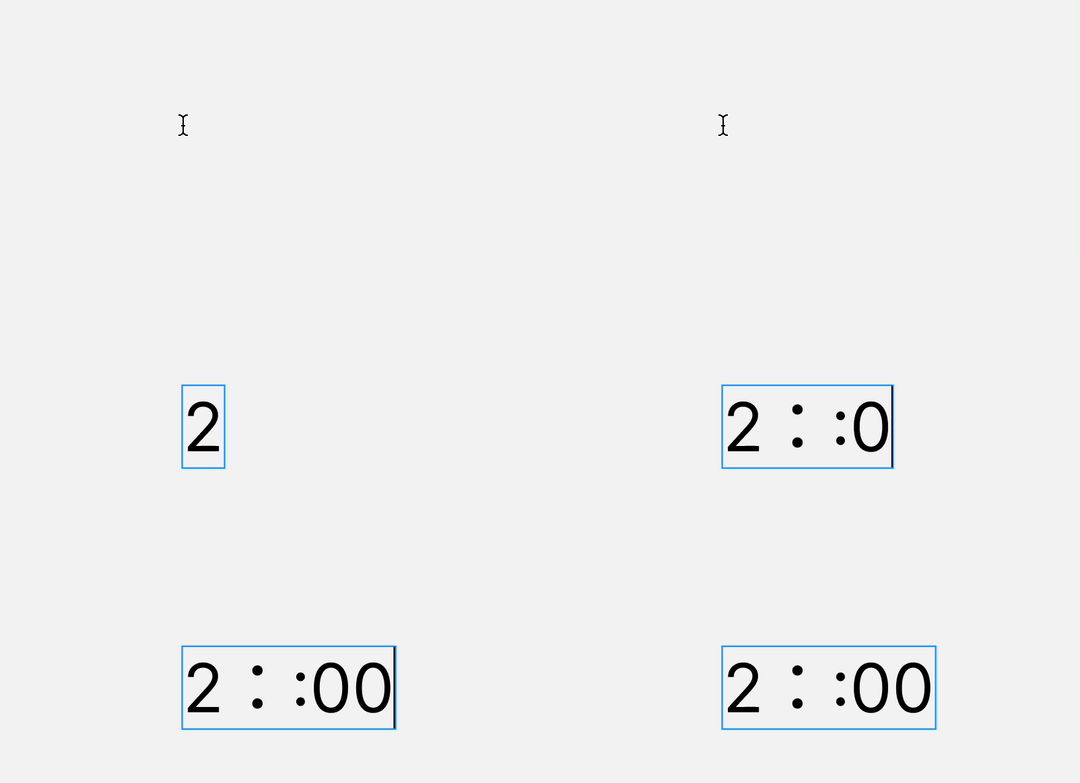
在使用Figma网页版时,于设计画布的文本工具内输入时间,若使用中文输入法(如搜狗输入法)输入数字-冒号-数字,会错误地生成一个中文冒号后紧接一个英文冒号的重复字符(::)。
-
具体示例:意图输入
16:00(中文冒号),实际输出为16::00。 -
问题范围:此问题仅出现在网页版的设计画布文本工具中。在以下场景均正常:
-
Figma桌面客户端
-
Figma网页版的其他输入区域(如插件搜索栏、评论框)
-
浏览器地址栏及其他所有第三方应用
-
-
环境信息:
项目 详情 操作系统 macOS 浏览器 Google Chrome (版本 143.0.7499.42(正式版本) (arm64)) 输入法 搜狗输入法 Figma版本 网页版
推测分析:
这很可能是Figma网页版对文本工具输入区域的输入法合成事件处理存在特定Bug,与中文输入法智能标点转换功能冲突,导致字符被异常追加。
附加信息:
我已尝试清除浏览器缓存、禁用插件及调整输入法设置,问题依旧。该Bug严重影响中文用户在设计稿内输入文本的效率和体验。
Duplicate Colon (Chinese & English) When Typing with Chinese IME in Web Version's Text Tool
Description:
When using the Text tool on the canvas in the Figma web version, If I use a Chinese input method (such as Sogou Input Method) to input numbers - colons - numbers, it incorrectly outputs a duplicate colon sequence containing both a Chinese full-width colon and an English half-width colon.
-
Example: Attempting to type
16:00results in16::00. -
Scope: This issue occurs exclusively in the canvas text tool of the web version. It works correctly in:
-
The Figma desktop app.
-
Other input areas within the Figma web version (e.g., plugin search bar, comment field).
-
The browser's address bar and all other third-party applications.
-
-
Environment:
Item Details OS macOS Browser Google Chrome (version 143.0.7499.42 (arm64)) IME Sogou Input Method Figma Version Web
Root Cause Analysis:
This is likely a specific bug in how the Figma web version's canvas text input field handles IME composition events. It may conflict with the intelligent punctuation conversion feature of Chinese IMEs, causing characters to be appended erroneously.
Additional Notes:
I have tried clearing the browser cache, disabling extensions, and adjusting IME settings without success. This bug significantly impacts the text input efficiency and experience for Chinese users.