
蔓清 1111
New Member
October 9, 2026
Solved

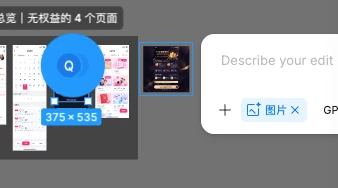
为什么现在创建图片不可以直接选择画板了???!
  • October 9, 2026
  • 2 replies
  • 23 views

原本创建图片我可以选择现在的画布把画布变成一张图片 直接选择就可以生成快照 现在我必须先导出这个画布 然后再给想他要编辑的图片添加参考图!好麻烦啊!!

    Best answer by Gayani_S

    Hey ​@蔓清 1111 , thanks for reaching out! I’m replying in English, but please let me know if anything isn’t clear and I’m happy to clarify.

    In Figma Design, you can currently add a reference image to Make an image or Edit image in these ways:

    1. Click + in the prompt box to upload an image from your computer.
    2. Copy an existing image to your clipboard, then paste it into the prompt box.
    3. Drag an image from your computer directly into the prompt box.


    Selecting a frame directly isn’t one of the documented options right now, so I’ve passed your feedback to our team internally.

    You can find the current steps in Generate and edit images with Figma AI.


    Hope this helps!

    2 replies

    hertaebertiejgl
    New Member
    October 9, 2026

    Now we don't even have image history! Why do they think this upgrade is better than the old one?

    Gayani_S
    Figmate
    Gayani_SSolution
    Community Support
    October 9, 2026

    Hey ​@蔓清 1111 , thanks for reaching out! I’m replying in English, but please let me know if anything isn’t clear and I’m happy to clarify.

    In Figma Design, you can currently add a reference image to Make an image or Edit image in these ways:

    1. Click + in the prompt box to upload an image from your computer.
    2. Copy an existing image to your clipboard, then paste it into the prompt box.
    3. Drag an image from your computer directly into the prompt box.


    Selecting a frame directly isn’t one of the documented options right now, so I’ve passed your feedback to our team internally.

    You can find the current steps in Generate and edit images with Figma AI.


    Hope this helps!