


Tom Reem
Figmate
Figmate
August 3, 2026

Rolling out: Projects become folders 📂 ✨

  • August 3, 2026
  • 37 replies
  • 2841 views

Hi Figma Forum — we rolled out some changes that will make organizing team files more flexible and intuitive.
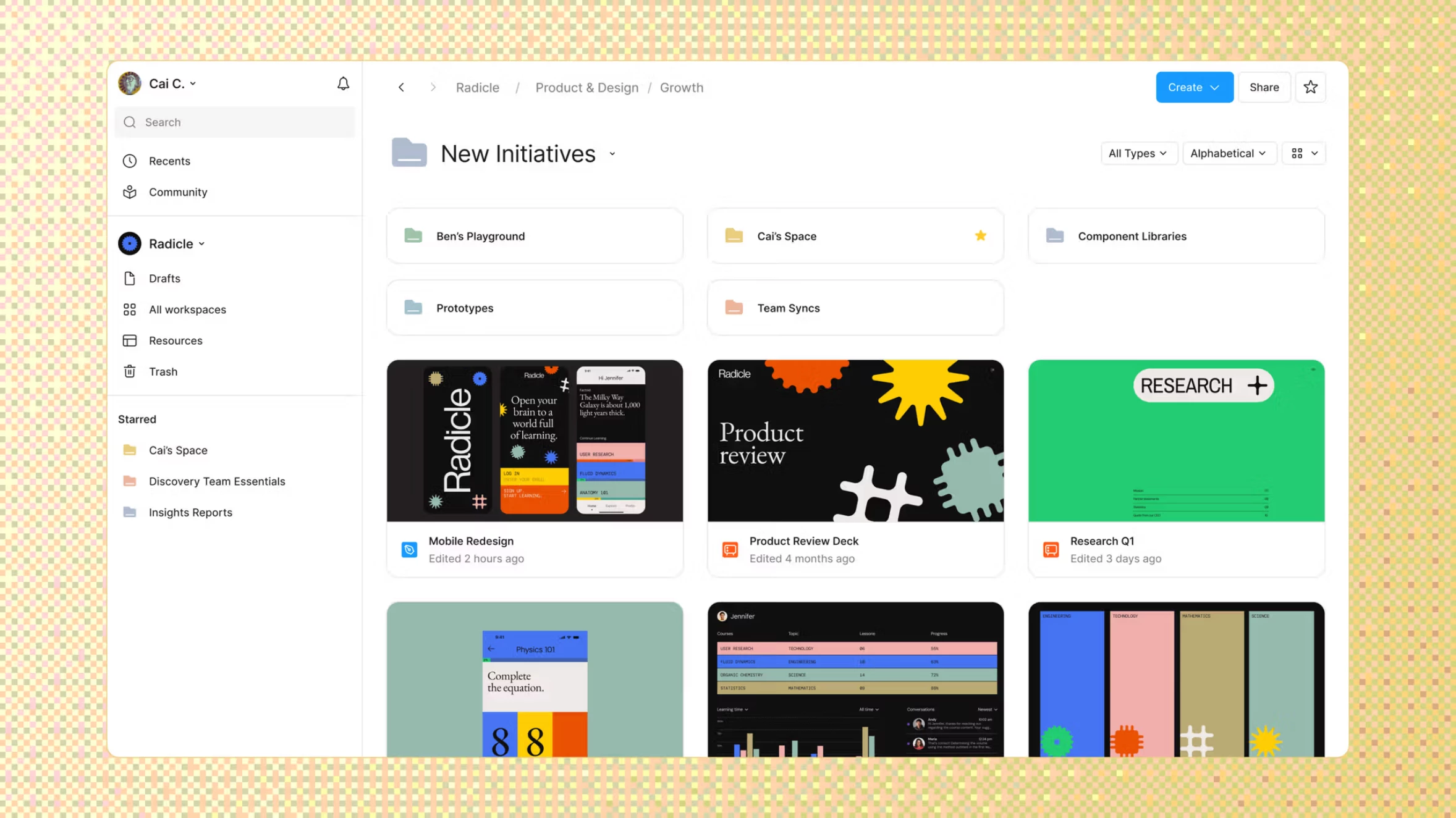
A Figma workspace organized with nested folders.

As more work happens in Figma, files can get harder to find. In the coming weeks, we’ll introduce folders, so you can structure files to mirror the ways your teams work.

Here’s what’s changed:

  • Projects become folders. All files in Teams will live in folders. Any previous reference to Projects in the UI will be renamed to Folders.
  • Subfolders and colors. Nest folders and assign folders colors to create hierarchy.
  • Simpler sharing. Subfolders inherit access from the folder above it by default, or you can limit access to specific people.

What’s not changing:

  • Workspaces and teams — these structures will stay exactly the same as before.
  • Who can access folders — the same people who had access to the project before have access to the folder now. This includes Connected projects, now called Connected folders.
  • Creating, moving, and sharing folders — the same ways and places apply as they did with projects.
  • API keys — these will continue to work as before.

✅ Thank you for your questions and feedback!

​@Jillian_Latimer and ​@Ethan Adams from the product team were here on Monday, August 17, 2026, between noon and 1pm PDT / 3pm and 4pm EDT to answer your questions about the rollout. This thread is now closed to new questions for the product team — thanks to everyone who weighed in!

Learn more about what’s changing specific to your plan type here: Updates to Figma’s file management.

This topic has been closed for replies.
Pinned Reply By Tom Reem

Hi again, everyone!

Thanks for all the questions and feedback as we rolled out these changes to file management, and shoutout to ​@Ethan Adams, ​@Jillian_Latimer, and the team for jumping in. This thread is now closed to new questions. ✅ Here's what came up during this discussion and where things stand.

👀 Making folders easier to scan. A lot of you navigate visually and many of you design covers specifically so the right project jumps out. You'd like that same quick recognition in the new folder view. The suggestions here included: custom folder covers, automatic previews pulled from a file inside, a larger card view for top-level folders. It's the single most common piece of feedback since folders shipped, and the team is working on an improvement. No timeline to share yet.

🎨 Folder colors and contrast. Colors are a good start for visually differentiating files, but a number of you ask for more visually distinct colors, plus non-color cues like emoji or icons that work regardless of how you see color. This is folded into the same work above.

🗂️ Sort order resetting. This matters most if you organize numerically (e.g. 01. Exploration, 02. In Design). Context worth having: The team has tried persistent sort before and heard just as strongly from people who found it disruptive, so today's behavior is a deliberate call rather than a bug. We're watching to see whether sentiment has shifted.

🫱🏻‍🫲🏼 All other asks, logged. Features like right-clicking on empty space to create a folder or file, expanding starred folders in the sidebar, pinning folders so an archive stays put, denser layout options, and reusing page structures — we hear you.

Want more context?

Keep it coming. This thread is closed, but the conversation isn't. More feedback or suggestions → Share Your Feedback. Something to fix → Report a Problem or Support. We'll keep looping in the right teams.

37 replies

Ethan Adams
Figmate
Figmate
August 17, 2026

​@furax75 


Thanks for the feedback on permissions! In this change, we prioritized replicating permissions exactly before and after launch. More detail available https://help.figma.com/hc/en-us/articles/41753150926103-Updates-to-Figma-s-file-management . 


That said, bulk permission management (editing many people/folders at once) is a gap for Professional plans today. We’ve reminded the team of this and will consider this for the roadmap.


As always, if there is a specific issue that you have with the change for this launch, please reach out to Support! https://help.figma.com/hc/en-us/requests/new


Ethan Adams
Figmate
Figmate
August 17, 2026

​@Arthur , ​@mobile_dev 


Thanks for the details on the API, this sounds like a bug!  Could you file this with our support team with the specifics you shared here (token scope, exact endpoints, and org/team ID if possible)? Happy to investigate and unblock you!


[Moderator note: bug reports filed. ​@Arthur, please check your inbox for your case number: 2077051 — and ​@mobile_dev, please check your inbox for your case number: 2077052.]

Ethan Adams
Figmate
Figmate
August 17, 2026

​@Ebuka.I 


Love it! Thank you for building and sharing it with the community! 


Ethan Adams
Figmate
Figmate
August 17, 2026

​@Effecty 


Great suggestion! Good idea for making navigation easier, especially for starred folders. 


Ethan Adams
Figmate
Figmate
August 17, 2026

​@Lucas39 


Good idea, folder pinning isn't something we support today. I’ve logged this as feedback for the team.


Tom Reem
Figmate
Tom ReemAuthorPinned
Figmate
August 17, 2026

Hi again, everyone!

Thanks for all the questions and feedback as we rolled out these changes to file management, and shoutout to ​@Ethan Adams, ​@Jillian_Latimer, and the team for jumping in. This thread is now closed to new questions. ✅ Here's what came up during this discussion and where things stand.

👀 Making folders easier to scan. A lot of you navigate visually and many of you design covers specifically so the right project jumps out. You'd like that same quick recognition in the new folder view. The suggestions here included: custom folder covers, automatic previews pulled from a file inside, a larger card view for top-level folders. It's the single most common piece of feedback since folders shipped, and the team is working on an improvement. No timeline to share yet.

🎨 Folder colors and contrast. Colors are a good start for visually differentiating files, but a number of you ask for more visually distinct colors, plus non-color cues like emoji or icons that work regardless of how you see color. This is folded into the same work above.

🗂️ Sort order resetting. This matters most if you organize numerically (e.g. 01. Exploration, 02. In Design). Context worth having: The team has tried persistent sort before and heard just as strongly from people who found it disruptive, so today's behavior is a deliberate call rather than a bug. We're watching to see whether sentiment has shifted.

🫱🏻‍🫲🏼 All other asks, logged. Features like right-clicking on empty space to create a folder or file, expanding starred folders in the sidebar, pinning folders so an archive stays put, denser layout options, and reusing page structures — we hear you.

Want more context?

Keep it coming. This thread is closed, but the conversation isn't. More feedback or suggestions → Share Your Feedback. Something to fix → Report a Problem or Support. We'll keep looping in the right teams.

Tom Reem
Figmate
Tom ReemAuthor
Figmate
September 16, 2026

Hello again, everyone!

Updated folder preview.

Coming back here with an update: When we wrapped the AMA, one of the clear themes was that folders were challenging to tell apart at a glance. I’m happy to share that as of today, folder tiles show a preview of the files inside again, and folder colors are more distinct. We’ve also added the ability to duplicate folders. ✅

These changes are live to users on all seats on all plans. Thanks again for sharing your feedback along the way.