

Ludovic4
New Member
Mar 20, 2024 3:51 PM UTC
Question

Wrong gradient behavior with opacity

Hello,

I’m might not the only one trough this, but gradients from 100% to 0% opacity are incorrect from a color to another. It doesn’t behave like a web browser and it can be confusing.
Here is an example roughly pasted from dev mode.
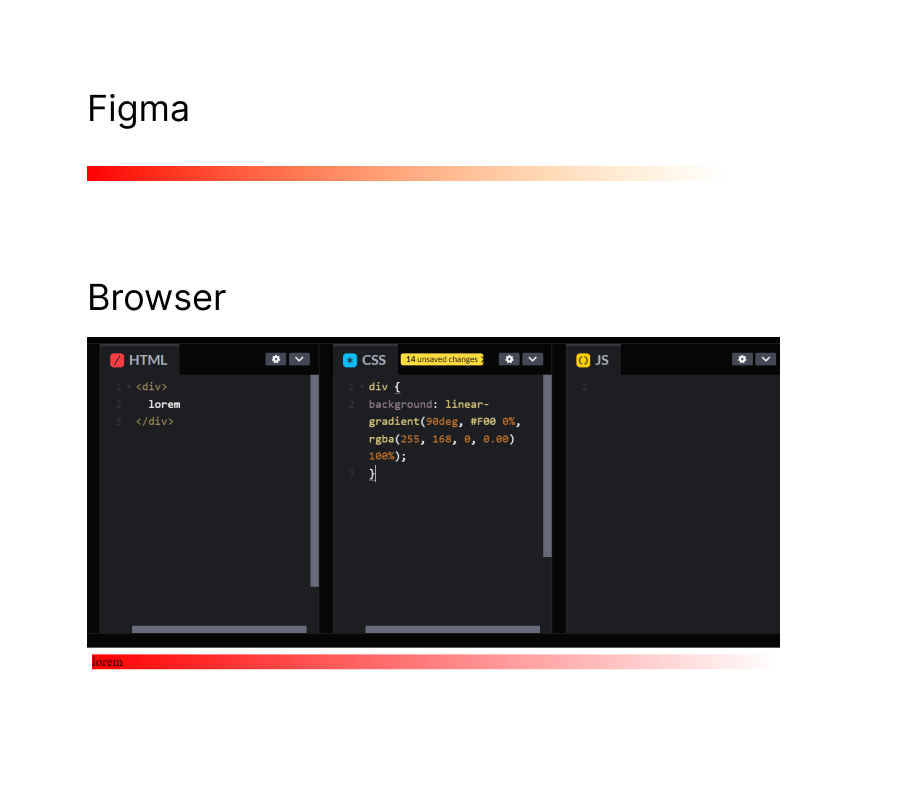
This topic has been closed for replies.

12 replies

y_toku
Figmate
Community Support
Mar 22, 2024 4:36 AM UTC

Hi there,

Thanks for reaching out. I tried to replicate on my end, and it looks fine for me.

So, would you be able to share the file link with access to support-share@figma.com? It won’t affect your billing. I hope I can investigate it further.

Also, I changed the category to “Ask the community” because the “Share an idea” is used for feature request.

Thanks for your understanding!
Toku

May 28, 2024 3:36 PM UTC

Hey @y_toku,

I’m having a similar issue and wanted to check if you’re sure you are replicating the gradient correctly:

The original gradient has opacity 0 on the end colour:
background: linear-gradient(90deg, #f00 0%, rgba(255, 168, 0, 0) 100%);

Whilst you have set it to 1 hence the different results:
background: linear-gradient(90deg, rgba(255, 0, 0, 1), rgba(255, 168, 0, 1));

I’m also getting this code from a Figma gradient:
background: radial-gradient(50% 50% at 50% 50%, #E0BAFF 0%, rgba(0, 255, 209, 0.00) 100%);

Which on the browser will not show any of the end colour as its opacity is 0, whilst in the file the gradient looks like this:

Sorry if I’m, wrong just thought I’d reply as someone experiencing a similar problem!

y_toku
Figmate
Community Support
May 30, 2024 5:21 AM UTC

Hi there,

It seems we need more investigation with our support team, could you reach out directly to the support team with a copy of your file: https://help.figma.com/hc/en-us/requests/new? Our support team will look into it/

Please make sure you use the email associated with your Figma account, include links to the file in question, and share access with support-share@figma.com. Don’t worry, inviting us to view your file won’t impact your billing.

Thanks!
Toku

claud_gp
New Member
Aug 6, 2024 12:33 PM UTC

Hiya, I’m experiencing issues with gradient behaviour with opacity too. Although different to this issue, I wanted to add to the thread.

I’m discovering that gradients don’t fade as expected.

When set to 0%, I’d expect the gradient to fade to nothing.

Instead, they create a ‘stripe effect’ at the tail end of the gradient.

When two gradients are overlaid, this ‘stripe’ is even more evident.

Please could you advise whether this is a bug or not? And any suggestions to solve this in the meantime.


roge
New Member
Oct 13, 2024 5:56 AM UTC

I’m working on an iOS App Store app icon and facing the same issue when exporting a PNG file with a gradient-filled background. The App Store always tells me the image has an alpha channel, which is weird. I don’t want to use JPEG format, but I have no way to fix this issue.

y_toku
Figmate
Community Support
Oct 14, 2024 7:37 AM UTC

Hi there,

Could you submit a bug report detailing the steps that led to this issue? You can do so by following the link: https://help.figma.com/hc/en-us/articles/360041468234-Submit-a-bug-report. Our support team will investigate it further.

Thanks,
Toku

Damian_Oczki
Active Member
Oct 14, 2024 10:34 AM UTC

They’re optical illusions. The white stripe isn’t really there; you can check it with the eyedropper tool, or observing that the bottom part is already pure white, so there can’t be a “more white” stripe there. As you can imagine, the “cross” illusion is just two of those effects, overlaid on top of another.

The illusion is caused by a sudden stop of the linear gradient, causing our eyes/brain to amplify the edge’s contrast. This can be reduced by changing to an easing gradient.

There are a few resources how to achieve this:

It appears that there are some Figma plugins for this, too:

With those plugins, you can compose overlaid gradients without the “cross” illusion in the corner:

Damian_Oczki
Active Member
Oct 14, 2024 11:20 AM UTC

Let’s label the gradient:

     Color A  +---------+  Color B
100% opacity  +---------+  0% opacity

We’re interested in what’s happening in the middle, so 50% of the way through the gradient.

Figma shows 50% of color B, at 50% opacity.
The browser shows 0% of color B, at 50% opacity.

I would lean into the direction of Figma rendering it correctly. It shows all the intermediate colors, so the orange color “leaks” into the gradient from the right side. Makes sense to me.

On the other hand, browsers use the alpha-premultiplied color space. As a result, it doesn’t matter what color you set on the other end - all hues will render exactly the same. To me, this is a weird behavior, because the browser ignores the color of the end stop.

I assume this creates problems when handing off the designs to developers. If they use the CSS as-is, they might not have the same result as shown on designs.

Possible solutions:

  • Manually add the middle gradient stop, and set it to orange at 50% opacity.
  • If you don’t want Figma’s effect, use the same colors on A and B ends of the gradient, and only set different opacities.
  • Tell your developers to use a solid gradient, with a mask that’s another gradient. (See below)
  • Convince Figma to automatically calculate the intermediate gradient stops, so Figma’s rendering can be replicated in browsers that render it “wrong”. Tagging @y_toku.
  • Convince W3C to allow disabling alpha-premultiplied behaviors, which currently completely ignore the color stops.

Figma’s rendering:


CSS (will cause this issue):

background: linear-gradient(to right, red, rgba(0, 0, 255, 0));


CSS (fixed):

background: linear-gradient(to right, red, blue);
mask-image: linear-gradient(to right, white, transparent);

Vito
New Member
Feb 15, 2025 8:24 PM UTC

Well this is definitely not an optical illusion. The color picker is picking up a lighter color on the transparent side of the gradient.


Looks to me like Figma is using some sort of noise filter to better blend gradients and this is producing lighter pixels on the transparent side.

JamesCurtis
New Member
Aug 14, 2025 8:33 AM UTC

​@Damian_Oczki thx. It's very helpful to me.

However, during my usage, I also discovered a problem. If we add transparency to their parent nodes again at this time, it will once again cause the problem to occur (regardless of whether the developers use masks or not).

demo: https://stackblitz.com/edit/stackblitz-starters-nzhj5ffb?file=index.html