Adrienne Lim
New Participant
Feb 3, 2025 5:34 AM UTC
Question

Wrong font weight showing in the Inspect panel

Hi all,


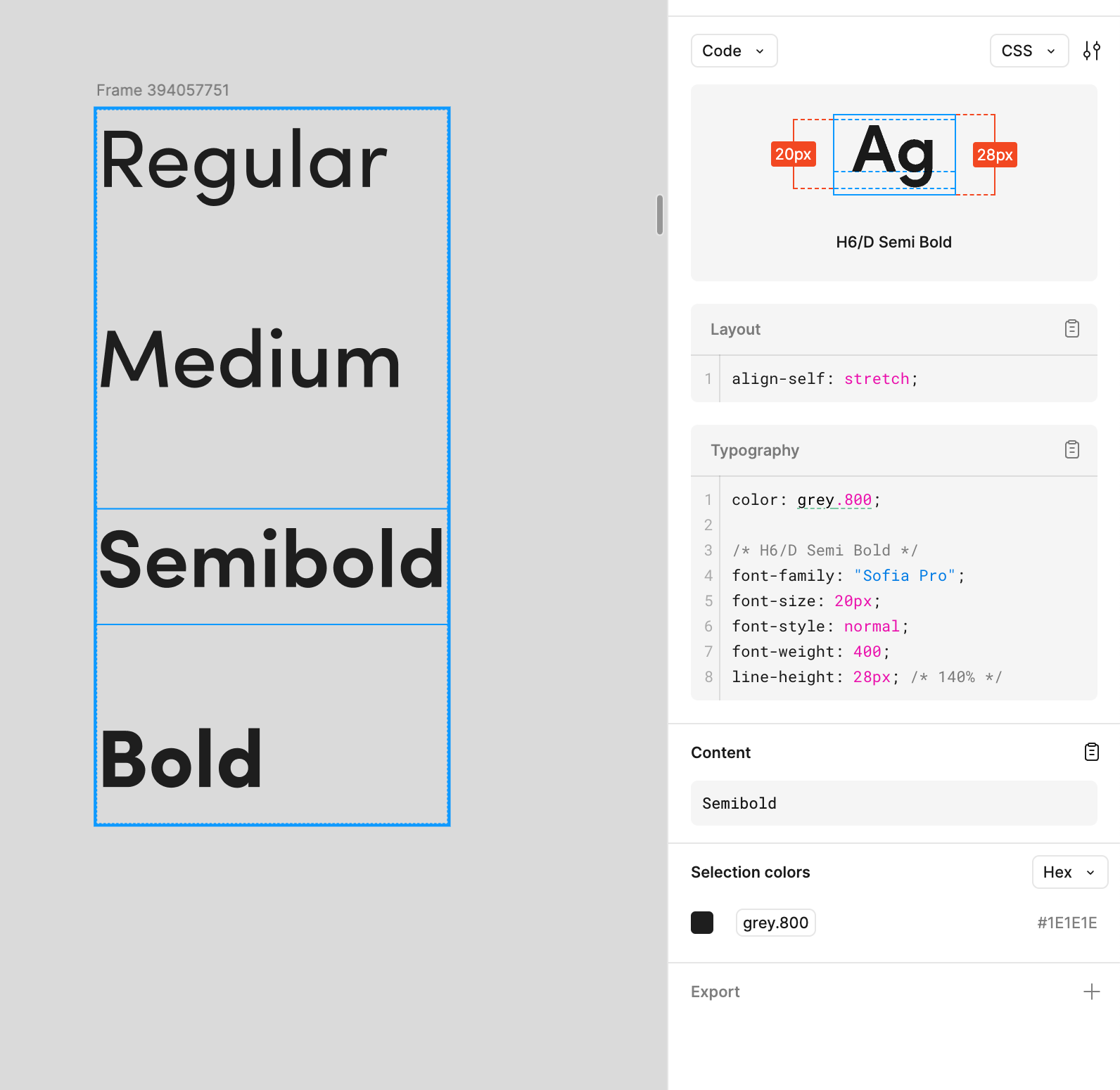
Need some help with the age old problem of Sofia Pro not showing the correct font weight when the Inspect panel is open. In this example, semibold has been applied but in the Inspect panel it shows as font-weight:400; for all weights. 


It’s causing additional back and forth between developers when reviewing components while they are technically following the designs and the information in Figma… except it’s the wrong font weight :(


I have seen some other threads that have been opened in the past but was wondering if someone had a newer solution to fix this. 


Are my only options to solve this problem still: 

  1. Ask developers to refer to the name ‘H6/D Semi Bold’ for the right font weight? 
  2. Edit the metadata? 

Thanks in advance! 


This topic has been closed for replies.

6 replies

Adrienne Lim
New Participant
Feb 11, 2025 5:24 AM UTC

Bump 😔

StanleyJames
New Participant
Feb 11, 2025 6:59 AM UTC

Hey! I totally understand the frustration. The issue might be with how the font files are loaded—missing or incorrect files can mess with the weight. Check if any CSS overrides or conflicting rules are affecting it. If you’re comfortable, creating a custom font-face declaration could fix it. The 'H6/D Semi Bold' workaround is a good solution too. Hope this helps! Let me know if you need more troubleshooting

Apolline
Active Member
Feb 11, 2025 8:37 AM UTC

Same issue here

y_toku
Figmate
Community Support
Feb 13, 2025 7:43 AM UTC

Hi ​@Adrienne Lim ​@Apolline, 


Thanks for reaching out and our apology for the delay. You mentioned that editing the metadata might be an option. Could you reach out to our support team for help with your file details? They can look into it and provide the necessary assistance. You can contact them directly here: https://help.figma.com/hc/en-us/requests/new.


Thanks for your patience.

Toku

Adrienne Lim
New Participant
Feb 20, 2025 12:27 AM UTC

Hi ​@y_toku 


Thanks for getting back to me. I reached out to support and they weren’t able to help with editing the metadata but they were able to confirm that it was incorrect. They suggested reaching out to the font foundry.


I’ll see if they reply and can assist but seem a bit doubtful after all of these years with this bug. 


Does anyone have any suggestions on easily editing the font metadata?


Thanks 

Adrienne Lim
New Participant
Feb 25, 2025 10:24 PM UTC

Hi ​@y_toku 

I have been able to get an updated font with the right metadata (exciting, I know). I’ve removed the old font, installed it and have toggled on Dev Mode but still see the old font weight. 


How do I get the right metadata to appear now that it’s showing correctly in the font meta data?


Thank you