Aug 14, 2024 7:24 AM UTC
Solved

Why is password protection disabled?

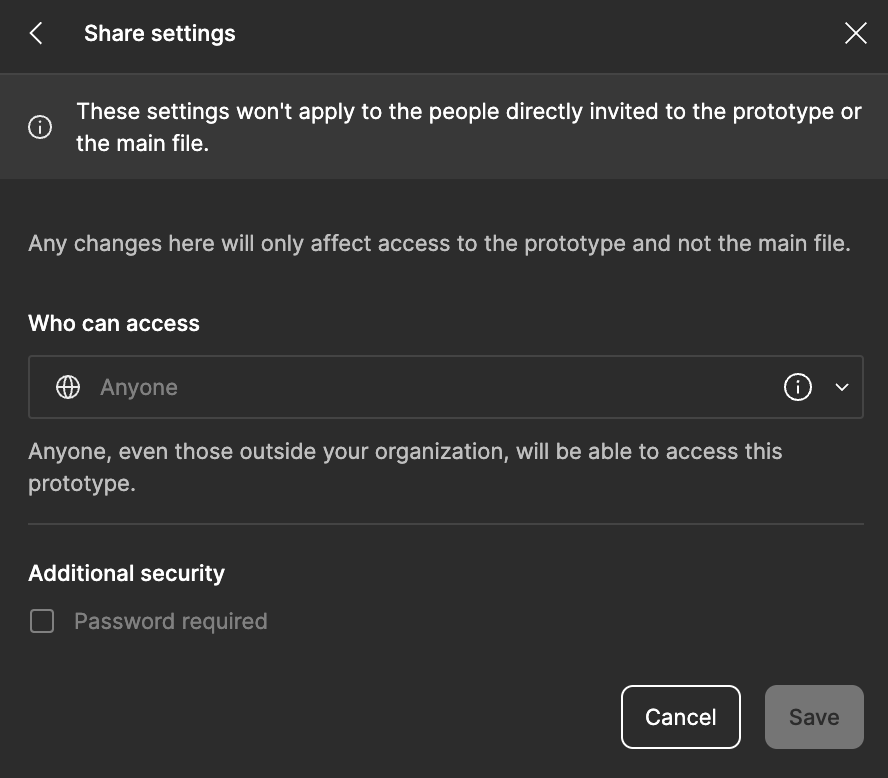
I am unable to create a password for my prototype, any thoughts as to why?
This topic has been closed for replies.
DHA
DHASolution
New Member
Feb 25, 2025 8:05 AM UTC

Hej, 
I also got the same struggle. Even by editing the share-settings directly in the main file as ​@Alexandre16 mentions, I’m send to the prototype-share-settings and there is no chance to change those and activate password protection.

Noticed this issue yesterday on Mac 15.3.1 (24D70) using the figma-app.


***Update: By selecting in main-file (layout) ‘Who has access: Only those invited’, you can now go to prototype-sharing-setting, change ‘Only invited people’ to ‘anyone’ and finally set a password.

Guess this workaround will be fixed the way it was working before soon.

4 replies

Gayani_S
Figmate
Community Support
Aug 14, 2024 5:05 PM UTC

Hey @mooooo, thank you for reaching out!

This feature is available on all paid plans and it requires “can edit” permission to the file.
Can you please confirm if you’re on a paid plan and if you’ve “can edit” access to the file?

You can find more information in our Help Center article: Add password protection to files and prototypes.

Thank you,
Gayani

Alexandre16
New Member
Feb 13, 2025 9:21 AM UTC

Hi,

I as having the same issue. It turns out I opened the share settings from the Proprotype directly.
You actually have to go to the main file (design file) and click on the Share button from there.

I hope that helps some of you!


DHA
DHASolution
New Member
Feb 25, 2025 8:05 AM UTC

Hej, 
I also got the same struggle. Even by editing the share-settings directly in the main file as ​@Alexandre16 mentions, I’m send to the prototype-share-settings and there is no chance to change those and activate password protection.

Noticed this issue yesterday on Mac 15.3.1 (24D70) using the figma-app.


***Update: By selecting in main-file (layout) ‘Who has access: Only those invited’, you can now go to prototype-sharing-setting, change ‘Only invited people’ to ‘anyone’ and finally set a password.

Guess this workaround will be fixed the way it was working before soon.

Nick_Zhurenko
New Participant
Jun 3, 2025 6:38 AM UTC


***Update: By selecting in main-file (layout) ‘Who has access: Only those invited’, you can now go to prototype-sharing-setting, change ‘Only invited people’ to ‘anyone’ and finally set a password.

Guess this workaround will be fixed the way it was working before soon.

Thank you, it works!)
