
jamiegraydesign
August 28, 2023
Solved

Why don't Figma links open in the App? Why do they open in the browser?

  • August 28, 2023
  • 15 replies
  • 8731 views

Figma links should open in the App. Stop cluttering my tabs. It’s bad enough to have to have the Figma forum open for all the things wrong about this app.

This topic has been closed for replies.
Best answer by Celine_

Hi @jamiegraydesign ,
By default, when you click on a Figma link, Figma will open the link in the browser.

If you want to open all Figma URLs in the desktop app, you can enable the Open links in desktop app setting. You can find this in your Preferences .

Please remind you can only access this setting if:

  • You have the desktop app installed
  • You are using the browser version of Figma. This setting isn’t available in the desktop app.
  1. Open the Capture d’écran 2023-09-14 à 11.59.21 menu and hover over the Preferences option.
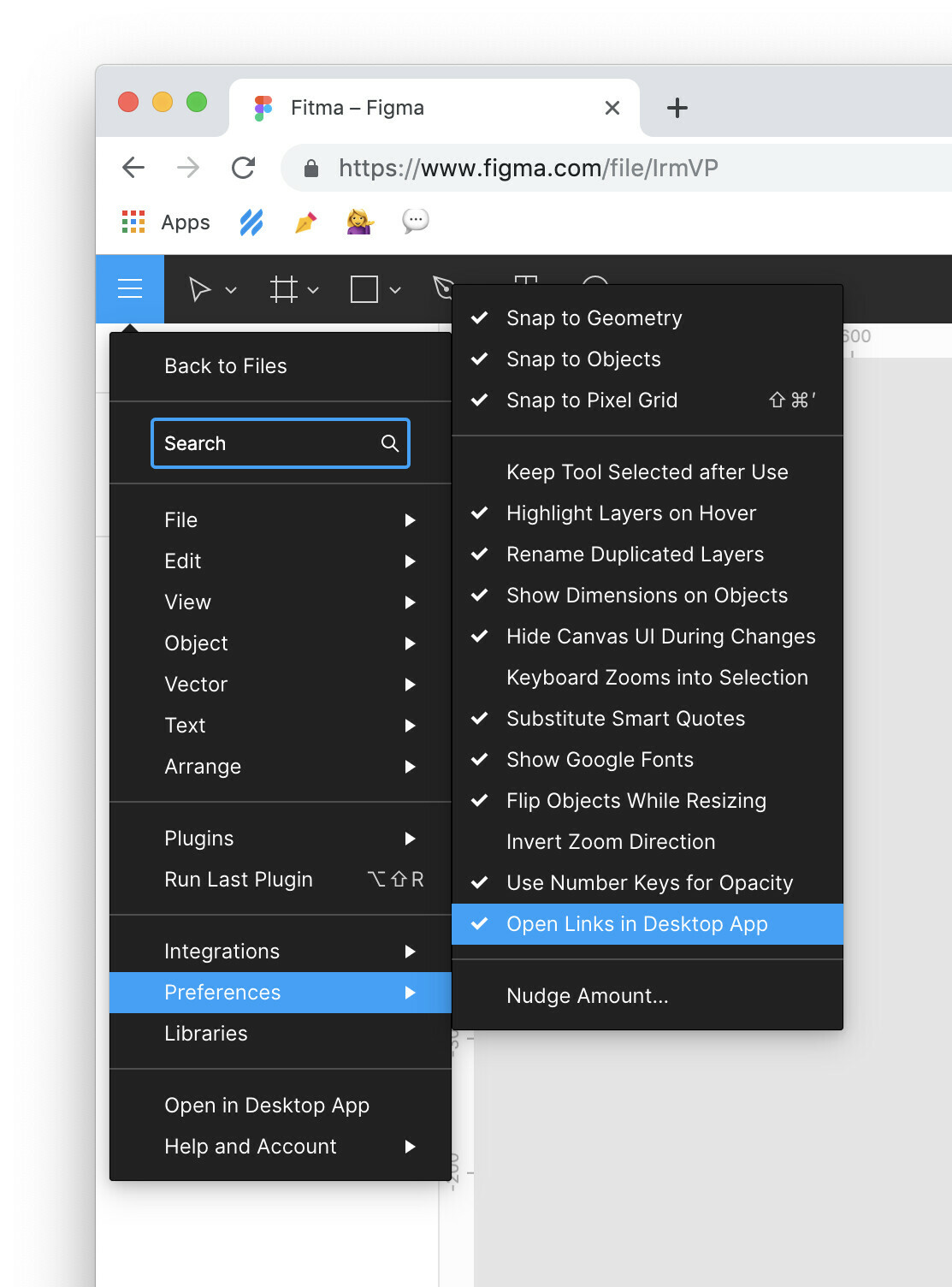
  2. Select the Open links in desktop app setting.
  3. A checkmark will be displayed next to the setting to show it is enabled. If there is a check next to the the setting already, you can select the setting again to disable it.

Hope it helps!

15 replies

Otavio_Luis_Vidal1
August 27, 2024

Safari user here and facing the same issue. I see “Get the desktop app” on the Figma menu when I open a design file in Safari even though I already have Figma installed on my Mac. Any fix for this coming soon?

Celine_
Figmate
Community Support
August 28, 2024

Hey there! As a first step, could you please try deleting the app and then re-installing it from here?

If after this workaround you are still running into issues, please submit a bug report, our technical specialist can investigate it further. Thank you!

Mayur_Bhandari
October 3, 2024

Hi @Celine_Figma ,

I downloaded the app using the link you shared but the issue with links opening up in browser is still reproducible.

Celine_
Figmate
Community Support
October 3, 2024

Hi there! Sorry to hear you are still having trouble to open in the App. As mentioned, if the issue still persists and the workarounds don’t help, please reach out out directly to the support team so they can investigate further your issue: here Thanks!

August
New Member
March 18, 2025

Please fix this Figma! This is rediculous - I’m burning waaaay to much time on this. I need the links to open in the app - why was the link to be able to do this removed?
