

Solved

Why do the icons display different icons inside the component?

  • August 6, 2026
  • 1 reply
  • 29 views

Seba_Sepulveda

I'm creating icons in Figma, and I've noticed that some icons display a different symbol inside the component hierarchy.

When I try to convert them to Vector Path, the results are not consistent. Some icons appear as the actual shape of the element, while others display the generic vector icon instead.
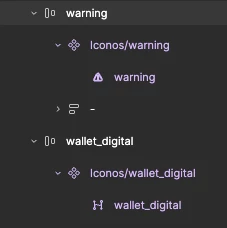


warning - wallet_digital

Best answer by blasdua8pc

That warning icon showing its actual triangle shape while wallet_digital shows the generic vector icon is a dead giveaway — it usually comes down to how each icon's inner layer was built. If the vector is a proper flattened path or boolean shape, Figma displays the real icon; but if it's still nested as a raw frame or has mixed layer types inside, Figma falls back to that placeholder vector icon instead. Try opening wallet_digital's layers panel and check if its innermost shape is actually a vector versus just a group or frame — flattening it (Ctrl/Cmd+E) before converting usually fixes the inconsistency.

1 reply

blasdua8pc
  • New Member
  • Answer
  • August 10, 2026

That warning icon showing its actual triangle shape while wallet_digital shows the generic vector icon is a dead giveaway — it usually comes down to how each icon's inner layer was built. If the vector is a proper flattened path or boolean shape, Figma displays the real icon; but if it's still nested as a raw frame or has mixed layer types inside, Figma falls back to that placeholder vector icon instead. Try opening wallet_digital's layers panel and check if its innermost shape is actually a vector versus just a group or frame — flattening it (Ctrl/Cmd+E) before converting usually fixes the inconsistency.