

Question

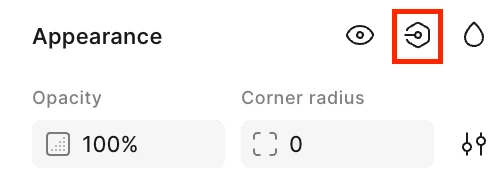
Where is the Apply/Create Variable under Appearance?
  • June 19, 2026
  • 1 reply
  • 8 views

emilylee123

My Figma was automatically updated to the new UI, and I can no longer find the Create/Apply Variables option under Appearance. I'm trying to create a component within another component, but I'm not sure where this feature has been moved in the new interface. Please helpp!

1 reply

djv
Figmate
  • Community Support
  • June 19, 2026

Hi ​@emilylee123, thanks for reaching out! 

With the new UI, the entry point to the variables modal has moved. To Create a variable, click the new Assets icon in the left navigation bar then click the toggle icon next to Variables in the Design panel. This should then show this pop up:


You can learn more about this recent change here: https://help.figma.com/hc/en-us/articles/15145852043927-Create-and-manage-variables-and-collections