
October 9, 2023
Question

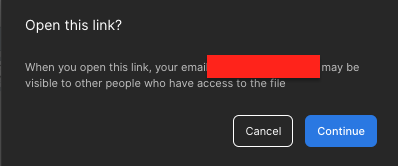
When I click "continue" button on the "Open this link? popup", the popup does not close
image

Hello

“Open this link?” When I click “continue” button on the popup, the popup does not close.

I was aware of the email exposure warning, but it seems strange that it doesn’t work.

Because of this, I can’t do my existing work. Sorry, but please check quickly.

This topic has been closed for replies.

13 replies

djv
Figmate
Community Support
December 12, 2023

Hey All, sorry to hear you’re still running into this issue!

Please reach out to the support team directly via this form for help: https://help.figma.com/hc/en-us/requests/new

Be sure to use your Figma account email, so we can take a closer look into this issue.

MichelleW
December 29, 2023

I’m having the same issue also - I did recently change my email address but it never affected my access with this particular client before.
I’ve asked them to remove my access to the file and reinvite me. I will see if that helps.
But I’ve tried all that everyone has suggested here.

Has anyone got a response from Figma directly?

January 11, 2024

I think this issue occurs mainly when the type of account for the person sharing does not match the type of account of the viewer. As far as I understand, this is a front end bug/API connectivity bug that you can technically bypass if viewing in browsers by right clicking on the modal overlay div → Inspect → and then removing the modal div from the page.

Please note that this is simply a workaround and cannot guarantee results - use with caution. This is definitely a bug that Figma needs to fix. Additionally, you cannot use this workaround when using the desktop application.

Note to Figma team: If you cannot fix the issue, please still allow the workaround 😊