

GabyUrbano
February 22, 2023
Question

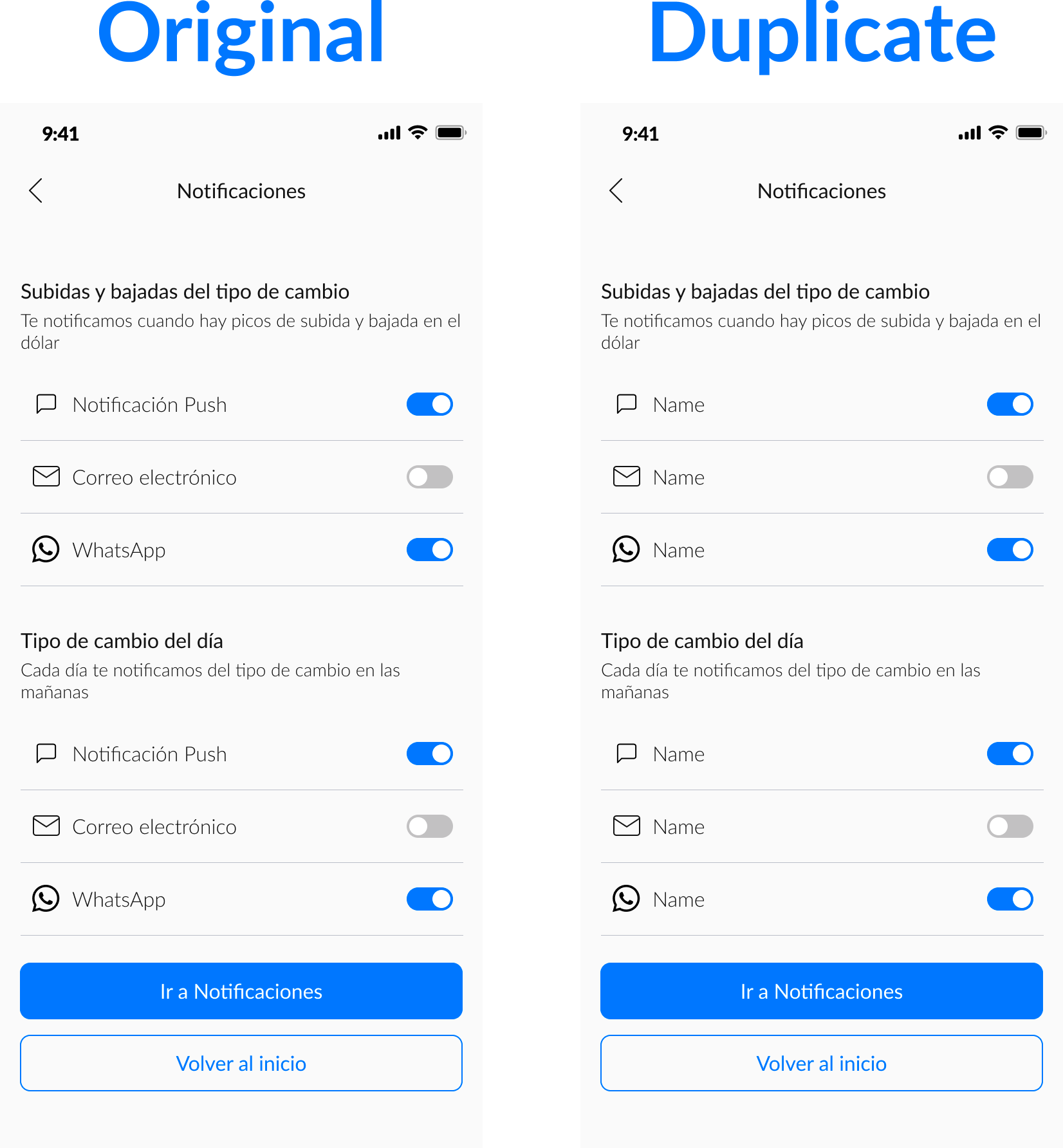
When duplicate a frame, the text properties of the instances within it are reset

  • February 22, 2023
  • 8 replies
  • 687 views

Hi everyone, I’m trying to duplicate this frame, but when I do so, I lose all the changes made to the instances. Does anyone know why this is happening? Thanks a lot!
This topic has been closed for replies.

8 replies

Pavel_Kiselev
Power Member
February 23, 2023

I second that. When copy-pasting component instances text overrides dropped

Derek_Avila
February 23, 2023

I have the exactly same problem

Brenda_Berenice_Barcelata_Reye
February 23, 2023

Me too! And it happens only when the text interacts with an icon in the same component

February 24, 2023

I occurred the same problem

IServ_Isik
February 24, 2023

Same here, can’t work like this

taras-stoliar
New Participant
October 15, 2023

Is there any fix for this? It wasn’t like this but it is now

Olly_the_Designer
New Participant
May 8, 2024

An issue I am facing. I’d like Figma Support to respond

Gayani_S
Figmate
Community Support
May 9, 2024

Hey @Olly_the_Designer, thank you for reaching out!

Are you seeing any error messages on your end? Is it happening in the browser, desktop app or both?

Can you clear out the cache. Here are some information to troubleshoot: https://help.figma.com/hc/en-us/articles/360040523973-Troubleshooting-checklist 1

Also please try to force-quit and open Figma in a new browser window (or force-quit the Figma Desktop app and restart it.)

To get this troubleshooting process started, can you make us a short video? Please include the whole window, with the properties and layers panels in view and relevant layers expanded, and select any layers you’re having trouble with so we can check any relevant settings. We use these videos to try and reproduce the issue in our own files and so showing all steps needed to reproduce the behavior is helpful.

If possible please also share your file link with support-share@figma.com invited directly as an editor (this won’t affect your billing at all).

Thank you in advance!