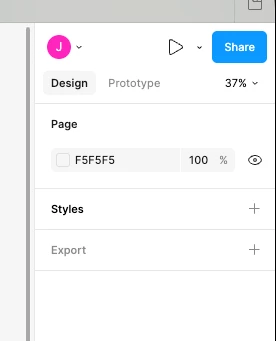
Hello, I am trying to create variables in my design file but they aren’t appearing where they traditionally have been. I have usually found them in between the Page and Styles sections on the right side bar. I am on a paid plan. Can anyone help me figure this out? Thank you.
I completely understand how this could be disorienting. Please note that the variables modal is not discoverable if you have a layer selected. Are you able to share a screenshot including your canvas and your layers panel?
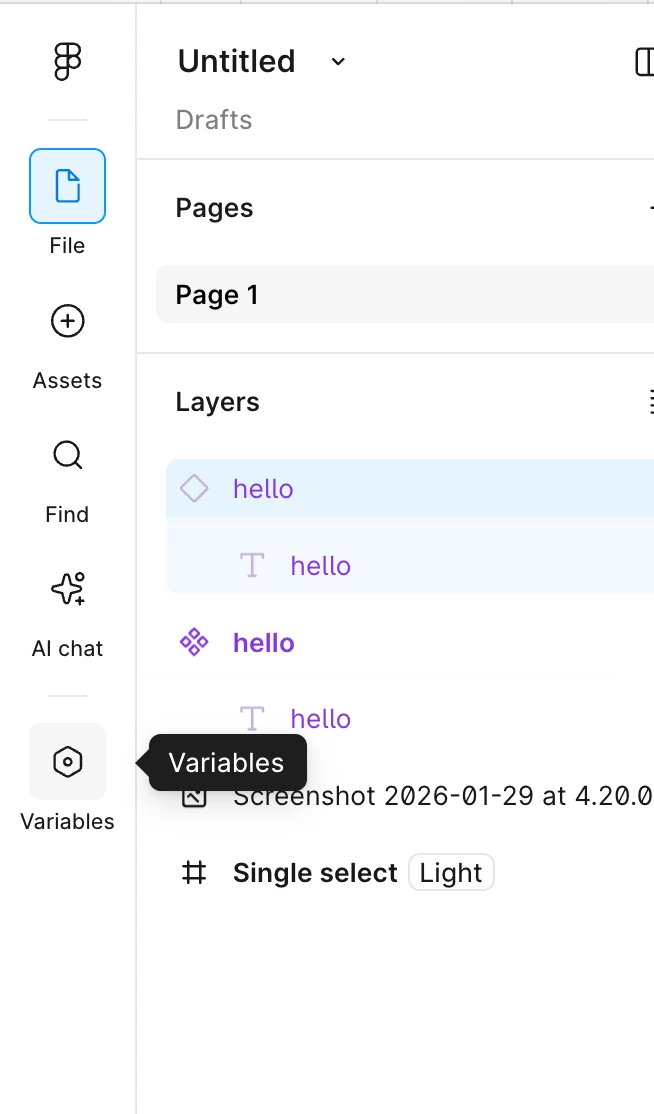
If you do not have a layer selected and you’re still no longer seeing Variables in their usual spot, you are likely on the newest version of Figma that includes the new navigation bar. If this is the case, your new entry point to the variables modal has moved.With the new navigation, the entry point to the variables modal in now in this bar on the left-hand side, so you can access your variable collections anytime.
I completely understand how this could be disorienting. Please note that the variables modal is not discoverable if you have a layer selected. Are you able to share a screenshot including your canvas and your layers panel?
If you do not have a layer selected and you’re still no longer seeing Variables in their usual spot, you are likely on the newest version of Figma that includes the new navigation bar. If this is the case, your new entry point to the variables modal has moved.With the new navigation, the entry point to the variables modal in now in this bar on the left-hand side, so you can access your variable collections anytime.