

Question

Variable Mode not changing font in prototype

  • May 5, 2026
  • 5 replies
  • 41 views

GDThre3

I have been experimenting with the Variable Modes and i could figure most things out but i feel like this one might be a bug since i coulndt find anything about it - But just in case i wanted to ask here first.

I created a Collection with 3 Modes, that change colors, Text content and now its supposed to change the Font Type and size of the Headline.
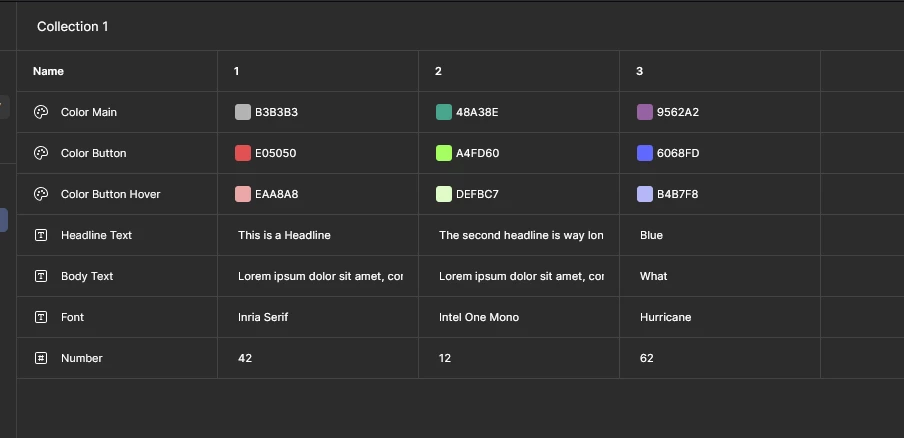
This works perfectly fine in the Workspace, but when i check the prototype the Font wont change. Furthermore, when i loop back to the first font the innate Font is changed to Inter.
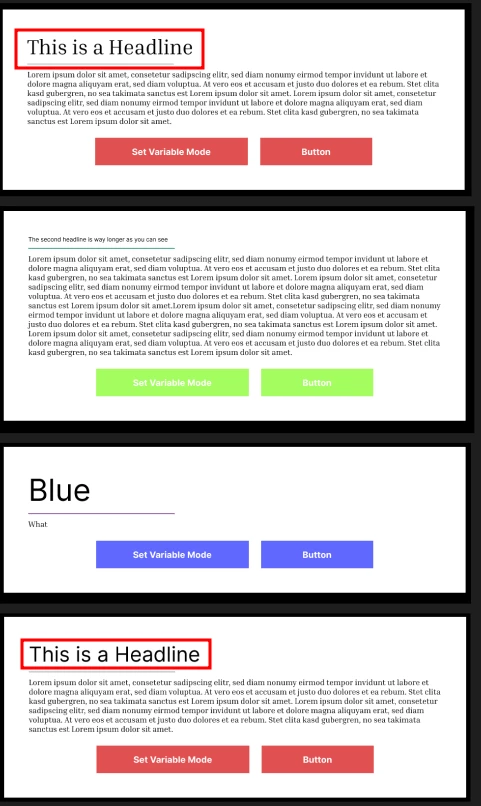
 

In case its relevant - I loop the Modes by having a seperate colltecion with one number. The button sets number to number+1 (until it hits 4, then it resets to 1) and checks what the variable is set the mode. This worked perfectly fine before i started to test the font change, so im unsure if its relevant.


Anyone gut any idea what the issue might be?

5 replies

Jaycee Lewis
Figmate

Hey, ​@GDThre3 👋 That detail about the font resetting to Inter on the loop is the tell. It sounds like you’ve actually hit this prototype behavior with locally installed fonts, rather than an issue with your counter logic.

In the other threads, if a font isn’t hosted (like a Google Font), the prototype can struggle to render the swap and defaults to Inter as a safety net.

Here’s what I suggest:

  • Swap to a Google Font: Try using a Google Font for any text layers driven by a variable. You can keep your custom font for static text, but variables play much more nicely with web-hosted fonts.

  • Check your action order: While you’re in the Interaction details panel, make sure your Set variable actions are listed at the very top. Actions run top-down, so we want the variable to update before any Change to or navigation actions trigger.

Give that a shot! If you’re still seeing Inter pop up, feel free to share a screenshot of your variable setup and we can dig into the layers together — Jaycee


GDThre3
  • Author
  • New Member
  • May 6, 2026

Hey, ​@GDThre3 👋 That detail about the font resetting to Inter on the loop is the tell. It sounds like you’ve actually hit this prototype behavior with locally installed fonts, rather than an issue with your counter logic.

In the other threads, if a font isn’t hosted (like a Google Font), the prototype can struggle to render the swap and defaults to Inter as a safety net.

Here’s what I suggest:

  • Swap to a Google Font: Try using a Google Font for any text layers driven by a variable. You can keep your custom font for static text, but variables play much more nicely with web-hosted fonts.

  • Check your action order: While you’re in the Interaction details panel, make sure your Set variable actions are listed at the very top. Actions run top-down, so we want the variable to update before any Change to or navigation actions trigger.

Give that a shot! If you’re still seeing Inter pop up, feel free to share a screenshot of your variable setup and we can dig into the layers together — Jaycee

Hello Jaycee, thank you for your answer. The Used Fonts are all google Fonts. The variables are shown in the first image of the post :) The action order seems to be fine as it doesnt have any issues with the other variables (color, Font size etc)


Jaycee Lewis
Figmate

Hi, ​@GDThre3 thank you for taking the time to update our thread. If you find this to be consistently reproducible, opening a support ticket is going to be a good next move. If you have a moment, can you set up one more quick test?

Font variable, no counter

  • New file. One frame, one text layer, one collection with 3 modes — each mode pointing to a different Google font (e.g. Inter / Roboto / Lora).
  • Duplicate the frame 3 times and apply a different mode to each
  • Open the prototype and click through the frames manually. Does the font swap cleanly?

Add the counter back (if successful)

  • Rebuild your counter setup in the same file and click through with a button

One follow up - with your headline in the original file, is the font applied directly to the text layer, or is there a text style applied on top? Screenshots of your variables panel + the headline's typography section + the button's interaction panel will be helpful for your support ticket. 


Talk soon! — Jaycee


GDThre3
  • Author
  • New Member
  • May 7, 2026

Font variable, no counter

  • New file. One frame, one text layer, one collection with 3 modes — each mode pointing to a different Google font (e.g. Inter / Roboto / Lora).
  • Duplicate the frame 3 times and apply a different mode to each
  • Open the prototype and click through the frames manually. Does the font swap cleanly?

Yes, this works perfectly fine.


Add the counter back (if successful)

  • Rebuild your counter setup in the same file and click through with a button

One follow up - with your headline in the original file, is the font applied directly to the text layer, or is there a text style applied on top? Screenshots of your variables panel + the headline's typography section + the button's interaction panel will be helpful for your support ticket. 


Talk soon! — Jaycee


I rebuild it and it works perfectly fine - as long as you only change the Font. When i change the String and fontsize as well it now works for one loop (which it didnt before), but resets to Inter once you return to the first Font.

Changes are only applied to the text layer.

Here are the screenshots:

Swap Logic


Would you like me to test anything else or should i proceed to open a ticket? 

And thank you again :) 


Jaycee Lewis
Figmate

Hey, ​@GDThre3 Thanks for everything so far. You should have received an email with your support ticket just now. The ticket ID is 1890044. Thank you very much for being a great partner here. Talk soon! — Jaycee