

Question

Using MCP server with Claude Code and Figma Desktop App

  • January 5, 2026
  • 1 reply
  • 55 views

markand.bhatt

I followed this doc https://developers.figma.com/docs/figma-mcp-server/local-server-installation/ to enable MCP server. Also, setup claude code as MCP Client. However, when I prompt “Implement this Figma design. {DESIGN_URL}” claude code tries to fetch design details but fails with error code 403.

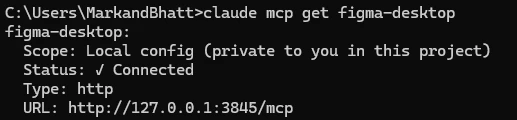
I see mcp server configured correctly.
 

1 reply

ksn
Figmate
  • Community Support
  • January 7, 2026

Hi ​@markand.bhatt -- it looks like the 403 is an authentication/authorization error. Please verify:

  1. Your Figma account has Dev Mode / MCP access
  2. Your OAuth token is valid (try reconnecting the MCP server)

I am assuming you have a full or dev seat in the team you are working on, but if that is not the case, you will need to upgrade to one of those to continue working. See here: https://help.figma.com/hc/en-us/articles/15023124644247-Guide-to-Dev-Mode